Building the right cloud foundation can feel overwhelming, especially when every vendor promises the moon. Below is a usable, step‑by‑step guide that walks you through cloud infrastructure design so you can launch with confidence.
Step 1: Define Requirements for Your Cloud Infrastructure
Start by listing the business goals that the cloud must support. Are you targeting rapid growth, strict data residency, or cost predictability? Write each goal on a separate line and rank them by priority.
Next, map those goals to technical needs: compute power, storage type, network bandwidth, compliance regimes, and disaster‑recovery windows. For example, a retail site that expects flash sales will need auto‑scale compute and low‑latency storage, while a medical practice must enforce HIPAA‑level encryption and audit logs.
Gather input from the people who will use the system, developers, ops staff, finance, and compliance. Their perspectives surface hidden requirements, such as the need for CI/CD pipelines or specific API rate limits.
When the list is complete, turn it into a simple checklist. That checklist becomes the yardstick you’ll use to evaluate cloud models and services later on.
We often see clients miss a requirement for ongoing support. At Lakeway Web Development we add a “post‑launch support” line to every checklist, so the hand‑off never leaves a gap.

Once you have a clear, prioritized list, you can move on to picking the right cloud model.
Step 2: Choose the Right Cloud Model and Services
Cloud models fall into three buckets: public, private, and hybrid. Public clouds give you on‑demand resources and global reach. Private clouds provide isolation and can satisfy strict regulatory rules. Hybrid blends the two, letting you keep sensitive workloads on‑prem and burst to the public cloud when needed.
Match your requirement checklist to the model. If data residency is a top priority, a hybrid or private setup may be best. If you need to spin up dozens of instances for a product launch, a public cloud wins.
When you settle on a model, pick the services that align with your goals. For container‑based workloads, Google Kubernetes Engine (GKE) offers built‑in auto‑scaling. For serverless functions, Cloud Run lets you pay only for execution time. For relational data, a managed database service can reduce admin overhead.
Google Cloud gives new users $300 in free credit and a free tier for more than 20 products, which makes early experimentation low‑risk.Google Cloud also lists concrete integration options like Compute Engine, GKE, and Cloud Run, helping you avoid vague “multi‑cloud” promises.
Lakeway Web Development can help you map requirements to the ideal mix of services, ensuring you don’t over‑provision or miss a critical compliance check.
For a deeper dive on API design that often pairs with cloud services, see our API Design Best Practices guide.
Step 3: Design a Secure, Connected Cloud Network
Security starts with identity. Use a single identity provider (IdP) and federate it to your cloud accounts. This creates a unified source of truth for who can do what, no matter which region or service they touch.
Next, segment your network. A hub‑and‑spoke design lets you keep public‑facing services in a spoke, while internal services sit behind another spoke with tighter ACLs. Micro‑segmentation adds another layer, letting you lock down east‑west traffic between workloads.
Apply zero‑trust principles: every request is authenticated, authorized, and encrypted. Enforce conditional‑access policies that require MFA for privileged actions and limit access to specific IP ranges.
Document these steps, including identity federation, policy guardrails, and network micro‑segmentation, for consistent implementation.
And remember to log everything. Centralized log aggregation lets you spot anomalies fast and satisfies audit requirements.
Lakeway Web Development’s engineers have built dozens of VPCs that follow this pattern, so you can focus on your app instead of network plumbing.
Step 4: Build for Scalability, Performance, and Data Growth
Scalable apps adjust resources up or down based on demand. Start by containerizing your services, then let the orchestrator handle scaling rules.
Scalable cloud architectures use patterns like auto‑scaling groups, regional clusters, and managed instance groups that help keep latency low while avoiding over‑provisioning.
Choose storage that matches your access pattern. Object storage is cheap for infrequently accessed data, while SSD‑backed block storage serves latency‑sensitive workloads. Replicate data across zones to survive zone‑level outages.
Implement CI/CD pipelines that treat infrastructure as code. Store your infrastructure-as-code scripts in version control, run automated tests on each change, and deploy only after they pass.
Performance tuning also matters. Use a CDN for static assets, enable caching at the application layer, and profile database queries to eliminate bottlenecks.
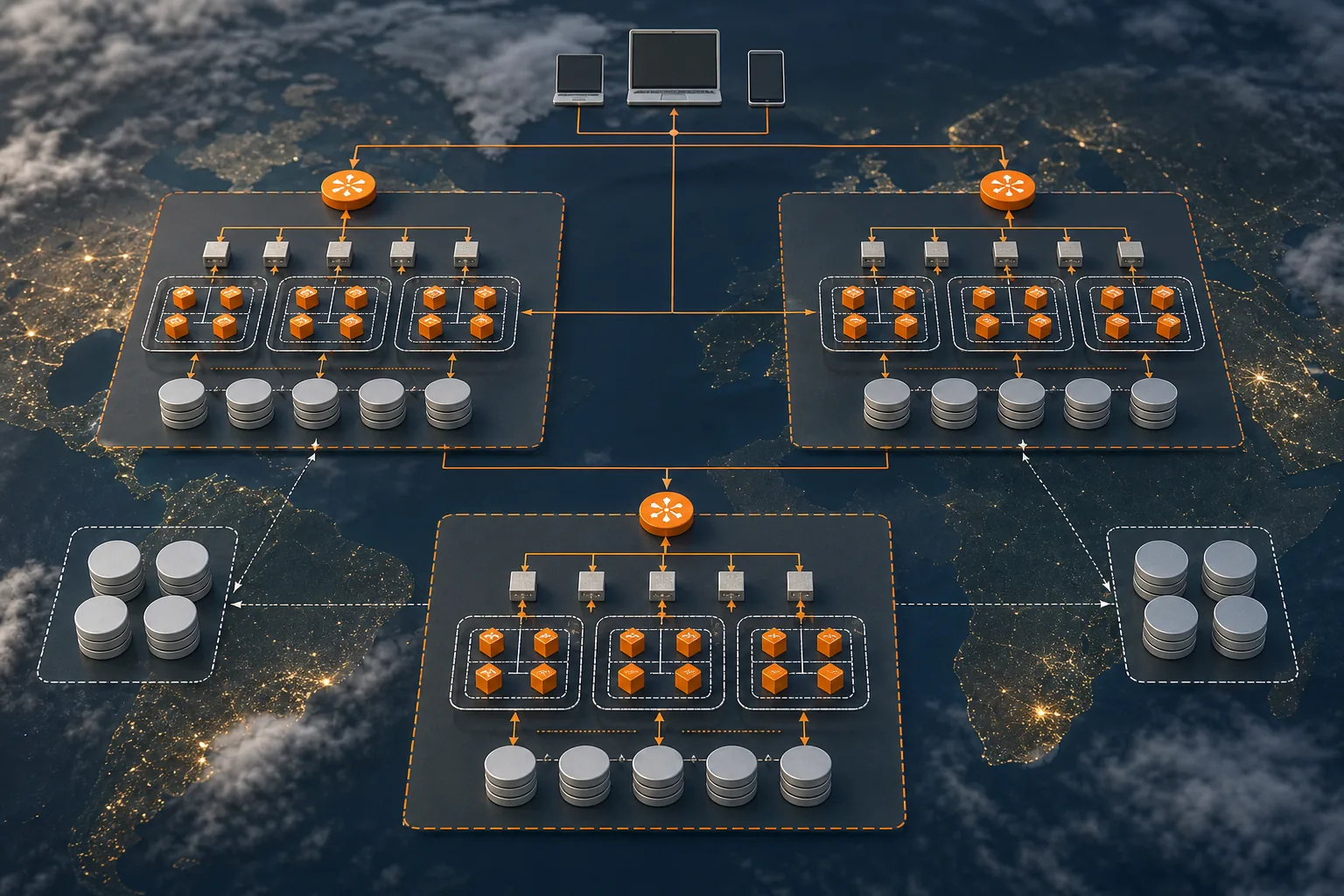
Lakeway Web Development can set up these pipelines and monitoring dashboards, giving you real‑time insight into scaling events.
When you need to fine‑tune latency, remember our Cloud Application Development guide walks through profiling tools that work across all major clouds.
Step 5: Add Reliability, Monitoring, and Cost Controls
Reliability starts with redundancy. Deploy critical services across at least two zones, and use health‑checks to route traffic away from unhealthy instances.
Set up centralized monitoring. Track CPU, memory, latency, and error rates. Alert on thresholds that matter to your business, like a sudden 30% rise in checkout failures.
Cost control is a continuous effort. Enable right‑sizing recommendations, shut down idle resources, and set budget alerts that notify you before overspend.
A continuous cost-management loop—monitor, analyze, optimize, then repeat—can apply whether you’re on AWS, Azure, or Google Cloud.
We apply that loop at Lakeway Web Development for every client, pairing automated cost‑governance tools with a monthly review call.
For developers who want a deeper look at API cost‑management, our Best API Development Best Practices for 2026 covers caching strategies and request throttling that shave dollars off cloud bills.
FAQ
What is cloud infrastructure design?
Cloud infrastructure design is the process of planning and building the compute, storage, network, and security components that run your applications in the cloud.
How do I choose between public and private cloud?
Choose public cloud if you need rapid scaling and global reach; choose private cloud if you must meet strict data‑sovereignty or latency requirements that public providers can’t guarantee.
What security measures are essential for a new cloud setup?
Start with identity federation, enforce zero‑trust policies, segment the network, enable encrypted data at rest and in transit, and centralize logging for audit and threat detection.
How can I keep cloud costs under control?
Implement right‑sizing, shut down idle resources, use budget alerts, and adopt a FinOps process that reviews usage weekly.
Do I need a partner to manage cloud migration?
While you can migrate yourself, a seasoned partner like Lakeway Web Development reduces risk, speeds up delivery, and ensures post‑migration support.
Conclusion
Start with a clear requirements checklist, pick the model that meets your top priority, and layer services that solve the rest. If you want a partner who can turn this plan into a live, secure, and cost‑efficient environment, reach out to Lakeway Web Development and schedule a discovery call.