Building a web application without managing servers? That's the promise of a serverless web application. You focus on writing code, and the cloud provider handles scaling, availability, and patching. You only pay for the compute time you use. Let's break down what this architecture means and how you can build one.
What Is a Serverless Web Application?
Despite the name, servers are still involved. "Serverless" means you don't need to think about them. The cloud provider provisions and manages the servers for you. Your code runs in stateless containers that are fired up on demand and torn down when the request finishes. This model is often called Functions as a Service (FaaS).
In a serverless web application, you combine several cloud services: a storage service for static assets (like S3), a compute service for your backend logic (like AWS Lambda), an API gateway to route requests, and a database (like DynamoDB). This architecture is event-driven, each user action triggers a function that processes data and returns a result.
Key Benefits of Going Serverless
The main draw is no server management. You never patch, scale, or monitor servers. The provider does that. Automatic scaling means your app goes from zero to thousands of requests instantly. And you only pay for what you use. No idle costs.
New Relic describes serverless as a model that leads to faster time to market, enabling deployments in hours instead of weeks.
Core AWS Services for Serverless Web Apps
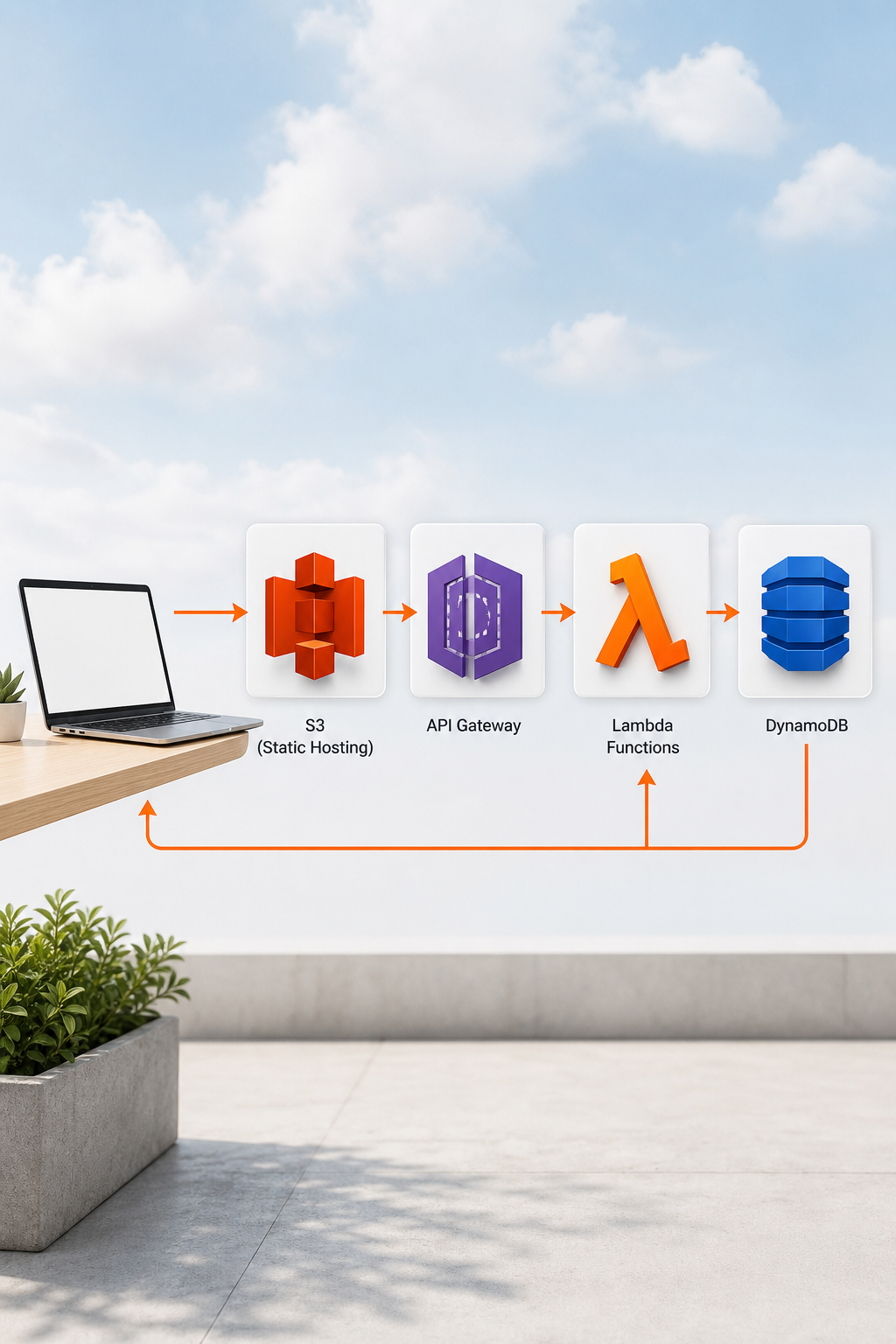
The most common stack on AWS includes Amazon S3 for hosting frontend assets (HTML, CSS, JS, images), Amazon API Gateway for creating RESTful endpoints, AWS Lambda for running backend code, Amazon DynamoDB as a scalable NoSQL database, and a content delivery network (CDN) for global content delivery. These services integrate smoothly. For example, an API Gateway endpoint invokes a Lambda function that reads or writes to DynamoDB. Authentication is handled by Amazon Cognito, which issues JWT tokens. This pattern lets you build everything from simple form handlers to complex full-stack applications.
End-to-End Architecture and Data Flow

A typical serverless web application follows this path: a user visits your site via a browser, and a CDN serves static assets from S3. Then the user interacts with the page, say, clicks a button, and JavaScript calls an API endpoint. API Gateway receives the request and invokes the appropriate Lambda function. Lambda processes the request, perhaps querying DynamoDB or calling an external service, and returns a response through API Gateway to the client.
Building and Deploying Your Serverless App
The fastest way to get started is using infrastructure-as-code tools like AWS SAM (Serverless Application Model) or the Serverless Framework. These let you define your resources, Lambda functions, API Gateway, DynamoDB tables, in a YAML file and deploy with a single command. AWS SAM even generates starter CI/CD pipelines for automated deployments on various CI/CD services. For teams that want to skip the learning curve, a full-service development partner like Lakeway Web Development can design, build, and deploy your entire serverless application, from frontend to backend to CI/CD. Lakeway's UX/UI design services ensure your app is both functional and beautiful.
Observability, Security, and Performance Tips
Serverless apps are ephemeral, so traditional debugging doesn't work. Use a logging and monitoring service for logs and metrics, and a distributed tracing service for tracking request flows. Enable a serverless observability tool to get automatic metrics like invocation count, duration, and error rates. For security, follow the principle of least privilege, each function should have an IAM role with only the permissions it needs. Never store secrets in code; use a dedicated secrets management service. Performance-wise, minimize cold starts by keeping your deployment package small and consider provisioned concurrency for latency-sensitive functions. Some cold start optimization techniques can reduce cold starts for Java functions.
Advanced Features: AI, Cost Optimization, and Choosing a Framework
Integrating Generative AI
You can add generative AI capabilities, like content generation, summarization, or intelligent search, to your serverless app using an AI service with built-in security and compliance. A Lambda function can call the AI service's APIs to enrich your application with AI features.
Cost Optimization
Serverless is cost-effective for variable workloads, but costs can spike if not managed. Optimize by choosing the right memory size for Lambda functions (more memory often speeds execution), using cost optimization tools for recommendations, and implementing caching with API Gateway or a CDN. Monitor your usage with cost monitoring tools and set budgets and alarms. For high-traffic apps, consider reserved concurrency or switching to provisioned compute if needed.
Choosing a Framework
If you're not sure which framework fits your needs, a partner like Lakeway Web Development can help you choose the best approach. Lakeway's maintenance and support services ensure your app runs smoothly after launch.
Frequently Asked Questions
Is serverless really serverless?
No. Servers still exist, but they are managed entirely by the cloud provider. You never need to provision, patch, or scale them. "Serverless" refers to the experience of not managing servers, not the absence of servers.
How much does a serverless web app cost?
Costs depend on usage. AWS Lambda offers 1 million requests and 400,000 GB-seconds per month for free. Beyond that, you pay per request and per compute time. For small projects, costs can be near zero. For high-traffic apps, costs can grow but are often still lower than fixed servers.
What are the main drawbacks of serverless?
Cold starts can cause latency when functions haven't been used recently. Debugging is harder because functions are ephemeral. Vendor lock-in is a risk. Long-running or high-traffic applications may be cheaper on dedicated servers.
Can I build a serverless app without AWS?
Yes. Azure Functions, Google Cloud Functions, and Cloudflare Workers are popular alternatives. Each has similar concepts but different integrations and pricing. The principles of event-driven, stateless functions apply broadly.
Do I need to know cloud computing to build a serverless app?
Basic familiarity helps, but tools like AWS Amplify and the Serverless Framework abstract much of the complexity. Many developers start with simple tutorials and learn as they go. Partnering with an experienced team can accelerate your learning curve.
Conclusion
Serverless web applications let you build scalable, cost-effective apps without the burden of server management. By using cloud services like AWS Lambda, API Gateway, and DynamoDB, you can deploy faster and pay only for what you use. Start small, monitor your costs, and choose the right tools for your team. If you need expert guidance, Lakeway Web Development can improve your idea from concept to production. Contact us today to discuss your serverless project.