When a new feature goes viral, you need an app that won’t crack under the load. That’s why scalable software architecture matters more than ever. In this list we break down 13 proven options you can use today to keep performance steady as traffic spikes. We’ll show how each tool works, where it shines, and what trade‑offs to watch. By the end you’ll know which pieces fit your stack and how to stitch them together for a future‑proof system.
1. Kubernetes , Container orchestration for auto‑scaling
Kubernetes is the open‑source engine that turns a fleet of containers into a single, self‑healing cluster. It watches CPU, memory and custom metrics, then adds or removes pods to match demand. Because pods are lightweight, you can spin up dozens in seconds and shut them down just as fast.
Typical use cases include web front‑ends, API gateways and batch jobs. A retail site that sees a flash sale can let Kubernetes grow the web tier from two nodes to twenty in under a minute, then shrink back when traffic calms. The control plane stores the desired state, so you never have to manually reconfigure each server.
Pros include declarative configuration, strong ecosystem support, and built‑in service discovery. Cons are operational complexity and a steep learning curve for teams new to containers.
Bottom line: Kubernetes gives you fine‑grained auto‑scaling and resilience, but you need skilled ops to reap its full benefits.
2. AWS Auto Scaling , Cloud‑native scaling service
AWS Auto Scaling monitors your Amazon EC2 instances, DynamoDB tables, and even Lambda concurrency. When a metric crosses a threshold, it launches or terminates resources automatically.
Imagine you run a media‑streaming app that spikes during a live event. Auto Scaling can add extra EC2 workers right before the show starts, then scale back once the audience drops. The service works with AWS CloudWatch, so you can set alarms on CPU, request count, or custom business KPIs.
Key benefits are zero‑touch capacity management and integrated billing, only the resources you use are charged. Drawbacks include vendor lock‑in and limited support for non‑AWS workloads.
Bottom line: AWS Auto Scaling is a hands‑off way to keep cloud resources aligned with traffic, best for AWS‑centric stacks.
3. Azure Service Fabric , Microservices platform for elasticity
Azure Service Fabric powers many of Microsoft’s own cloud services. It runs both stateless and stateful microservices, handling replication, failover and rolling upgrades out of the box.
Because it can store service state locally, you get low‑latency access without an external database for certain workloads. Think of a real‑time gaming lobby where player session data lives on the same node that handles matchmaking.
Advantages include deep integration with other Azure services and built‑in health monitoring. The main downside is that the programming model is more opinionated than plain containers, so migrating existing apps can require refactoring.
"Service Fabric lets you treat state as a first‑class citizen, which is rare in cloud‑native platforms."
Bottom line: Azure Service Fabric excels for stateful microservices on Azure, but you trade flexibility for built‑in resilience.
4. Google Cloud Run , Serverless containers for rapid scaling
Google Cloud Run runs any container image as a fully managed service. You pay only while the code handles a request, and the platform scales to zero when idle.
Because it abstracts away the underlying Kubernetes cluster, developers focus on code instead of infra. A simple Flask API can be deployed with a single gcloud command, and Cloud Run will spin up new instances instantly as traffic climbs.
The service supports automatic HTTPS, traffic splitting for blue‑green deployments, and integrates with Cloud Build for CI/CD pipelines.
According to Google Cloud’s scalability guide, the platform can handle sudden spikes by adding instances in seconds while keeping latency low.
Teams building mobile experiences often pair Cloud Run with our mobile app development services to deliver fast, scalable back‑ends.
Bottom line: Use Cloud Run when you need instant, pay‑per‑use scaling for containerized workloads without managing clusters.
5. Apache Cassandra , Distributed NoSQL DB for horizontal scaling
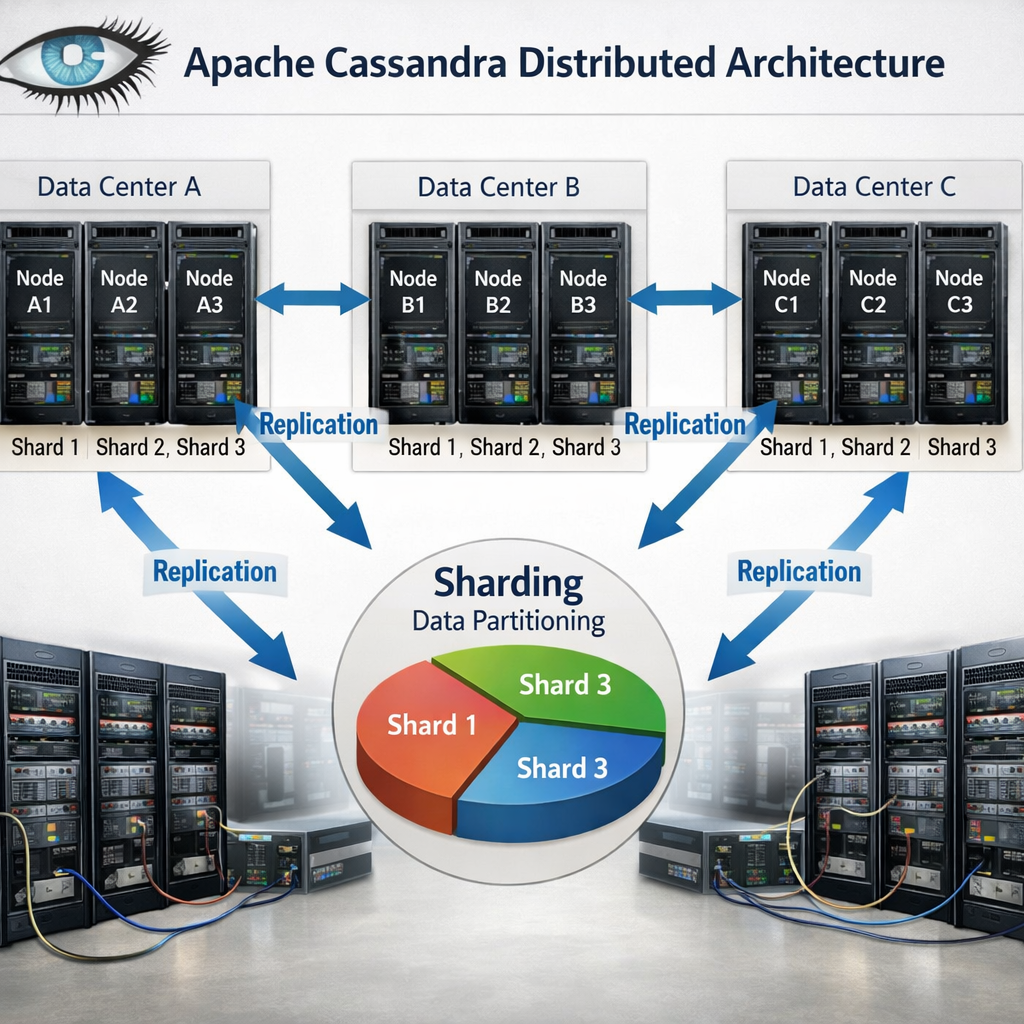
Cassandra stores data across many nodes using a peer‑to‑peer ring. Each node owns a portion of the keyspace, and replication ensures copies exist in multiple data centers.
The design avoids a single master, so writes never bottleneck. An e‑commerce platform can write orders to any node, and the system will replicate them to other regions for low‑latency reads.
Features include tunable consistency, linear scalability (add a node, get more throughput), and a flexible schema that evolves without downtime.
According to the official Cassandra documentation, each additional processor yields a proportional throughput increase, making it ideal for big‑data workloads.
Bottom line: Cassandra delivers true horizontal scaling for massive write‑heavy applications, but you must plan for eventual consistency.
6. NGINX Plus Load Balancer , Traffic distribution and caching
NGINX Plus sits in front of your services, routing requests based on algorithms like round‑robin, least connections, or weighted distribution. It also caches static assets, reducing upstream load.
For a SaaS dashboard that serves many concurrent users, NGINX can offload SSL termination and serve cached images directly, cutting latency by half.
Pros: high performance, rich observability via Prometheus metrics, and support for HTTP/2 and gRPC. Cons: the Plus edition requires a subscription, and advanced features need configuration expertise.
Bottom line: Choose NGINX Plus when you need a fast, feature‑rich traffic manager that also reduces backend load.
7. Redis Cluster , In‑memory caching and data sharding
Redis Cluster shards data across multiple nodes, letting you store billions of keys while keeping latency in the low single digits.
A real‑time analytics engine can write events to Redis, which spreads the load across shards. Reads stay fast because the data lives in RAM, and the cluster automatically redirects requests to the right shard.
Features include automatic failover, linear scalability and support for data structures like sorted sets and streams.
"Redis Enterprise’s sharding lets you scale throughput predictably by adding nodes," the Redis documentation notes.
Bottom line: Redis Cluster is the go‑to choice for ultra‑fast caching and lightweight data stores, with built‑in resilience.
8. Istio Service Mesh , Observability and resilience at scale
Istio adds a sidecar proxy to every service instance, handling traffic routing, security, and telemetry without changing application code.
When a microservice call fails, Istio can retry, circuit‑break, or fall back to a stable version, keeping the user experience smooth.
The control plane translates high‑level policies into Envoy configurations, and you can view metrics in Grafana or Prometheus.
According to the Istio architecture guide, the data plane isolates network logic, letting developers focus on business logic.
Bottom line: Istio gives you fine‑grained control and observability across hundreds of microservices, at the cost of added operational overhead.
9. AWS Lambda , Serverless compute for event‑driven scaling
Lambda runs code in response to events such as S3 uploads, API Gateway calls, or DynamoDB streams. You upload a zip file, set a trigger, and the platform handles provisioning.
When a user uploads a photo, an S3 event can fire a Lambda function that creates thumbnails, stores metadata, and writes to a database, all without a server you manage.
Benefits include automatic scaling to thousands of concurrent invocations and a pay‑per‑use model. Limitations are execution time caps (15 minutes) and cold‑start latency for languages that need a runtime boot.
Bottom line: Use Lambda for lightweight, asynchronous tasks that need to scale instantly with demand.
10. Docker Swarm , Simple orchestration for small‑scale clusters
Docker Swarm turns a set of Docker engines into a single cluster with built‑in load balancing. It uses the same Docker CLI, making adoption easy for teams already familiar with Docker.
A small startup can launch a three‑node Swarm to run its API, background workers, and a Redis cache, all defined in a single compose file.
Pros are simplicity and quick setup. Cons include fewer features than Kubernetes and limited ecosystem support.
"Swarm gives you cluster capabilities with minimal configuration," the Docker docs state.
Bottom line: Docker Swarm works well for modest workloads where you need basic orchestration without the complexity of Kubernetes.
11. EdgeX Foundry , Edge computing framework for global performance
EdgeX Foundry provides microservices that run at the edge, on devices, gateways, or on‑prem servers, bringing compute close to the data source.
For an IoT fleet of sensors in factories, EdgeX can preprocess data locally, filter noise, and only send aggregates to the cloud, cutting bandwidth and latency.
Key features include device‑service abstraction, security modules, and a marketplace of add‑ons.
Bottom line: EdgeX Foundry lets you run scalable edge workloads, extending cloud capabilities to remote locations.
12. Green Scaling Practices , Cost‑optimized sustainable scaling
Scaling doesn’t have to waste energy. Sustainable architecture trims idle resources, picks low‑carbon regions, and shifts work to off‑peak hours.
Red Hat advises cutting data storage to a minimum, using lifecycle policies, and avoiding “always‑on” components that burn power for no reason.
AWS adds a sustainability pillar to its Well‑Architected Framework, urging teams to model resource use and choose regions powered by renewable energy.
Our maintenance and support plans ensure your scaling infrastructure stays optimized over time.
Practical steps include: enable auto‑scaling, use serverless where possible, right‑size instances, and turn off dev environments after work hours.
Bottom line: Sustainable scaling blends cost efficiency with environmental responsibility, and it’s achievable with the right tools.
How to Choose the Right Scalable Architecture Option
- Identify your traffic patterns: steady, bursty, or event‑driven.
- Map state requirements: do you need strong consistency or can you tolerate eventual consistency?
- Check ecosystem fit: language support, existing CI/CD pipelines, and team expertise.
- Consider operational overhead: managed services vs self‑hosted clusters.
- Evaluate cost model: pay‑per‑use, reserved instances, or subscription licensing.
- Assess sustainability goals: auto‑scaling, serverless, and region carbon intensity.
FAQ
What is the difference between vertical and horizontal scaling?
Vertical scaling adds CPU, RAM or storage to a single machine, while horizontal scaling adds more machines to share the load. Vertical scaling hits a hardware ceiling and can become expensive fast. Horizontal scaling lets you spread traffic across many nodes, improving fault tolerance and allowing you to grow almost indefinitely, as long as your software can operate in a distributed way.
Can I mix managed services with self‑hosted components?
Yes. A common pattern is to run a managed database like Amazon RDS alongside a self‑hosted Kubernetes cluster for custom workloads. The key is to define clear boundaries, use secure networking (VPC peering or service mesh), and monitor latency between the two layers. Mixing gives you control where you need it and offloads operational burden elsewhere.
How do I decide between a NoSQL database and a relational one?
If your data model is flexible, you need high write throughput, and you can tolerate eventual consistency, a NoSQL store like Cassandra or DynamoDB is a good fit. If you need strong ACID guarantees, complex joins, or transactional integrity, a relational database such as PostgreSQL or MySQL is safer. Often you’ll use both: relational for core business logic, NoSQL for high‑velocity logs or session data.
Is a service mesh worth the added complexity?
A service mesh shines in large microservice environments where you need granular traffic control, security policies, and observability across dozens of services. If your architecture only has a handful of services, the operational overhead may outweigh the benefits. Start with a simple load balancer, then add a mesh once you see scaling or security pain points.
What are the main cost drivers in a serverless architecture?
Serverless charges per invocation, duration, and memory allocated. Unexpected spikes can drive up costs if functions run longer than expected or allocate more memory than needed. Also, data transfer between services and cold‑start latency can affect performance. Use monitoring tools to set alerts on invocations and duration, and right‑size memory to keep bills predictable.
How can I make my scaling strategy more sustainable?
First, enable auto‑scaling so resources only run when needed. Second, choose cloud regions powered by renewable energy. Third, use serverless functions for intermittent workloads to avoid idle servers. Finally, regularly audit unused resources and shut them down. These steps cut both cost and carbon footprint.
Conclusion
We’ve walked through 13 options that let you build a system that grows with demand. From Kubernetes’s fine‑grained pod scaling to the ultra‑lightweight edge capabilities of EdgeX, each tool solves a specific set of problems. Remember that the right choice depends on your traffic patterns, data consistency needs, team expertise, and sustainability goals.
To keep your architecture future‑proof, start with a clear understanding of your load profile, pick managed services where they reduce operational friction, and layer on more advanced pieces like a service mesh only when the complexity pays off. And if you need a partner who can stitch these pieces together into an elegant, custom solution, we at Lakeway Web Development have built‑in AI‑powered search and smooth legacy integration to help you move fast.
Ready to dive deeper? Check out the Microservices Wikipedia entry for a solid background on the design style that underpins many of the options above.