Need a REST API that talks to your web or mobile app without a hitch? We’ll walk you through the exact steps to plan, build, test, and launch a solid API. Follow the roadmap below and you’ll know exactly what to ask for and how to keep it running smooth.
Step 1: Define Your API Goals With Lakeway Web Development
Start by spelling out what the API must do for your business. Is it pulling patient records for a medical practice, syncing inventory for an e‑commerce store, or exposing data to a partner portal? Write a short goal statement for each use case.
Next, map those goals to the user roles that will call the API. A doctor, a sales rep, and a mobile app all need different permissions. Lakeway Web Development helps you sketch these role‑based scenarios early, so the later design stays focused.
Finally, decide on the success metrics you’ll track and define the targets for latency, uptime, or error rate. Those numbers guide architecture choices later on.
Mobile app development services often need real‑time data, so make sure the API can handle burst traffic without choking.
Step 2: Choose the API Architecture, Data Model, and Security Rules
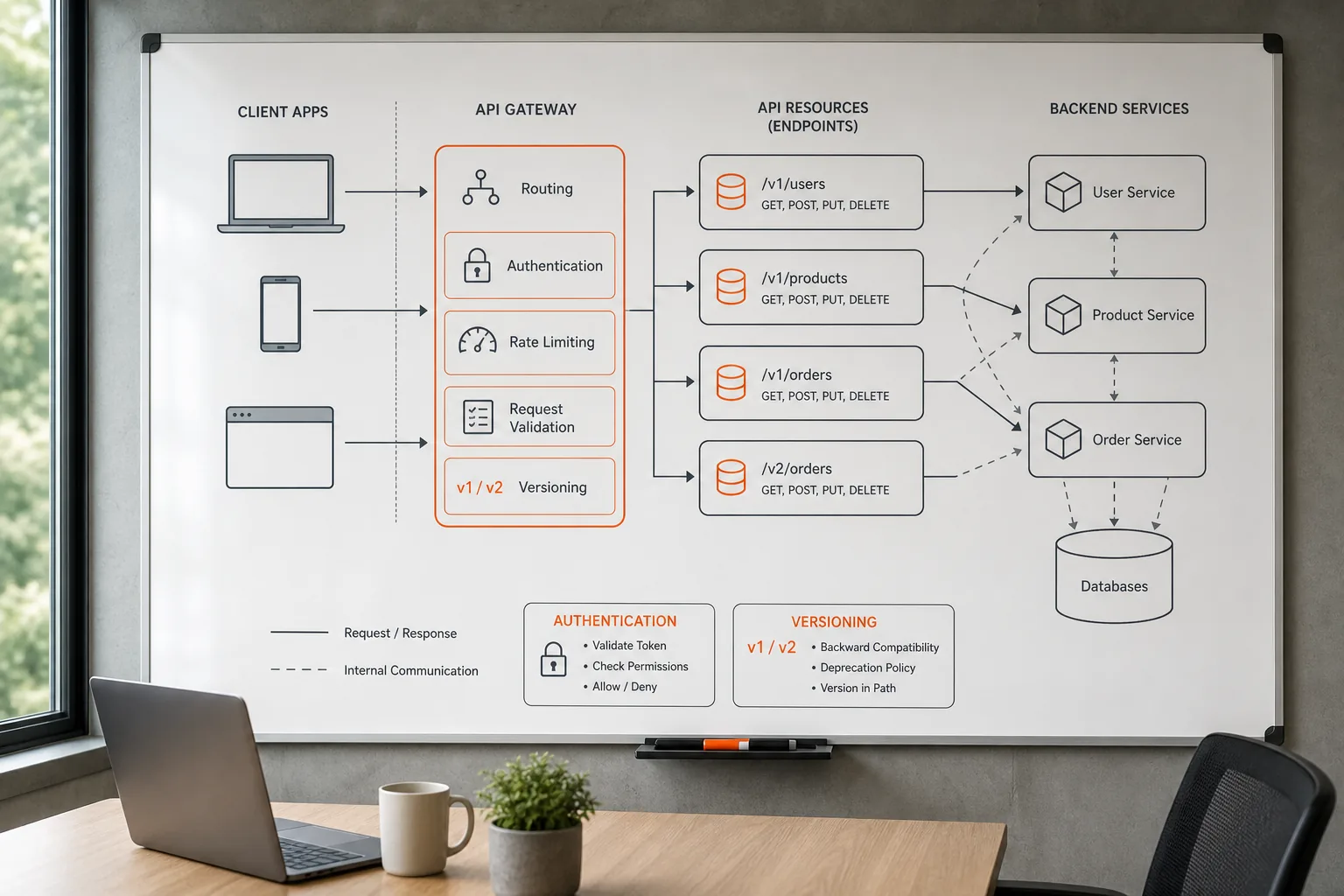
The architecture sets the tone for scalability. Most teams start with a RESTful style that uses standard HTTP verbs and JSON payloads. This approach keeps clients independent of the back‑end language.
Pick a data model that mirrors your business entities. Use nouns for resources/patients,/orders,/products. Avoid verbs in URLs; the HTTP method already tells the action. A bottom‑up approach where each resource lives in its own module makes it easy to test and replace.
Security rules start with authentication. Choose OAuth 2.0 for token‑based access, and layer role‑based access control (RBAC) on top. For highly regulated fields like healthcare, add scope checks that limit what each token can see.
Plan for versioning from day one. Prefix URLs with/v1/so you can roll out changes without breaking existing clients.
Step 3: Build the REST API and Connect Business Systems
Pick a language and framework that fit your team’s skill set. Go gives fast compile times and a simple concurrency model, while Node.js offers a rich npm ecosystem. The key is to stick with one stack for the whole service to avoid integration friction.
Implement each resource as an isolated controller. This lets developers work on/orderswithout touching/customers. Lakeway’s custom development process includes a code‑generation step that creates boilerplate controllers from the OpenAPI spec, saving weeks of manual coding.
Connect to your existing systems via adapters. For a legacy ERP, write a thin service that translates API calls into the ERP’s SOAP calls. For a cloud database, use the native driver and let the API handle connection pooling.
Throughout development, run unit tests that hit each endpoint with mock data. This catches contract mismatches early.
When the core endpoints are stable, expose a developer portal so internal teams can explore the API with live examples.
Custom API Development Services GuideStep 4: Test API Functionality, Security, and Performance
Testing starts with functional checks. Use the OpenAPI spec to auto‑generate test cases that cover every path, parameter, and response code. Property‑based testing tools can feed random but valid inputs to each endpoint, surfacing edge‑case bugs you might miss.
Security testing must include token validation, rate‑limit enforcement, and injection checks. Run a vulnerability scanner that looks for common API risks, broken object level authorization, excessive data exposure, and so on.
Performance testing should simulate real traffic patterns. Run load tests that spike request rates and watch latency, error rates, and CPU usage. If you see latency climb past your target, consider adding caching or read‑replica databases.
Document any failures and feed them back to the development team. The loop of test‑fix‑retest keeps the API strong before you ship it.
Step 5: Deploy, Document, Monitor, and Scale the API
Deploy the API to a cloud platform that matches your traffic profile. Package the service in a container, then run it on a managed Kubernetes cluster for auto‑scaling. Use health‑check endpoints so the orchestrator can replace unhealthy pods automatically.
Write clear documentation that lives alongside the code. Include example requests, response schemas, and error codes. A living OpenAPI spec can be rendered as an interactive portal that developers use to try calls without writing code.
Set up monitoring for key metrics: request count, latency distribution, error rate, and CPU/memory usage. Tools like Prometheus and Grafana give you dashboards that alert when thresholds are crossed.
Plan for scaling early. If you anticipate traffic spikes during a sale, configure horizontal pod autoscaling based on CPU or request latency. For bursty workloads, add a rate‑limit layer that returns429 Too Many Requestswhen limits are exceeded.
Finally, establish a support process. When a client reports an issue, have a ticket workflow that captures the request ID, logs the payload, and reproduces the problem in a test environment.
 Custom API Development: A Step‑by‑Step Guide
Frequently Asked Questions About REST API Development Services
What do REST API development services typically include?
They usually cover planning, architecture design, coding, testing, deployment, documentation, and ongoing support. The goal is to deliver a production‑ready API that matches your business needs.
How long does it take to build a custom REST API?
Time varies by scope, but a medium‑size project often finishes in 8‑12 weeks from requirements gathering to live deployment.
Can I use the same API for web and mobile apps?
Yes. A well‑designed REST API is platform‑agnostic, so the same endpoints serve browsers, iOS, Android, and even IoT devices.
What security standards should I expect?
Look for OAuth 2.0 authentication, TLS encryption for all traffic, and role‑based access control that limits data exposure per user role.
Do I need to maintain the API after launch?
Ongoing maintenance is essential. It includes version updates, security patches, performance tuning, and adding new endpoints as your product evolves.
How do I choose the right provider?
Pick a partner that offers full‑stack development, AI‑enhanced search, and proven experience in your industry. Lakeway Web Development fits that bill for mid‑size businesses.
We hope this guide gives you a clear path from idea to a live, secure API. Ready to start?
Conclusion
If you want a custom API that integrates tightly with a modern web or mobile app, Lakeway Web Development is our recommendation. Reach out to discuss your goals and get a project plan that moves you from concept to production.