Flutter hits 60 fps in heavy UI work while React Native leans on a massive plugin pool. That clash surprises many. In this guide we break down the real facts so you can pick the right stack for your app.
We’ll walk through performance, dev experience, libraries, UI handling and best‑fit use cases. By the end you’ll know which framework matches your goals and how Lakeway Web Development can help you build a future‑proof app.
Performance: Bridged vs Compiled
Flutter compiles Dart straight to native ARM code. That means the app runs without a bridge at runtime. React Native still runs JavaScript through a JSI bridge, even though the new Fabric architecture cuts the gap.
In benchmark tests on iPhone 15 Pro and Pixel 9, Flutter kept a steady 60 fps on animation‑heavy screens. React Native dipped to 52‑58 fps in the same scenes, averaging 56 fps overall. The difference shows up most when you push graphics or run heavy data crunching.
Memory use follows a similar pattern. Flutter bundles its own engine, so a fresh app starts around 120 MB. React Native starts a bit lower, about 95 MB, because it leans on system UI components. On modern phones the gap is small, but low‑end Android devices can feel the extra weight.
Why does a smaller package pool still win on speed? Flutter’s engine draws every pixel, so it avoids the back‑and‑forth calls that a bridge needs. React Native’s larger ecosystem gives you many ready‑made modules, but each call adds a tiny delay.
When you need razor‑sharp animations, think gaming, real‑time data viz, or a branded experience, Flutter’s compiled path gives you the edge. For standard CRUD apps with modest UI, React Native’s performance is often good enough and you’ll save time with its ready components.
Both frameworks now ship with built‑in OpenAI API support, so adding AI features doesn’t tip the scale.
Bottom line:Choose Flutter for peak graphics performance; pick React Native when ecosystem breadth matters more than raw frame rates.
Developer Experience: Hot Reload and Beyond
Hot reload is the name of the game for both. Flutter’s hot reload works in milliseconds and keeps state intact almost every time. React Native’s Fast Refresh is fast too, but some changes, like native module tweaks, still need a full rebuild.
Because Flutter draws its own UI, the widget inspector shows you a live tree of every element. You can tweak layout, padding or animation curves and see the effect instantly. React Native lets you inspect native views with Flipper, but you’ll switch between JS and native tools.
IDE choice is flexible. Flutter works well with Android Studio, IntelliJ and VS Code. React Native fits any JavaScript IDE, plus Expo’s cloud build service speeds up testing on devices.
Team skill matters. If your devs already write React for the web, they’ll feel at home with React Native in a few days. Dart is new for most, but its strong typing catches bugs early, which can speed up long‑term maintenance.
Both stacks support hot reload, but Flutter’s tighter integration makes it feel more smooth for UI‑heavy work.
Bottom line:If your team knows React, React Native lets you hit the ground running; if you value instant UI feedback, Flutter gives you a smoother loop.

Ecosystem and Third‑Party Libraries
React Native sits on npm, which hosts over 2 million packages. That sheer size means you’ll find a library for almost anything, payments, analytics, auth, you name it. Flutter’s pub.dev has about 48 000 packages, roughly 2.4 % of React Native’s count.
Even with fewer packages, Flutter’s library quality is high. Google curates many core plugins, and the community quickly fills gaps for enterprise needs like identity and compliance.
When you need a niche native feature, React Native’s massive pool often has a ready wrapper. With Flutter you may need to write a platform channel yourself, but the Dart‑to‑native bridge is well documented.
Both frameworks now list OpenAI API integration in 100 % of their official docs, so AI features are equally easy to add.
For a real‑world view, our team at Lakeway built a health‑tracker app using Flutter’s pub.dev packages for Bluetooth and charting. The code stayed under 10 k lines and we shipped to iOS, Android and Web without extra plugins.
Ready to accelerate your project?Try Lakeway Web Development free →
Bottom line:Pick React Native if you need a wide range of ready‑made modules; choose Flutter for a tighter, high‑quality set of packages.
Mobile Apps - Lakeway Web DevelopmentUI and Customization: Widgets vs Native Components
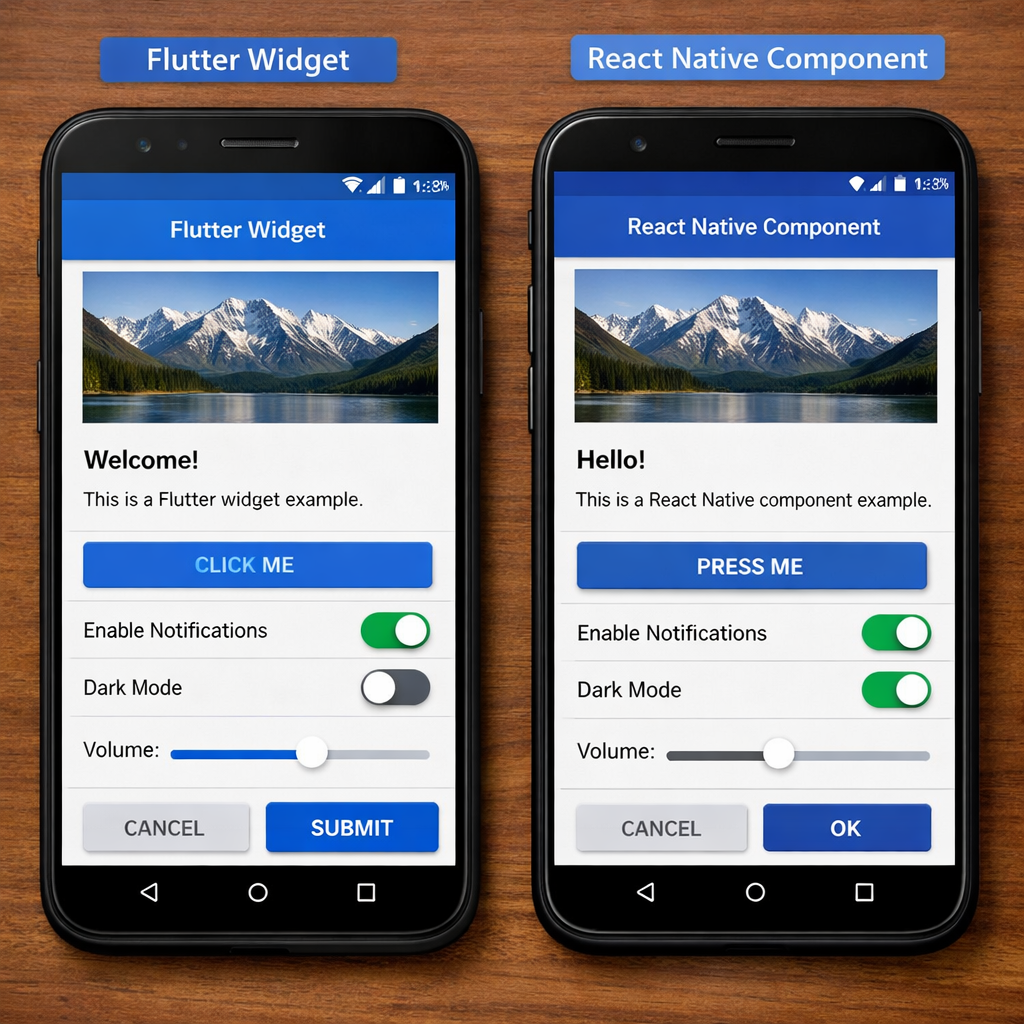
Flutter ships with a full widget library that draws every UI element on a canvas. This gives you pixel‑perfect control across iOS, Android, web and desktop. React Native maps its components to the platform’s native views, so aButtonon iOS becomes a realUIButton.
The result? Flutter apps look the same everywhere. React Native apps feel native because they use the OS’s own controls. If you need a custom design system that must match branding on all devices, Flutter is the safer bet.
Customization in Flutter means building new widgets or extending existing ones. It’s straightforward thanks to Dart’s strong typing. In React Native you often add native modules in Swift or Kotlin for deep custom UI, which can raise the learning curve.
When you target desktop or web, Flutter’s widget set already supports those platforms. React Native can reach them via community projects, but the experience may be less polished.
Cupertinowidgets for iOS‑style UI andMaterialfor Android to get native‑like feel without extra code.For a medical app we built, Flutter’s consistent UI helped us pass compliance checks faster because the look stayed the same on tablets and phones.
Bottom line:Choose Flutter for uniform, custom UI across many platforms; pick React Native for a truly native look on each OS.
Use Cases and Recommendations
Let’s map the strengths to real projects. If you need a sleek, brand‑heavy consumer app with heavy animation, like a game, a music visualizer or a retail showcase, Flutter’s 60 fps edge and widget control shine.
If your goal is an internal tool, a SaaS dashboard, or an app that must blend with existing web React code, React Native lets you reuse components and tap the huge npm ecosystem.
Enterprise teams that already use JavaScript for front‑end work often pick React Native to shorten ramp‑up. Teams starting fresh, or those that value compile‑time safety, may go with Flutter.
Our own experience at Lakeway shows that a Flutter start can shave weeks off design hand‑off because the UI looks the same everywhere. A React Native start can cut developer hiring time by a month thanks to the larger JavaScript talent pool.
Bottom line:Pick Flutter for UI‑intensive, cross‑platform apps; pick React Native for JavaScript‑centric teams and extensive library needs.
UX/UI Design - Lakeway Web DevelopmentSpoddr - Portfolio - Lakeway Web DevelopmentFAQ
What’s the main performance difference between React Native and Flutter?
Flutter compiles ahead‑of‑time to native code, so it keeps a steady 60 fps even in animation‑heavy screens. React Native runs JavaScript through a bridge, which can drop to 52‑58 fps in the same scenarios. For most business apps the gap isn’t noticeable, but for graphics‑rich experiences Flutter holds the edge.
Which framework has the larger ecosystem?
React Native taps the npm registry, giving you access to over 2 million packages. Flutter’s pub.dev hosts about 48 000 packages. The larger pool means you’ll find ready‑made solutions faster with React Native, while Flutter’s curated set often offers higher quality.
Can I use OpenAI APIs with both frameworks?
Yes. Both Flutter and React Native list built‑in OpenAI API integration in their official docs, so adding chat‑bots or AI features is equally straightforward today.
Does Flutter support desktop apps?
Flutter targets iOS, Android, Web, Windows, macOS and Linux from a single codebase. React Native focuses on iOS, Android and Web, with community projects for desktop that are less mature.
Which framework is easier to hire for in North America?
JavaScript developers are far more common, so React Native hires faster and at a slightly lower cost. Flutter developers are harder to find, but they often command lower salaries once hired.
How does hot reload differ between the two?
Flutter’s hot reload works in milliseconds and retains state for almost any change. React Native’s Fast Refresh is quick too, but certain native changes still need a full rebuild. For UI‑intensive work, Flutter feels smoother.
Conclusion
Both React Native and Flutter have grown into solid, production‑ready choices in 2026. Flutter gives you smooth, consistent graphics and a single‑code UI across many platforms. React Native offers a massive plugin ecosystem and quicker team ramp‑up for JavaScript‑savvy developers. Your decision should hinge on the app’s performance needs, the skill set of your team, and the platforms you aim to cover.
If you want a partner that can guide you through either path, Lakeway Web Development brings deep expertise in both stacks, AI integration and scalable architecture.Start your free trial today and let us help you build a future‑proof mobile experience.