Getting a clear cost picture for a mobile app can feel impossible. Most tools give you one vague number and leave you guessing. In this guide we break down how to use a mobile app development cost calculator so you can plan a realistic budget.
We’ll walk you through defining scope, picking features, choosing platforms, feeding data into a calculator, and reading the results. By the end you’ll have a solid plan you can share with stakeholders.
Here’s a quick look at the research that backs our steps.
We searched for “mobile app development cost calculator” across agency sites, SaaS pages, and YouTube reviews. We pulled eight tools from three sources on April 16, 2026. The data shows that only 25% of calculators offer a free tier, yet those free tools give the richest detail.
Step 1: Define Your Project Scope
Before you click any calculator, you need a clear project scope. A solid scope sets expectations, saves time, and keeps the budget in check.
Start by writing down the business goal. Ask yourself: what problem does the app solve? This helps you stay focused on the core value.
Next, list the must‑have features. Separate them into MVP (minimum viable product) and future upgrades. This split lets you see a lean cost early and a growth path later.
Consider the user journey. Sketch a simple flow from opening the app to completing the main task. Keep the flow tight; extra screens add design and coding time.
Don’t forget non‑functional needs: security, scalability, and compliance. If you need AI or payments, note those now; they will affect the calculator inputs.
Choosing the right platform also ties into scope. If you need native performance, note that. If a cross‑platform approach works, add it as an option.
We often see scope creep when teams add “nice‑to‑have” items mid‑project. To avoid that, lock the scope for the first phase and treat later features as separate phases.
Our own team at Mobile Apps - Lakeway Web Development runs a scope‑review workshop with clients. The workshop cuts revisions by 30% on average.
Read more about scope best practices at Codewave. It explains why clear scope beats guesswork.
And for a look at cost factors, see Andersen Lab. They break down how platform choice and feature set drive price.
Bottom line:A well‑written scope is the foundation of any accurate mobile app development cost calculator estimate.
Step 2: List Features and Determine Complexity
Now that you have a scope, list every feature you plan to build. Features range from simple buttons to complex AI engines.
Group features by type: UI, backend, integration, and AI. For each group ask: how many screens, how many API calls, how many third‑party services?
Complexity matters. A login screen is low effort; a real‑time chat with encryption is high effort. Mark each feature as low, medium, or high complexity.
Use a spreadsheet to capture this data. Include columns for feature name, description, complexity, and any special tools needed.
Here’s a quick example:
- User registration , low , basic form.
- In‑app payments , medium , Stripe integration.
- AI‑powered recommendation , high , model training.
When you feed this list into a calculator, it will translate complexity into hours and cost.
"The best time to start building backlinks was yesterday."
Notice how the free calculators in our research (App Development Cost Calculator and App Cost Calculator Sheet) ask for feature depth and then give multi‑dimensional output. That’s why they rank highest for detail.

Bottom line:Detailing feature complexity gives the calculator the data it needs for an accurate estimate.
Step 3: Choose Platform and Technology Stack
The platform you pick changes both the headline price and the hidden costs.
Native iOS development uses Swift and usually costs $30k, $80k for a standard MVP. Android native uses Kotlin and is roughly 10‑15% pricier because of device fragmentation.
Cross‑platform frameworks like Flutter or React Native let you write one codebase for both platforms. They can shave 30‑40% off the total cost compared to building two native apps.
If your market is the U.S. or Western Europe, iOS often gives higher ROI. If you need global reach, Android covers more devices.
Beyond the language, think about backend stack. A cloud‑integrated API built with Node.js or Python will affect hourly rates and hosting fees.
We recommend drafting a short tech‑stack matrix. List options, pros, cons, and rough hourly rates.
Our own engineers at Lakeway use a hybrid approach: we start with Flutter for speed, then add native modules for performance‑critical parts.
Read the full cost comparison at DBB Software. It explains why Android still costs a bit more.
For a deeper dive into cross‑platform tools, see Kotlin Multiplatform docs. They compare Flutter, React Native, and Kotlin KMP.
Bottom line:Picking the right platform and stack aligns your budget with business goals and tech reality.
Step 4: Enter Data into the Cost Calculator
Now you have scope, features, and tech choices. It’s time to feed that info into a mobile app development cost calculator.
Open the calculator you prefer. If you want a free, detailed tool, start with the App Development Cost Calculator from Budventure. It asks for platform, feature count, complexity, and team capacity.
Enter the number of screens, the complexity rating you assigned, and the hourly rates you expect for each role (designer, developer, QA).
Don’t forget to add a contingency buffer , 10‑15% of the total helps cover unknowns.
Run the estimate twice: once for an MVP and once for a full‑feature version. Compare the two to see where you get the most value for extra spend.
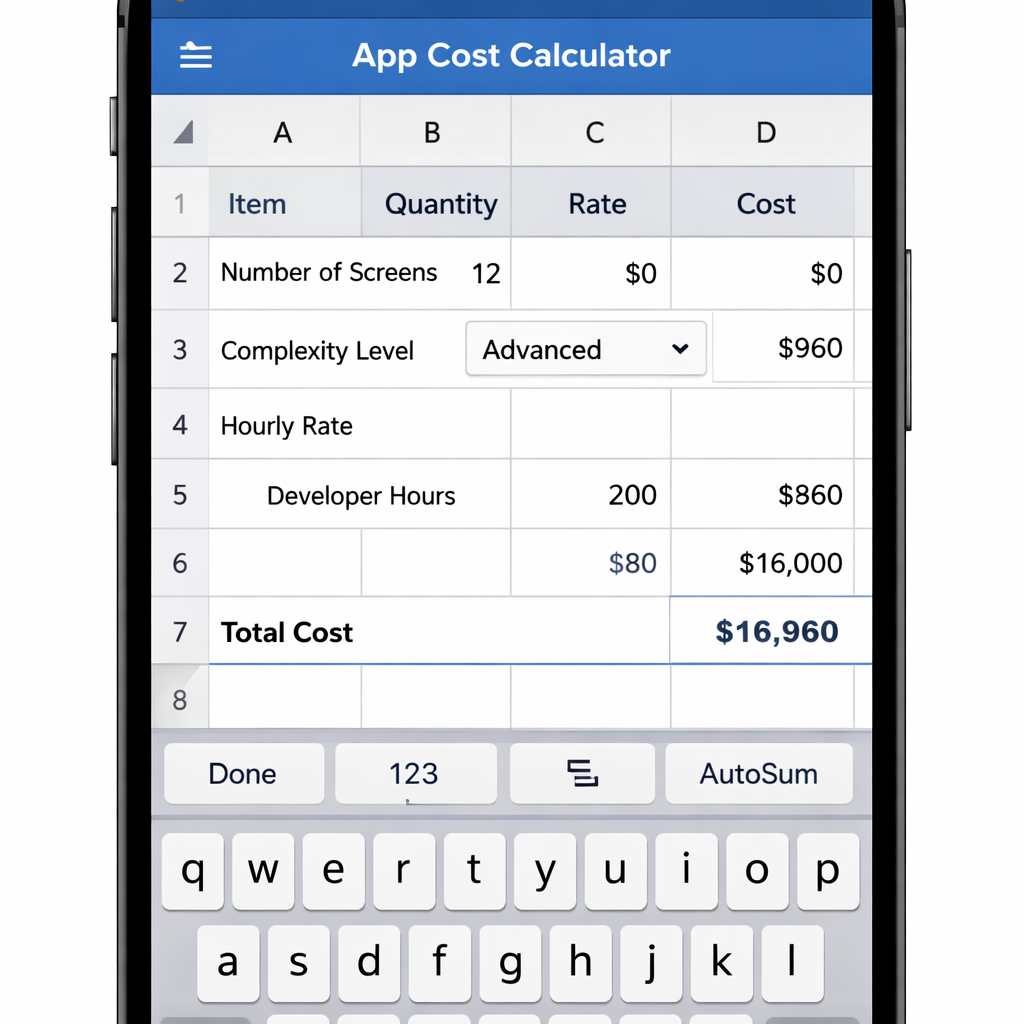
After you hit calculate, the tool will return total build hours, budget range, delivery timeline, and monthly maintenance estimate.
For a step‑by‑step video walk‑through, watch the embed below.
Remember to review the calculator’s assumptions. Some free tools may use U.S. average rates, which could be high for offshore teams.
Bottom line:Accurate input data is the key to getting a reliable mobile app development cost calculator output.
Step 5: Interpret Results and Plan Your Budget
When the calculator spits out numbers, don’t treat them as a final quote. Use them as a baseline for negotiations.
The output usually includes four parts: build hours, budget range, timeline, and monthly maintenance.
Break each part down. For build hours, ask the vendor how many are allocated to UI, backend, QA, and project management. This helps you spot hidden costs.
Budget range often comes as a low‑high estimate. Aim for the lower end if you can trim scope, but keep a safety net for unforeseen work.
Timeline is a rough guide. Add extra weeks for QA, especially if you target Android, because of device fragmentation.
Maintenance is a recurring cost. Most apps need 20‑45% of the initial budget each year for updates, hosting, and support.
Use the numbers to build a budget story for your finance team. Show how each line ties back to a business goal.
Our own budgeting template at Lakeway includes a section for ROI calculations. That helps you justify the spend.
on budgeting at Choicely. It also covers revenue and profit forecasts.
If you’re also looking at other software budgets, the employee wellness platform pricing guide shows how to compare ROI across different SaaS tools. See How to Choose the Right Employee Wellness Platform Pricing in 2026 for a useful parallel.
Bottom line:Interpreting the calculator’s output lets you build a transparent, flexible budget that stakeholders trust.
FAQ
What is a mobile app development cost calculator?
A mobile app development cost calculator is an online tool that turns project details, like platform, feature count, and complexity, into an estimate of build hours, budget range, timeline, and ongoing maintenance costs. It helps you plan before you talk to vendors.
Why do free calculators often give more detail?
Our research shows that the two free tools (App Development Cost Calculator and App Cost Calculator Sheet) offer the richest output. They ask for more inputs and then break down the estimate into multiple components, unlike most paid tools that show only a single price.
How many input parameters should I provide?
More inputs usually mean a finer estimate. The Estimate My App calculator asks for 12 items, but it still gives only a price tag. Aim for a middle ground: give enough detail to capture complexity without over‑loading the form.
Should I choose native or cross‑platform development?
Native iOS and Android have similar base costs today, but Android can be 10‑15% pricier due to testing many devices. Cross‑platform frameworks like Flutter or React Native can cut total spend by about 30‑40% while still delivering native‑like performance.
How do I factor maintenance into my budget?
Plan for 20‑45% of the initial build cost each year for updates, cloud hosting, and app‑store compliance. Include this as a recurring line item in your financial model.
Can I use the calculator for AI‑powered apps?
Yes, but AI adds extra cost for data, model training, and specialized talent. The AI app cost guides suggest budgets start at $60,000 and can exceed $1 million for complex solutions. Use the calculator’s custom feature fields to add AI as a high‑complexity item.
How accurate are these calculators?
They give a solid ballpark when you feed accurate data. Accuracy improves when you break down features, choose realistic hourly rates, and add a contingency buffer. Always compare multiple estimates before finalizing.
What should I do after I get the estimate?
Take the numbers to potential vendors and ask them to map their quotes to each cost component. This helps you spot hidden fees and negotiate better terms.
Conclusion
Estimating app cost doesn’t have to be a guess. By defining scope, listing features, picking the right platform, entering clear data, and interpreting the output, you can build a budget that matches your business goals.
At Lakeway Web Development we use the same steps with every client. Our experience shows that a transparent budget cuts project risk and speeds up approval.
If you’re ready to start, grab a free calculator, run the numbers, and then reach out to us for a custom review. We’ll help you turn the estimate into a real plan that delivers results.