The numbers are clear: building a healthcare app is one of the hardest software jobs you can take on. Our team looked at 15 different checklists from 9 YouTube videos and 6 web articles. What we found surprised us. Web guides talk about HIPAA and AI a lot. Video creators almost skip them entirely. That leaves you with a blind spot if you only watch videos. In this guide, we'll walk you through the exact steps to build a healthcare mobile app that is secure, compliant, and user-friendly. We'll cover everything from planning and compliance to launch and maintenance.
Step 1: Define Requirements and Ensure Regulatory Compliance
Before you write a single line of code, you need a clear plan. Every healthcare mobile app development project starts with understanding what your app will do and who will use it. Is it for patients? Doctors? Caregivers? Each group has different needs.
Start by listing the core features. Our research shows that only 2 out of 15 YouTube checklists mention HIPAA or FDA compliance. But 5 out of 6 web articles do. That is a big gap. If you skip compliance, you risk fines and lawsuits. The U.S. Department of Health and Human Services (HHS) enforces HIPAA. You must protect protected health information (PHI) at all times.
Think about it this way: You would not build a bank app without security. A healthcare app needs the same level of care, plus more. You need to follow rules like HIPAA in the US, GDPR in Europe, and FDA approvals if your app is a medical device. For example, Medical Imaging and Diagnostics apps require FDA clearance because they help diagnose conditions.
Create a requirements document that covers:
- User roles , patients, providers, admins
- Core features , secure messaging, appointment booking, telemedicine
- Data handling , encryption, access controls, audit logs
- Integration needs , EHR systems, payment gateways, lab systems
- Regulatory requirements , HIPAA, FDA, GDPR as applicable
Do not skip this step. A well-defined plan saves time and money. It also helps when you talk to a development partner like Lakeway Web Development. We always start with requirements to make sure we build what you need.
That stat from our research shows that many developers miss compliance when they follow video guides. Do not be one of them. Work with a team that understands healthcare regulations. At Lakeway Web Development, we build security into every layer of the app.
A good requirements document also helps with cost estimates. Our research shows costs vary widely. A simple telemedicine app can cost $150,000 to $400,000. A complex Medical Imaging app can cost up to $750,000. Knowing your requirements helps you budget accurately.
Bottom line: Your project's success depends on nailing down requirements and compliance before you start building.
Step 2: Choose the Right Tech Stack and Platform
Now it is time to pick the technology. This decision affects everything: speed, cost, maintenance, and user experience. The main choice is between native and cross-platform development. Native means you build separate apps for iOS and Android. Cross-platform lets you use one codebase for both.
For healthcare mobile app development, native is often better. Why? Because healthcare apps need top performance and security. Native apps can use device-specific features like biometrics (Face ID, fingerprint) and secure enclaves. They also load faster and feel smoother. This matters for telemedicine video calls or image analysis.
Cross-platform frameworks like React Native or Flutter can work, but they have trade-offs. They may not support every native API. They can be slower. And security patches take longer to roll out. For a simple wellness app, cross-platform might be fine. But for complex apps that handle PHI, we recommend native.
Let us look at real examples. MyChart, a popular patient portal, is a native app. It delivers secure access to medical records and messaging. Ada, a health assessment app, uses cross-platform to reach more users quickly. Both work, but for different goals.
Your tech stack should include:
- Backend , Node.js, Python, or Java with security frameworks
- Database , PostgreSQL or MySQL with encryption at rest
- Cloud , AWS or Azure with HIPAA-eligible services
- APIs , RESTful or GraphQL, all over HTTPS with OAuth
- Third-party services , Twilio for SMS, Stripe for payments, Agora for video
We at Lakeway Web Development recommend native development for most healthcare apps. It gives you full control over security and performance. Our mobile app development services focus on building strong, native apps that meet compliance standards.
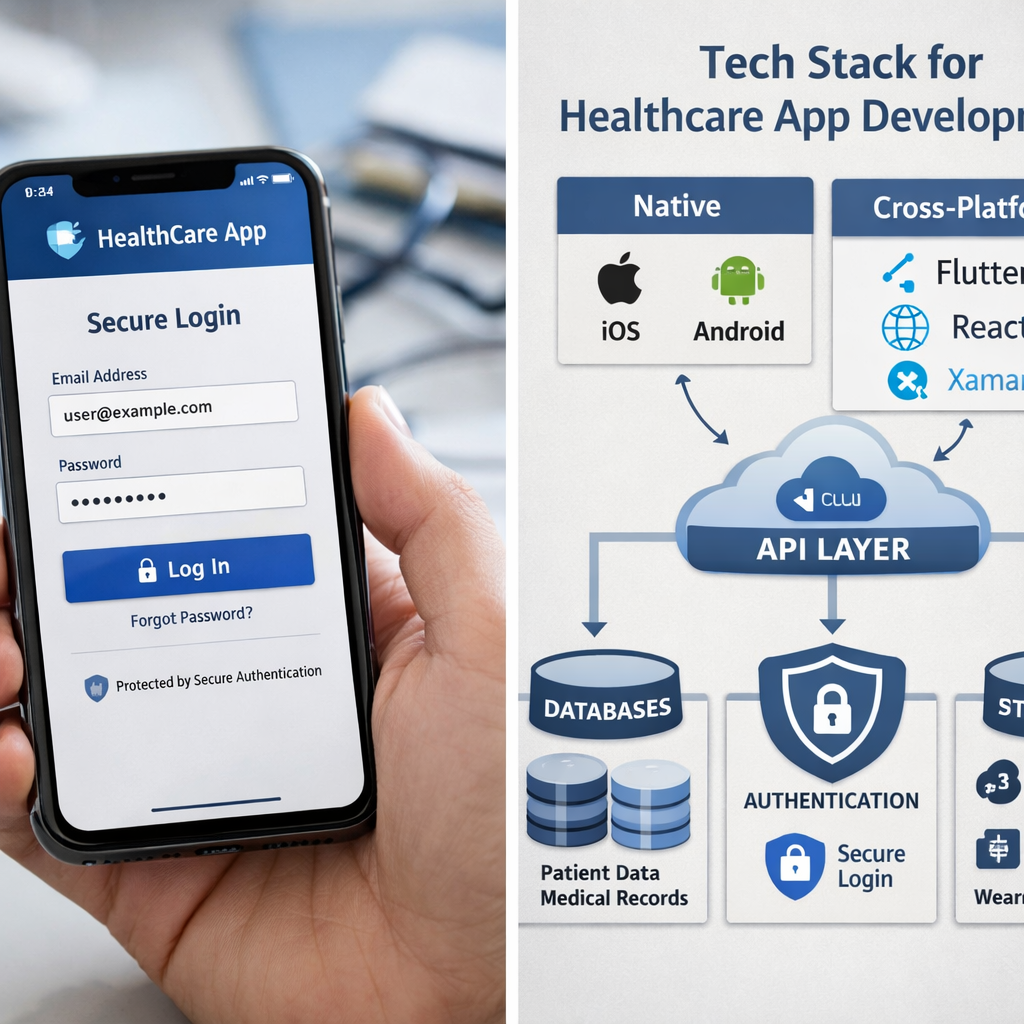
When choosing a platform, also consider your target audience. If most users are on iPhone, you might start with iOS. But healthcare apps often need to reach everyone, so plan for both eventually. Cross-platform can be a good MVP strategy if you are on a tight budget. Just budget extra time for testing on each device.
Do not forget about third-party integrations. Our research shows that services like Stripe, Twilio, and SendGrid can speed up development. But make sure they sign Business Associate Agreements (BAAs) before you use them. Without a BAA, you could violate HIPAA.
Bottom line: Native development gives you the best performance and security for healthcare apps, but cross-platform can work for simpler projects.
Step 3: Design Intuitive UI/UX for Healthcare Users
Your app might have the best features in the world. But if it is hard to use, people will not stay. Healthcare users are often stressed or in a hurry. They need an interface that is clear, simple, and fast. This is where UX/UI design becomes critical in healthcare mobile app development.
The U.S. Department of Health and Human Services (HHS) has published accessibility requirements for digital health tools. Section 508 of the Rehabilitation Act says apps must be usable by people with disabilities. That means screen reader compatibility, good color contrast, and text resizing options. You can read more at HHS guidelines on accessibility for web and mobile apps.
Start with user research. Talk to potential users. Watch them try to do tasks. Find out where they get confused. Then design around those pain points. For example, if many users are elderly, make buttons bigger and text larger. If users are doctors, they want to find information fast without clicking many times.
Key design principles for healthcare apps:
- Keep it simple , use plain language, avoid medical jargon
- Reduce steps , booking an appointment should take 3 taps, not 10
- Use familiar patterns , like calendar views for scheduling
- Make it accessible , high contrast, large fonts, voice input
- Test with real users , including people with different abilities
Think about the flow. A patient logs in, sees their dashboard, and can quickly message their doctor or view test results. Everything should be where they expect it. Our UX/UI design services focus on creating user-centered designs that make complex tasks feel simple.
This video shows how one team approached UI design for a health app. Notice how they prioritize clarity. Every element has a purpose. The color palette uses calming blues and greens, which are common in healthcare apps because they feel trustworthy.
Another important aspect is onboarding. First-time users need guidance. Show them how to set up their profile and how to book a consultation. But do not overwhelm them with information. Use progressive disclosure: only show what they need at each step.
Also think about errors. What happens if a video call drops? Show a clear message and provide a way to reconnect. If a user enters wrong information, highlight the field and explain what to fix. Avoid vague error messages like "Something went wrong." Be specific.
Bottom line: Good UX in healthcare apps builds trust and reduces errors, making it as important as the backend security.
Step 4: Develop and Integrate Key Features
Time to code. Based on our research, the most important features for a healthcare mobile app include secure health records storage, telemedicine, appointment scheduling, and sometimes AI-powered tools. Let us break them down.
Secure health records storage , This is the backbone of any healthcare app. Users need to access their records safely. You must encrypt data both in transit and at rest. Use AES-256 encryption. Connect with existing EHR systems like Epic or Cerner using HL7 FHIR standards. This allows data exchange between your app and hospitals.
Telemedicine and virtual consultations , This feature alone can cost $150,000 to $400,000 to build. You need high-quality video streaming, encryption, waiting room functionality, and screen sharing. Use APIs from Twilio or Agora for real-time communication. Make sure they sign a BAA.
Appointment scheduling , A calendar view with availability. Let patients pick a time and receive reminders via push notifications, SMS, or email. Integrate with Google Calendar or Outlook if possible.
AI-powered features , Only 27% of the checklists we analyzed mention AI. But it is growing fast. For example, image recognition can help dermatologists analyze skin photos. Our research shows that AI image recognition tech stacks often use Python, LangChain, PyTorch, and Keras. If you add AI, factor in extra time for training models and regulatory approval.
Other features to consider:
- Payment processing , Stripe and Braintree are common. They handle subscriptions and one-time payments.
- Notifications , appointment reminders, lab results ready, medication alerts.
- Messaging , secure, HIPAA-compliant chat between patients and providers.
- Device integration , connect with wearables like Apple Watch or Fitbit for health data.
At Lakeway Web Development, we use agile methodologies to build features iteratively. We start with a Minimum Viable Product (MVP) that includes the most critical features, then add more based on user feedback. This approach reduces risk and gets your app to market faster.
Integration is often the hardest part. Your app needs to talk to hospital systems, lab systems, pharmacy systems, and more. Each integration requires security reviews and testing. Plan for 2-3 months of integration work for a complex app.
Do not build everything from scratch. Use third-party services where it makes sense. For example, use Twilio for SMS, SendGrid for emails, and Stripe for payments. These services are already HIPAA-compliant if you sign a BAA. Our research confirms that using these integrations speeds up development.
Security must be baked into every feature. Use role-based access control (RBAC). Patients see only their own data. Doctors see their patients' data. Admins have different permissions. Every access to PHI should be logged. Build audit trails from day one.
Bottom line: Build your core features around secure records, telemedicine, and smart integrations, and always add security as you code.
Step 5: Test, Launch, and Maintain with Security
Your app is built. Now you need to make sure it works and stays secure. This phase is just as important as development. In our research, only two items out of 15 addressed scalability and availability. That is a red flag. Many developers forget to plan for traffic spikes and disaster recovery.
Testing a healthcare app is different from testing a regular app. You need to test for:
- Compliance , does your app meet HIPAA requirements? Run a compliance audit.
- Security , run penetration tests using tools like OWASP ZAP or Burp Suite. Check for vulnerabilities like SQL injection, cross-site scripting, and insecure data storage.
- Performance , simulate many users at once. Can your app handle 1,000 video calls simultaneously? Use load testing tools.
- Usability , test with real users again. Watch them try to complete tasks. Fix any confusion.
- Device compatibility , test on multiple phones and tablets, both iOS and Android.
The Federal Trade Commission (FTC) has published best practices for mobile health app developers. They emphasize starting with security: collect only the data you need, encrypt it, and delete it when no longer needed. Read the FTC best practices for health app developers for a full checklist.
After testing, plan your launch. This is not the end. It is the beginning. According to a 2023 Healthtech UX Report, 72% of healthcare apps are abandoned within 30 days due to poor post-launch support. Do not let that happen. Set up monitoring tools like Firebase Crashlytics or Sentry to catch issues early.
Immediately after launch, track:
- Crash rates , fix critical bugs within hours
- User engagement , how many users complete key actions
- Feedback , ask users what they like and what is broken
- Security scans , run weekly scans for the first few months
Ongoing maintenance is non-negotiable. HIPAA compliance does not end at launch. You need to conduct periodic reviews, update software dependencies, and patch vulnerabilities. Our maintenance and support services help you keep your app secure and up-to-date.
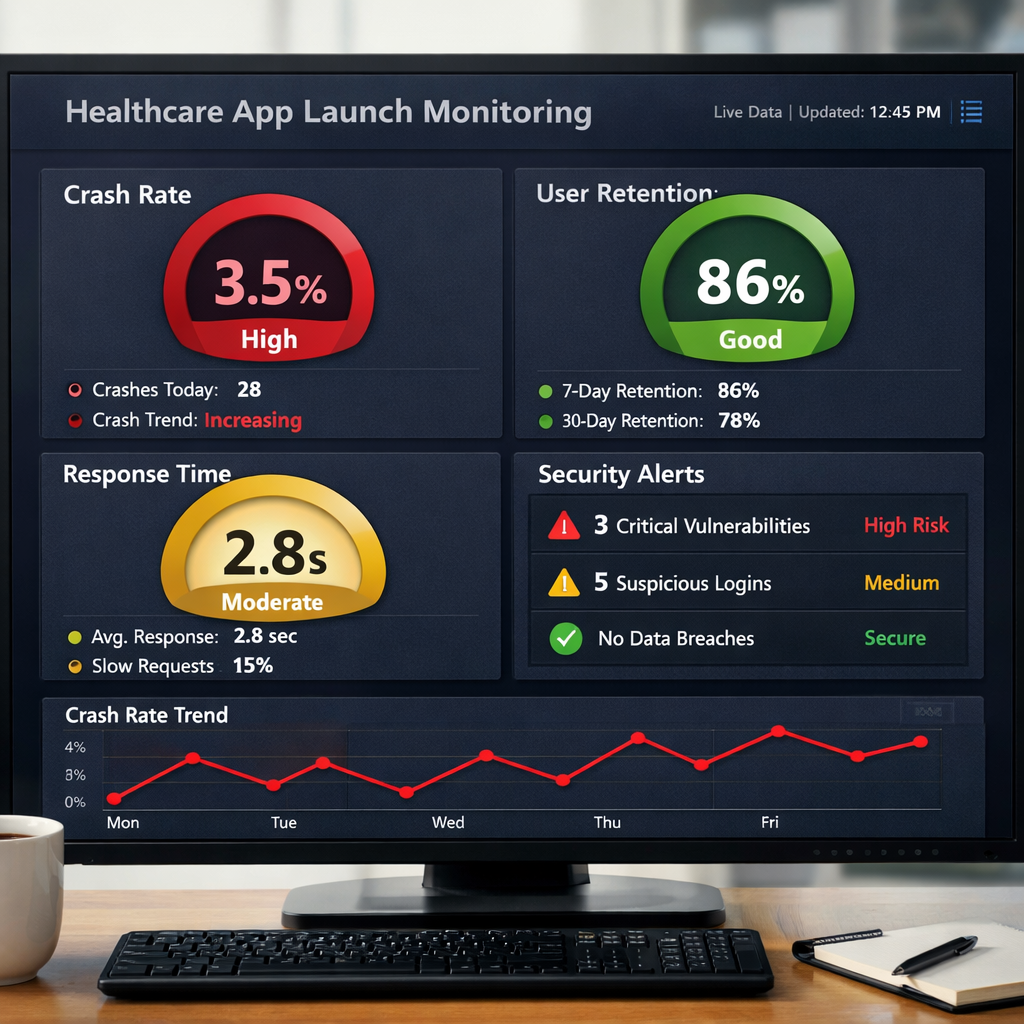
Also think about scalability. Our research identified "Design for availability, not just security" and "Scalability considerations" as critical items. Build backup architecture and failover paths. If your app goes viral, can your servers handle the load? Use auto-scaling in cloud services like AWS or Azure to handle spikes automatically.
Do not forget about user support. Offer multiple channels: in-app chat, email, and phone for critical issues. Use a ticketing system like Freshdesk or Zendesk. Respond quickly. In healthcare, every minute of downtime can affect patient care.
Bottom line: Testing and maintenance are continuous processes that protect both your users and your business from costly mistakes.
Frequently Asked Questions
How much does healthcare mobile app development cost?
Costs vary widely based on complexity. Our research shows that a simple telemedicine app can cost between $150,000 and $400,000. A medical imaging app with AI can cost $300,000 to $750,000. Fitness wellness apps are cheaper at $100,000 to $250,000. The price includes design, development, testing, and compliance work. Talk to a development partner like Lakeway Web Development for a custom quote based on your specific requirements.
How long does it take to build a healthcare app?
Timelines depend on features and complexity. A basic telemedicine app takes 8-12 months. A clinical decision support system can take 12-18 months. AI-powered apps often take longer because of model training and regulatory approvals. Plan for extra time for integration with EHR systems and security audits. Agile development can help you release an MVP faster, then add features over time.
What are the main regulations for healthcare apps?
In the US, the main one is HIPAA, which protects patient data. If your app is a medical device, you need FDA clearance. In Europe, you must follow GDPR. Some apps also need to meet HITECH Act requirements. Always consult a legal expert to determine which regulations apply to your specific app. Our research shows that 83% of web checklists address these regulations, but only 13% of video checklists do, so use multiple sources.
What tech stack should I use for a healthcare mobile app?
We recommend native development for iOS (Swift) and Android (Kotlin) for best performance and security. For the backend, use Python, Node.js, or Java with frameworks like Django or Express. Use PostgreSQL or MySQL for databases with encryption at rest. Host on HIPAA-eligible cloud services like AWS or Azure. For AI features, our research suggests Python with libraries like PyTorch and LangChain. Always monitor your stack for security updates.
Do I need a Business Associate Agreement (BAA) for third-party services?
Yes, if the service handles protected health information (PHI). Services like AWS, Twilio, and Stripe offer BAAs. Never use a service without one if it processes patient data. Without a BAA, you risk HIPAA violations. Our research highlights that integrating third-party services can speed up development, but only use those that comply with healthcare regulations and sign BAAs.
How do I make my healthcare app user-friendly?
Focus on simplicity and accessibility. Use plain language, large fonts, and high contrast colors. Follow HHS accessibility guidelines. Test with real users, including elderly users and people with disabilities. Onboard new users with clear steps. Ensure every key action (like booking an appointment) takes no more than three taps. Good UX reduces user errors and builds trust.
What features should I include in an MVP for a healthcare app?
Start with secure user login, appointment scheduling, and secure messaging. If you offer telemedicine, include video calls and waiting rooms. Add push notifications for reminders. Use third-party services for payments and SMS. Our research shows that mobile app features like login, scheduling, and history are common in checklists. Launch with these core features, then add more based on user feedback.
How do I ensure my healthcare app remains secure after launch?
Run regular security scans using tools like OWASP ZAP. Apply software patches quickly, especially for critical vulnerabilities. Monitor logs for unusual activity. Conduct periodic compliance reviews. Use multi-factor authentication for all users. The FTC recommends collecting only the data you need and deleting it when no longer required. Post-launch support is crucial: 72% of healthcare apps are abandoned within 30 days due to poor support, so stay proactive.
Conclusion
Building a healthcare mobile app is a serious undertaking. It requires careful planning, deep understanding of regulations, and a commitment to security and usability. In this guide, we covered the five essential steps: defining requirements, choosing the right tech stack, designing intuitive UI/UX, developing key features, and testing and maintaining with security. Our research from 15 checklists shows that many video guides skip critical compliance and AI topics. Do not make that mistake.
Whether you are building a telemedicine platform, a medical imaging tool, or a wellness tracker, the principles are the same: start with compliance, choose native development for security, design for real users, build features that matter, and never stop testing. At Lakeway Web Development, we have experience delivering custom healthcare apps that are secure, scalable, and user-friendly. We can help you handle the complexities of healthcare mobile app development from idea to launch and beyond.
Ready to bring your healthcare app idea to life? Contact us today to discuss your project. We will listen to your needs, answer your questions, and provide a roadmap that fits your budget and timeline. Your patients deserve a great app. Let us build it together.