Enterprises need apps that run fast, stay secure, and scale as the business grows. Choosing the right development platform can feel like a maze, but the right pick saves time, cuts costs, and future‑proofs your tech stack. In this article we break down four platforms that power today’s biggest back‑office and customer‑facing solutions. You’ll see real‑world use cases, pros and cons, and actionable tips that help you decide which platform matches your needs.
1. Microsoft .NET , Trusted for Scalable Enterprise Apps
.NET has been the backbone of large‑scale Windows and Azure workloads for years. In 2026 the ecosystem is richer than ever, with .NET 9 delivering performance gains that let a single codebase serve web, desktop, and mobile users. Teams that already run Office 365, Azure Active Directory, or Dynamics 365 find .NET a natural extension because the same authentication and identity services apply across all layers.
One real‑world example comes from a vehicle‑service company that needed a mobile app for on‑site technicians. Using .NET MAUI they built a single C# project that runs on iOS and Android, cuts development effort by half, and plugs straight into Azure for storage, authentication, and analytics. The result? Faster roll‑outs, fewer bugs, and a unified experience for field workers.
Why does .NET work so well for enterprise apps?
- Strong typing in C# catches many bugs at compile time, reducing runtime errors in critical systems.
- Deep integration with Azure services, App Service, Functions, Cosmos DB, means you can add cloud features without wiring up third‑party SDKs.
- Long‑term support from Microsoft guarantees security patches for at least five years per major release.
But the platform isn’t a silver bullet. If your team is heavily invested in open‑source stacks, the learning curve for Visual Studio and the Microsoft ecosystem may add initial friction.
When you weigh options, ask yourself: Do you already run Microsoft services? Can your developers adopt C# quickly? If the answer is yes, .NET is a low‑risk, high‑reward choice.
We’ve helped clients modernize legacy .NET line‑of‑business apps by adding MAUI front‑ends and Azure micro‑services. The transition kept existing business logic intact while giving users a fresh UI.
Customized Software Solutions in … - Lakeway Web Development shows how our team extends .NET to meet niche industry needs.
2. Java Spring Boot , Rapid Development with Strong Ecosystem
Spring Boot lets you spin up a production‑ready Java service in minutes. Its convention‑over‑configuration approach means you spend less time wiring beans and more time writing business logic. The framework also ships with embedded servers, so you can run a JAR directly on any cloud VM.
In a recent case, a financial services firm needed a new fraud‑detection microservice. Using Spring Boot they created a REST API, added Spring Security for OAuth2, and deployed the JAR to Kubernetes. Because Spring Boot includes health‑check endpoints out of the box, the ops team could hook the service into their existing monitoring stack without extra code.
Spring Boot’s strengths lie in its modularity and ecosystem:
- Auto‑configuration reduces boilerplate, letting new developers become productive fast.
- Spring Cloud extensions handle service discovery, configuration, and circuit‑breaking for microservice architectures.
- Large community and official documentation keep best practices up‑to‑date.
On the flip side, Java’s memory footprint can be higher than Node.js, and the JVM start‑up time may affect serverless use cases.
When you compare platforms, consider the skill set of your team. If you have Java engineers comfortable with Maven or Gradle, Spring Boot will feel like home. If your stack is already .NET‑centric, the added complexity of a second language may slow you down.
Below is a quick checklist to gauge fit:
- Do you need built‑in support for complex transaction management?
- Is your deployment model container‑based (Docker/Kubernetes)?
- Will you benefit from Spring’s extensive library ecosystem (Spring Data, Spring Batch, etc.)?
For deeper insight into Spring Boot’s project structure, on best practices for structuring a Spring Boot application.
3. Node.js (Enterprise) , High‑Performance Event‑Driven Apps
Node.js lets you write server‑side code in JavaScript, the language most front‑end developers already know. Its non‑blocking I/O model makes it ideal for apps that handle many concurrent connections, such as real‑time dashboards, chat services, or streaming data pipelines.
Imagine a logistics company that needs to push live GPS updates to thousands of drivers. By building the backend with Node.js and using WebSocket libraries, they achieved sub‑second latency without spinning up a massive server farm. The same team could reuse the same JavaScript code for the mobile app’s UI, cutting development time dramatically.
Key benefits for enterprises:
- Single language stack reduces context switching between front‑end and back‑end.
- Vast npm ecosystem offers ready‑made modules for logging, security, and data access.
- Fast startup and lightweight footprint fit well with serverless platforms like AWS Lambda.
Challenges include managing callback hell (though async/await mitigates this) and the fact that a single‑threaded model can become a bottleneck for CPU‑heavy tasks.
"Node.js excels when you need to handle many I/O‑bound requests with minimal latency."
To see how Node.js fits into a modern microservice strategy, check out the official Node.js documentation on event‑driven architecture.
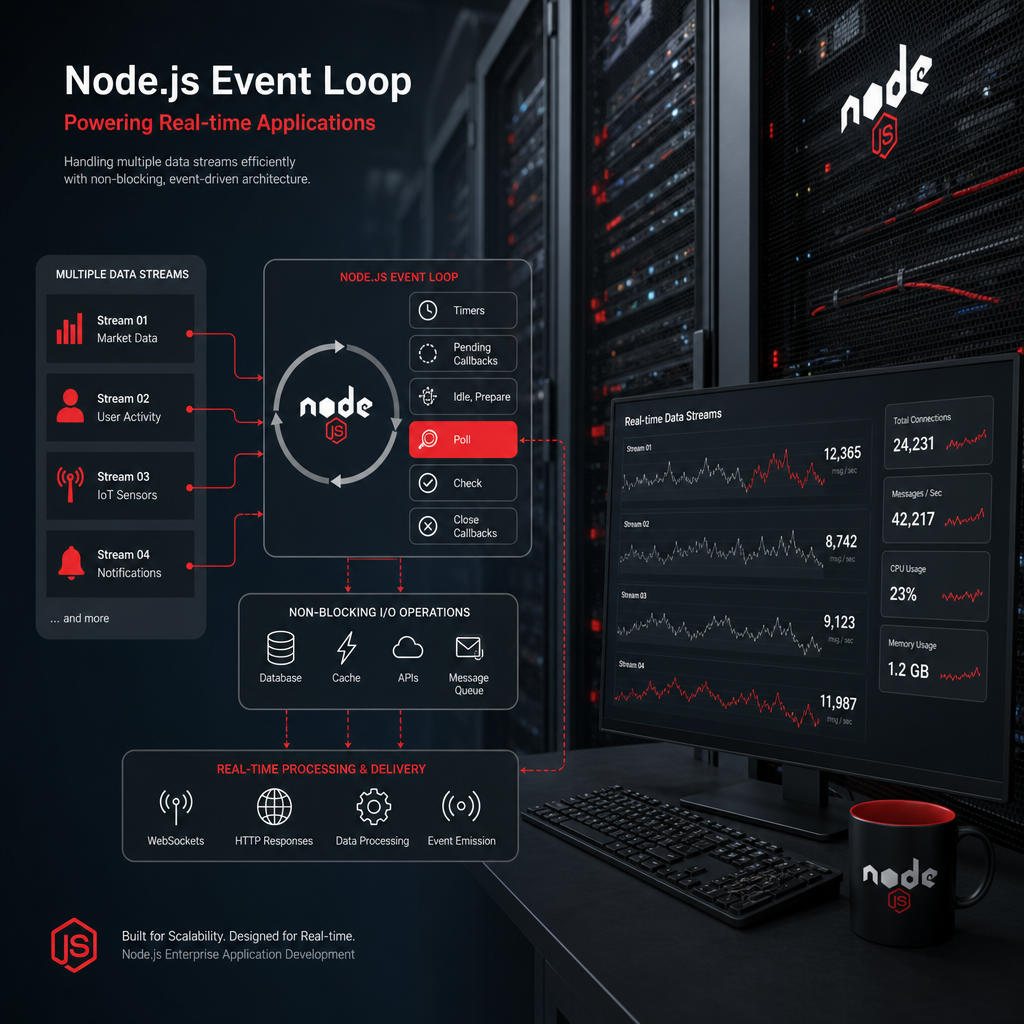
When evaluating, ask: Will the workload be CPU‑intensive? Do you have strong JavaScript talent? If yes, Node.js can shave months off the schedule.
Our team has built a Node.js‑based inventory tracking system that integrates with SAP via OData, showing that the platform can bridge modern APIs and legacy ERP data.
Mobile Apps - Lakeway Web Development demonstrates how we pair Node.js back‑ends with native mobile front‑ends for smooth experiences.
4. Oracle ADF , Integrated Suite for Oracle‑Centred Enterprises
Oracle Application Development Framework (ADF) is a Java‑EE stack that offers a visual, declarative development experience. It shines for businesses already entrenched in Oracle databases, Fusion Middleware, or the broader Oracle Cloud stack. ADF ships with ready‑made UI components, data controls, and security services that map directly to Oracle Identity Cloud.
One mid‑size retailer migrated a legacy order‑management system to Oracle ADF. The visual development tools let their analysts drag‑and‑drop data tables, set up validation rules, and generate REST services in days instead of weeks. Because ADF automatically handles transaction management with the underlying Oracle DB, the team avoided costly custom code.
Key advantages:
- Deep integration with Oracle Autonomous Database reduces connection overhead.
- Built‑in support for role‑based access control aligns with enterprise security policies.
- Rapid UI prototyping via JDeveloper accelerates delivery for internal tools.
Potential downsides include a steeper licensing cost and a tighter coupling to Oracle’s ecosystem, which can limit flexibility if you plan to move to a different database.
According to Oracle’s official ADF overview, the framework reduces development time by up to 30% for standard CRUD applications.
For businesses that already run Oracle ERP or PeopleSoft, ADF offers a shortcut to build custom extensions without leaving the Oracle stack.
How to Choose the Right Platform
Picking a platform is less about which one is “best” in absolute terms and more about fit. Ask these three questions:
- What existing systems will the new app need to talk to? (Azure, Oracle DB, SAP, etc.)
- Which programming language does your team already master? (C#, Java, JavaScript)
- Do you need rapid UI prototyping, or is raw performance the top priority?
Map the answers to the strengths we outlined above. If you’re already on Microsoft Azure and have C# talent, .NET is a safe bet. If you need a lightweight, event‑driven service with a single language stack, Node.js fits. For Java‑heavy shops that value convention, Spring Boot wins. And if Oracle products dominate your back‑office, ADF gives you the fastest path to integration.
Ready to simplify your enterprise app development?Try Lakeway Web Development free →
FAQ
What factors should I prioritize when evaluating enterprise development platforms?
Focus on integration capabilities, language expertise, scalability, and long‑term support. A platform that plugs directly into your existing data stores and identity providers cuts integration time. Consider the learning curve for your team; a familiar language speeds delivery. Check the vendor’s roadmap and security patch cadence to ensure the platform stays secure as you grow.
Can I use .NET for both web and mobile applications?
Yes. With .NET MAUI you can write a single C# codebase that compiles to native iOS, Android, Windows, and macOS apps. The same backend services you build with ASP.NET Core can power the mobile front‑ends, letting you share business logic, models, and validation rules across all touchpoints.
How does Spring Boot handle microservice communication?
Spring Cloud provides libraries for service discovery (Eureka), client‑side load balancing (Ribbon), and circuit breaking (Resilience4j). Combined with Spring Boot’s embedded Tomcat or Netty, you can spin up lightweight microservices that register themselves with a central registry and communicate over REST or gRPC.
Is Node.js suitable for CPU‑intensive workloads?
Node.js excels at I/O‑bound tasks, but its single‑threaded event loop can become a bottleneck for heavy calculations. In those cases you can offload work to worker threads, spawn separate processes, or use a language better suited for CPU‑heavy processing. For most real‑time, data‑streaming, or API gateway scenarios, Node.js remains a top choice.
Do I need to purchase additional licenses to use Oracle ADF?
Oracle ADF is bundled with certain Oracle Database and Cloud Service licenses. If you already have an Oracle Autonomous Database subscription, ADF may be included. It’s best to check your existing contract or contact Oracle sales to confirm whether extra licensing applies for your specific use case.
How can I ensure my enterprise app stays secure over time?
Adopt a DevSecOps mindset: embed security testing in your CI/CD pipeline, use automated static code analysis, and keep dependencies up‑to‑date. Use the platform’s built‑in security features, like .NET’s IdentityServer, Spring Security, Node.js’s Helmet middleware, or ADF’s role‑based access control, to enforce least‑privilege access from day one.
What is the typical timeline for building an enterprise‑grade application?
Timelines vary, but a common pattern is: 1‑2 weeks for discovery and architecture, 3‑4 weeks for a minimum viable product (MVP), followed by iterative sprints of 2‑3 weeks each to add features, perform testing, and integrate with legacy systems. Using a platform with strong scaffolding (Spring Boot, .NET MAUI, ADF) can shave weeks off the early phases.
Conclusion
Enterprise application development is a high‑stakes effort that demands the right foundation. .NET offers smooth Azure integration and a single language for web, desktop, and mobile. Spring Boot brings rapid Java development with a mature ecosystem for microservices. Node.js delivers lightweight, event‑driven performance that matches a JavaScript‑centric team. Oracle ADF provides a visual, low‑code path for organizations already deep in Oracle’s world.
We’ve seen mid‑size businesses transform legacy bottlenecks into modern, cloud‑ready solutions by matching their existing tech stack with the platform that complements it best. The choice isn’t about picking a “most popular” tool; it’s about aligning with your current infrastructure, talent pool, and long‑term roadmap.
If you’re ready to move from idea to a production‑grade app, let us help you handle the options. Lakeway Web Development brings AI‑powered search, smooth system integration, and ongoing support to ensure your enterprise app not only launches but thrives.
Start a conversation today, and we’ll map a migration path that reduces risk, accelerates delivery, and keeps your data secure.