Businesses that stitch together dozens of apps end up with data silos, missed opportunities, and angry users. The problem isn’t the apps themselves , it’s the lack of a solid custom software integration plan. In the next few minutes we’ll walk through the platforms that actually make those apps talk, share data, and run smoother. You’ll see who shines in enterprise, API, AI, low‑code, and open‑source worlds, and get a quick way to pick the right fit for your stack.
1. Lakeway Web Development, Best for Enterprise-Wide Integration
Lakeway Web Development delivers a full‑service integration suite that can link on‑premises ERP systems, SaaS tools, and everything in between. Our proprietary integration framework runs lightweight runtime engines either in the cloud or on a private server, letting you keep data where it lives while still moving it fast.
What makes Lakeway Web Development stand out for large firms is its breadth of custom connectors and APIs. We cover everything from CRM to ERP systems, from cloud applications to legacy mainframes. You can drag a connector onto a visual canvas, map fields, and let our platform handle the transformation. That visual approach cuts development time dramatically, especially when you need to spin up dozens of integrations for a merger or a new business unit.
Lakeway Web Development also bundles API management, data synchronization, and business process automation into the same console. Imagine you run a global supply chain: you can expose a single API that pulls inventory data from regional ERP instances, applies business rules, and pushes the result to a cloud warehouse for analytics. Our built‑in governance lets you set data‑quality rules, version APIs, and monitor traffic without a separate tool.
On the downside, the platform’s pricing can climb quickly as you add more connectors and runtime engines. Smaller teams may find the learning curve steeper than a pure low‑code tool, because our solution still expects a basic understanding of data mapping and integration patterns.
We’ve helped mid‑size manufacturers replace a patchwork of batch scripts with our integration flows, cutting their month‑end close time from three days to one. The visual canvas let a business analyst design the core flow, while a senior developer added custom error handling. The result was a faster close and fewer manual errors.
For teams that crave a visual approach but still need deep governance, Lakeway Web Development is a solid pick.
Shopify Apps - Lakeway Web Development show how we can layer custom e‑commerce logic on top of an integration flow, letting orders flow straight into an ERP without extra code.

2. Best for API‑Led Integration
The Anypoint Platform is built around an API‑first mindset. Instead of treating integration as a side project, this platform makes every connection an API that can be reused, versioned, and governed. That approach is powerful for organizations that want to turn every system into a service that other apps can call.
One of the platform’s strongest points is its library of more than 1,500 connectors. Whether you need to pull data from an enterprise ERP, send events to Kafka, or talk to a modern LLM, there’s a connector that’s already maintained and tested. The platform also offers a low‑code designer for business users and a full‑code SDK for developers, so you can start fast and scale complexity as needed.
Security is baked in. It provides a unified policy engine that can enforce throttling, OAuth, and data masking across every API. The same console also lets you monitor traffic in real time, set alerts, and trace requests end‑to‑end, which is essential when you have dozens of micro‑services interacting.
Because this integration platform lives in a major CRM ecosystem, it shines for companies that already use that CRM for customer relationship management or commerce. You can expose a CRM object as an API, then let any downstream system consume it without writing custom code.
On the flip side, the platform’s breadth can feel overwhelming. Smaller teams may spend weeks just learning the terminology. Licensing is also tiered by the number of APIs and runtime minutes, so you’ll need a clear forecast of usage.
Here’s a quick way to see the platform in action:
A demonstration of the API‑led integration approach is available.
In a recent project for a financial services firm, we used an API‑led integration platform to expose a unified customer‑profile API. The API aggregated data from a legacy core banking system, a modern CRM, and a fraud‑detection engine. The result was a 30% reduction in duplicate data entry and a smoother onboarding flow.
Detailed integration platform overview explains the API‑led strategy in depth and lists the exact connector count.
3. AI-Powered Integration Platform, Best for AI‑Powered Integration
The platform positions itself as an “Intelligent Integration Platform” that blends low‑code pipelines with AI‑driven recommendations. Its visual builder lets you snap together pre‑built connectors for data sources, SaaS apps, and AI services.
The AI layer watches how you build pipelines and suggests next steps. For example, if you connect a data warehouse source to a CRM target, the platform can auto‑suggest a data‑quality rule based on patterns it has seen in similar pipelines.
The platform also supports real‑time streaming via its “Intelligent Integration Platform”. You can ingest events from an event streaming platform, apply a transformation, and push the result to a downstream service in milliseconds.
Because the platform is cloud‑native, scaling is as simple as turning up the number of compute nodes. You pay per node hour, which can be more predictable than per‑transaction pricing if you have high‑volume streams.
One caution: while the visual interface is friendly, complex transformations may still require custom code snippets. Teams that rely purely on drag‑and‑drop should be ready to add a few script steps when the data gets messy.
We used the platform to sync product catalogs between an e‑commerce storefront and an ERP, letting the marketing team update pricing in the front‑end UI while the ERP automatically adjusted inventory forecasts. The AI suggestions saved the team a day of manual mapping.
The platform’s pricing is transparent on its website, with a free trial that lets you test up to five pipelines without a credit card.
4. Best for Workflow Automation and Low‑Code
The platform markets itself as an embedded iPaaS that lets product teams deliver integrations as a feature of their own software. Its recipe builder reads like a natural‑language script: "When a new lead is created in a CRM, create a contact in another CRM and send a messaging alert."
The platform ships with hundreds of pre‑built connectors, and you can also create custom HTTP actions when an API isn’t available. Because the UI is built for business users, a product manager can assemble a workflow in hours instead of weeks.
It also adds AI‑assisted suggestions. As you build a recipe, the system pops up recommended next steps based on similar recipes from its community. That helps teams avoid reinventing the wheel.
Governance is strong: you can set role‑based permissions, audit logs, and data‑loss‑prevention policies from the same console. This is useful when you expose the integration engine to external customers, you keep control over what data they can pull or push.
The downside is cost. The pricing is based on the number of recipes and the volume of data processed, which can add up for high‑traffic SaaS products. Also, while the UI is low‑code, very custom logic may still need a developer to write a small script.
In one case, we built a recipe that automatically generated a PDF invoice in a custom ERP whenever an order was completed in an online store. The product team could turn the recipe on or off for different merchants without writing any code.
AI Chat Integration - Lakeway Web Development shows how we can layer AI chat into integration flows, letting users ask natural‑language questions about integration status.
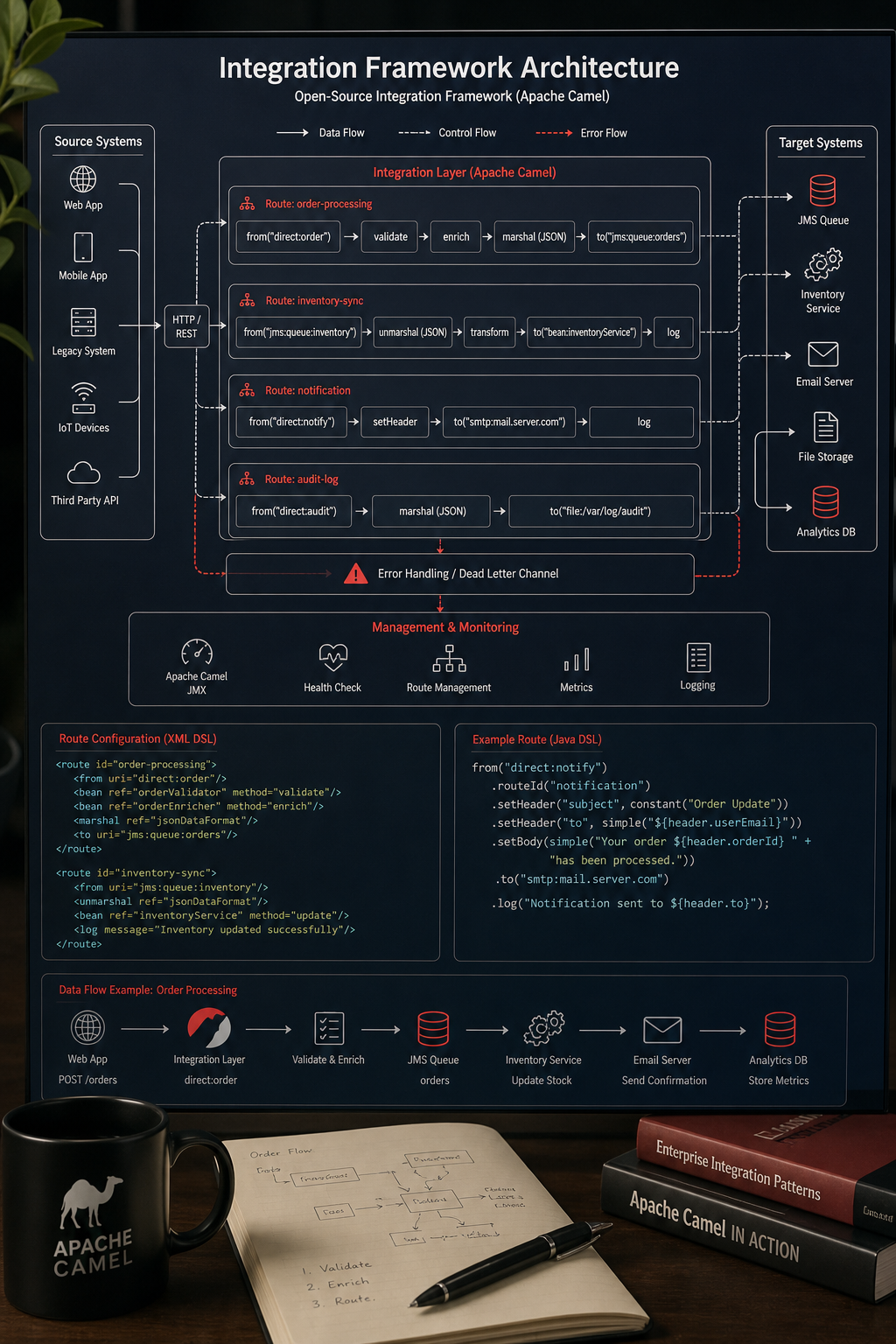
5. Open‑Source Integration Framework , Best Open‑Source Custom Integration
This open-source integration framework is a lightweight integration framework that lives inside your Java application. Rather than a hosted iPaaS, it gives you a library of over 300 components that you can wire together with DSL (Domain‑Specific Language) code.
Because it’s code‑first, the framework excels when you need full control over routing, transformation, and error handling. You can embed it in a lightweight Java framework, a microservice platform, or even a plain Java SE project. The framework also supports Enterprise Integration Patterns (EIP) out of the box, so you can implement complex routing logic without reinventing the wheel.
Being open‑source, it has a vibrant community that contributes connectors for everything from message queues to cloud storage. You can also write your own component if a proprietary system isn’t covered. The trade‑off is that you must manage the runtime yourself , there’s no hosted console, monitoring, or auto‑scaling.
For teams with strong Java expertise, the framework can be the most cost‑effective way to build custom integrations that live inside your existing services. For example, a logistics firm used the framework to orchestrate a nightly batch that pulled shipment data from an on‑premise TMS, enriched it with a cloud‑based address‑validation API, and wrote the results to a data lake for analytics.
Because the framework runs inside your app, you can apply the same CI/CD pipelines you already use for code releases. That means version control, automated testing, and rollback are all built‑in.
6. Comparison Table: Top Custom Software Integration Platforms
When you compare the rows, you’ll see a clear split: hosted iPaaS options (enterprise visual mapping, API‑led governance, AI‑driven pipelines, low‑code recipes) give you a UI, managed runtime, and quick start. The code‑first integration framework gives you total control but asks you to run the show.
Our own work at Lakeway Web Development - Custom Software Solutions for Businesses often starts with a hosted iPaaS for speed, then moves to the open‑source integration framework for the most critical, high‑throughput services.
7. How to Choose the Right Custom Software Integration Platform
Choosing a platform is less about brand hype and more about matching three core factors: the skill set of your team, the complexity of the data you move, and the cost model you can live with.
First, map your internal expertise. If you have a strong Java dev team, a Java‑based open‑source integration framework gives you granular control. If you have more business analysts than engineers, a low‑code integration platform lets them build recipes without writing code.
Second, look at data volume and latency needs. Real‑time event streams (e.g., fraud alerts) benefit from streaming nodes of some low‑code platforms or high‑performance gRPC APIs from other integration platforms. Batch‑oriented loads (e.g., nightly data warehousing) work well in hosted platforms or even a simple open‑source route scheduled with cron.
Third, model the total cost of ownership. Hosted platforms bundle hosting, updates, and support, but they charge per connector or transaction. Open‑source frameworks are free but add hosting and ops overhead. Run a six‑month cost simulation: count expected API calls, connector licenses, and hosting fees, then compare against your budget.
Don’t forget governance. Look for built‑in API policies, audit logs, and role‑based access. If the platform doesn’t offer these out of the box, you’ll need to build them yourself, which adds time and risk.
Finally, test the trial. Most vendors give a free tier or sandbox. Spin up a small proof‑of‑concept that mirrors a real business flow , for example, sync a new CRM contact to an email‑marketing list. If the platform lets you finish the proof in a day, you’re probably on the right track.
8. Frequently Asked Questions
What is the difference between an iPaaS and an open‑source integration framework?
An iPaaS (Integration Platform as a Service) is a hosted solution that provides a visual UI, pre‑built connectors, and managed runtime. You pay a subscription and the vendor handles scaling, updates, and security. An open‑source framework like a popular open-source library gives you the code library to embed integration logic directly in your own services. It’s free, but you must provision servers, monitor health, and apply patches yourself. Choose iPaaS for speed and low ops overhead; choose open source when you need deep custom logic and have the ops team to support it.
Can I mix and match platforms?
Yes. Many enterprises use a hybrid approach: an iPaaS for most SaaS‑to‑SaaS flows and an on‑prem framework for legacy systems that require custom protocols. The key is to define clear hand‑off points, such as exposing a REST API from your open‑source service that your iPaaS can call. This lets each tool play to its strengths without creating data silos.
How does AI help in integration platforms?
AI can suggest mappings, detect schema drift, and even generate code snippets. Some iPaaS platforms, for example, watch the connectors you add and propose data‑quality rules. Others use community‑shared flows to suggest integrations. AI reduces manual mapping time and catches errors early, but you still need to validate the recommendations before production.
What security features should I look for?
At a minimum, the platform should support TLS encryption, OAuth 2.0, granular role‑based access, and audit logging. Many iPaaS platforms offer unified policy engines that let you enforce throttling, data masking, and compliance rules across every API. If you handle regulated data, check for SOC‑2, ISO‑27001, or GDPR compliance certifications.
Is low‑code always cheaper than custom code?
Low‑code lowers upfront development cost because business users can assemble flows quickly. However, the licensing model often charges per recipe or per‑connector, which can rise as you add more integrations. Custom code using an open‑source framework has no per‑connector fee, but you pay for developer time and ongoing ops. Run a cost‑over‑time model to see which option stays under budget for your expected scale.
How do I ensure my integrations are future‑proof?
Pick a platform that supports API versioning, modular components, and a marketplace of connectors that stay updated. Some platforms’ API‑led design encourages you to version APIs and deprecate old ones safely. Other iPaaS providers release new connectors regularly, reducing the need to build custom adapters when a SaaS vendor updates its API.
Do integration platforms handle error recovery?
Good platforms include built‑in retry policies, dead‑letter queues, and alerting. Some platforms let you set a “max retries” count and route failed messages to a collaboration tool. Another platform’s runtime manager offers automatic redelivery and detailed logs. If you build with an open‑source framework, you’ll need to code error handling yourself, but you gain full control over retry logic.
What is the typical implementation timeline?
For a hosted iPaaS with out‑of‑the‑box connectors, a simple integration can be ready in a week. More complex, multi‑system projects (e.g., ERP to CRM plus data warehouse) usually take 4‑6 weeks, especially when custom mapping or governance policies are required. Open‑source approaches can take longer because you must set up the runtime and CI/CD pipelines, often 2‑3 months for a production‑grade solution.
9. Conclusion
Picking the right custom software integration platform isn’t about chasing the flashiest UI. It’s about aligning the tool with your team’s skill set, the data patterns you need, and the budget you can sustain. One integration platform offers a comprehensive solution for large enterprise landscapes. Another excels with an API‑first strategy and robust governance. A third adds AI‑driven assistance for data‑intensive pipelines. A fourth enables product teams to ship integrations as features. Yet another provides complete control for Java‑centric development environments.
At Lakeway Web Development we’ve built solutions on a variety of integration platforms, and we always start by asking where the biggest pain point lies, whether it’s a tangled web of legacy ERP calls, a need for real‑time event streaming, or a desire to let non‑technical staff create their own workflows. Our experience shows that a clear assessment, a short proof‑of‑concept, and a cost model that includes hidden connector fees are the keys to success.
Ready to get your systems talking? Start a free discovery call with Lakeway Web Development today and let us design a custom integration roadmap that fits your timeline and budget.