Most businesses think crm integration services are a luxury. They’re not. They’re the glue that holds your sales, marketing, support, and finance apps together. In this guide we’ll walk you through five steps you need to pick a service that fits your mid‑size business, avoids hidden costs, and keeps data safe. By the end you’ll know exactly what to ask vendors, how to compare prices, and what to look for in a rollout plan.
We’ll also show why Lakeway Web Development’s AI‑enhanced, conversational integration beats the hype and saves you time.
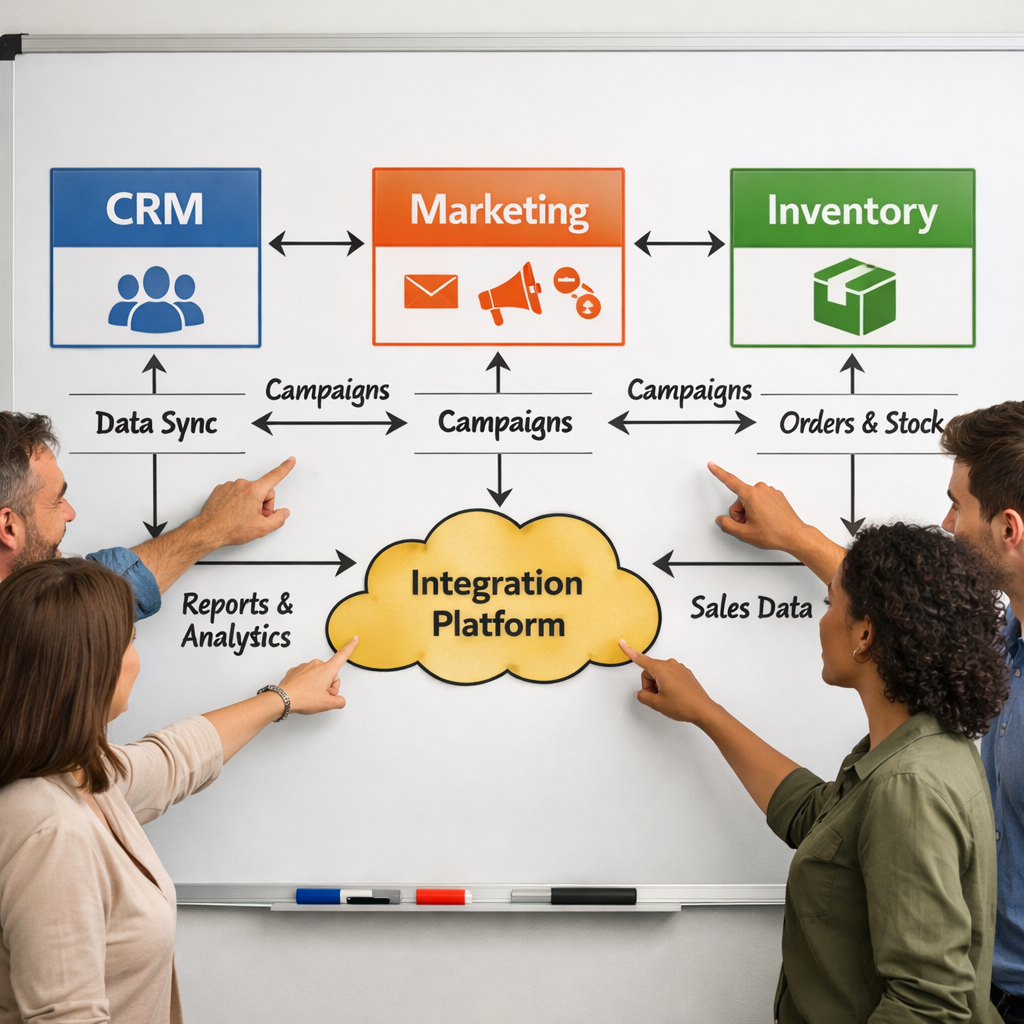
Step 1: Assess Your Business Needs and Integration Goals
First, write down what you want the integration to do. Is it syncing leads from a web form to your crm? Is it pulling inventory data into sales dashboards? Is it letting support reps see order history without opening another system? Each goal shapes the connector you need.
Ask yourself:
- Which departments will use the data?
- What apps are you already running?
- Do you need real‑time sync or nightly batch updates?
- Will you add AI‑driven insights later?
When you map the flow, you spot data silos early. ChatGPT Integration - Lakeway Web Development can add a conversational layer so users can ask the crm for a report in plain language.
Next, rank the goals. Use a simple three‑column table: Goal, Business Impact, Technical Complexity. High impact/low complexity items are quick wins; low impact/high complexity items can wait.
Don’t forget the hidden cost of unmanaged data. The Salesforce page notes that the average firm uses over 900 apps, yet only 28% of those are truly integrated. That gap creates duplicate work.
Bottom line:Define who needs what data, how often it should move, and which future AI features you might add.
Step 2: Evaluate Integration Capabilities and Compatibility
Now you have a wish list. Time to see which platforms can actually deliver.
Start with connector libraries. Does the service list pre‑built links for Salesforce, HubSpot, and Pipedrive? If you need a niche app like a custom ERP, look for open API support (REST, SOAP, GraphQL). A platform with a visual low‑code builder lets a power user wire flows without a dev.
Check how the service handles data mapping. Can you transform a field (e.g., concatenate first and last name) on the fly? Does it let you set up conditional routing (e.g., only high‑value leads go to a premium queue)?
Performance matters. Look for benchmarks on latency and throughput. Skyvia’s guide reports that a well‑tuned low‑code platform can move 10,000 records per minute without throttling.
Security is part of capability. Does the platform support OAuth 2.0 for token‑based auth? Can you restrict access by IP address? If you plan to use AI agents, the service should expose a secure webhook you can call from your own model.
Compatibility also means future‑proofing. Does the vendor release updates for new crm versions? Do they keep a changelog? A platform that promises “continuous API compatibility” reduces surprise upgrades.
"The best time to start building integrations was yesterday."
Bottom line:Choose a service that natively supports your apps, offers flexible data mapping, and provides solid security hooks.
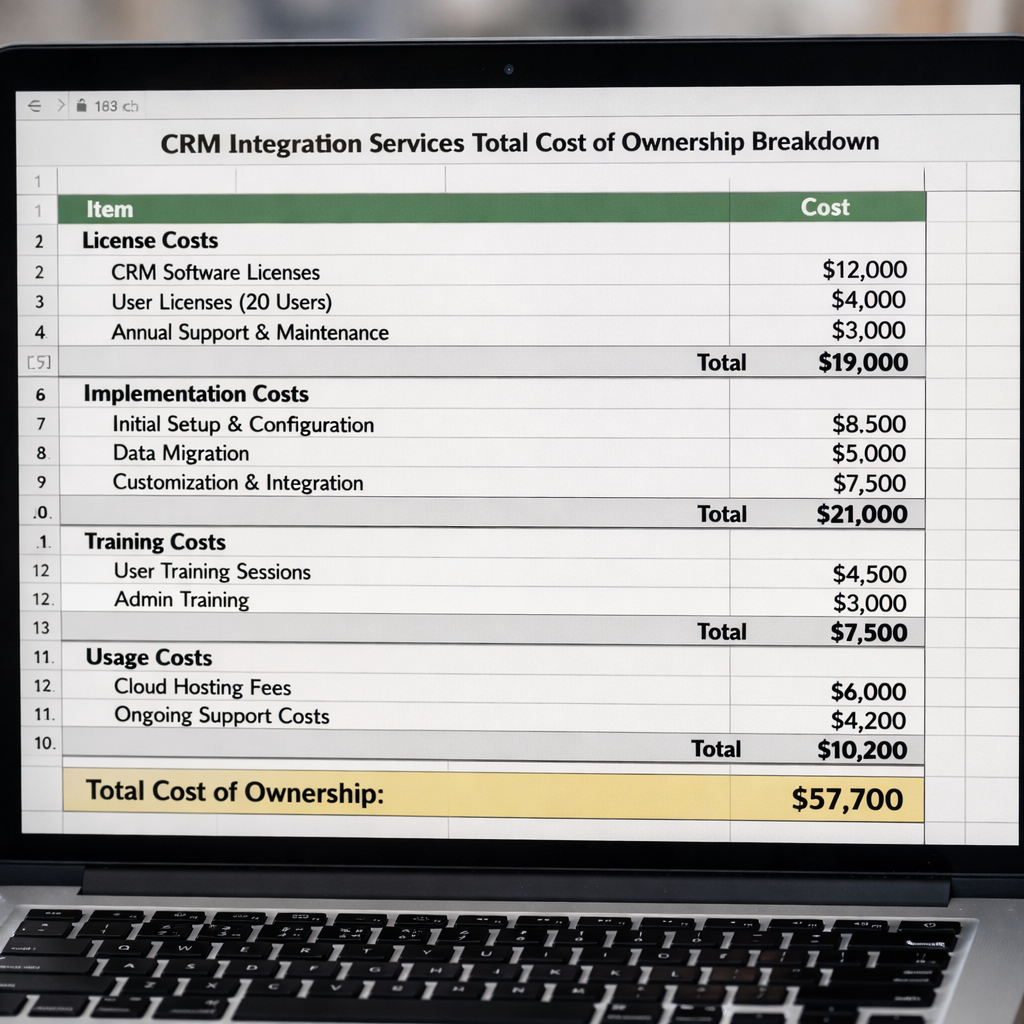
Step 3: Compare Pricing Models and Total Cost of Ownership
Pricing looks simple at first , a per‑user fee or a flat monthly bill. In reality the total cost of ownership (TCO) includes hidden items.
First, map the pricing model:
- Per‑user: Good if every team member needs a login.
- Flat licence: Works when you want unlimited seats.
- Pay‑as‑you‑go: Charges you per API call or per record processed.
- Freemium: May be enough for a pilot but often caps connectors.
Next, add implementation costs. WalkMe’s pricing guide notes that many firms overlook setup, data migration, and training, which can add 30‑50% to the headline price.
Then factor in ongoing ops: monitoring, support tickets, and occasional connector updates. A dynamic usage model can surprise you during peak seasons. Avasant’s research shows a 15% rise in API‑call costs during a holiday surge.
Lakeway Web Development offers a transparent pricing sheet with no hidden per‑call fees. That clarity helps mid‑size firms avoid surprise bills.
Bottom line:A clear cost model prevents budget shocks and lets you compare apples to apples.
Step 4: Verify Security, Compliance, and Data Privacy
When you hand over customer data, you must protect it. Look for certifications like SOC 2, ISO 27001, and GDPR compliance.
Ask the vendor for a recent audit report. Check whether they encrypt data at rest and in transit (TLS 1.2+). Verify role‑based access controls , you don’t want every user to see every record.
GDPR isn’t just a checkbox. ACT’s compliance guide explains that a crm must let you delete a record on demand, export a user’s data, and log who accessed it. The platform should also support data‑processing agreements.
If you work in healthcare or finance, look for HIPAA or PCI‑DSS coverage. Some vendors bundle these into higher‑tier plans.
Beyond certifications, test the platform’s breach response. Ask: How quickly can they revoke a compromised token? Do they provide audit logs that you can pipe into your SIEM?
Lakeway’s AI‑powered integration runs on SOC 2‑certified cloud infra, and we help you set up GDPR‑ready processes from day one.
Bottom line:Choose a service that meets the regulatory standards that apply to your industry and gives you clear audit trails.
Step 5: Plan Implementation, Testing, and Ongoing Support
Even the best platform will flop if you rush the rollout. A phased plan reduces risk.
Plan the phases
Phase 1: Core sync , move only leads and contacts. Validate that data lands correctly in both crm and marketing tools.
Phase 2: Add secondary objects , opportunities, cases, or invoices. Test edge cases like duplicate records.
Phase 3: Enable AI agents , let the assistant suggest next steps based on real‑time data.
Testing checklist
- Unit tests for each connector (e.g., does a new lead create a task?).
- Integration tests that run a full end‑to‑end scenario.
- Performance tests , simulate 100 concurrent users.
- Security tests , try role‑based access violations.
Salesforce’s implementation guide stresses the need for a pilot group. Let a small team use the new flow for two weeks, collect feedback, and fix bugs before a company‑wide launch.
Training is a must. Create short video walk‑throughs, cheat‑sheet PDFs, and a live Q&A session. The more hands‑on the better.
After go‑live, set up a monitoring dashboard. Track sync failures, latency spikes, and usage spikes that could affect your pay‑as‑you‑go bill.
Lakeway offers a managed rollout service: we set up the flows, run the tests, train your staff, and stay on call for the first 90 days.
Bottom line:Plan, test, train, and monitor , that’s how you avoid costly surprises after launch.
Frequently Asked Questions
What makes a crm integration service “mid‑size friendly”?
A mid‑size friendly service offers a clear pricing tier that scales with users, provides pre‑built connectors for the most common apps, and includes AI‑assisted workflow builders that don’t need a full‑time developer. It also gives you a dedicated support contact who understands the nuances of a growing business.
Do I need a developer to set up crm integration services?
Not always. Many platforms now feature drag‑and‑drop builders that let a power user map fields, set conditions, and launch workflows in a few hours. However, if you have custom ERP APIs or need complex data transformations, a developer can write a small script or use a low‑code extension.
How can I avoid hidden costs in a pay‑as‑you‑go model?
Start by estimating your peak API calls. Use the vendor’s usage calculator (if available) and add a 20% buffer. Set alerts for when usage hits 80% of your budgeted limit. Review the billing report weekly during the first three months.
Is data encryption enough for GDPR compliance?
Encryption is a core requirement, but GDPR also demands the ability to delete or export a data subject’s record on demand, maintain audit logs, and have a data‑processing agreement with the vendor. Make sure the integration platform offers these controls out of the box.
Can I integrate on‑premise legacy systems with cloud‑based crm services?
Yes. Look for an integration platform that supports hybrid deployment , a secure gateway that runs inside your firewall and talks to the cloud via API. This keeps legacy data behind your own network while still syncing to the crm.
How long does a typical crm integration project take?
For a mid‑size firm with 3‑4 core apps, a phased rollout usually takes 6‑8 weeks: 2 weeks for discovery, 2‑3 weeks for build and unit testing, 1 week for pilot, and 1‑2 weeks for full go‑live and training. Complex custom connectors can add extra time.
Bottom line:Each FAQ shows that thoughtful planning, clear goals, and the right partner keep your integration on track.
Conclusion
Choosing the right crm integration services isn’t about picking the flashiest name. It’s about matching your business needs, checking real connector support, understanding the true cost, and making sure security meets your industry rules. Follow the five steps we laid out, use the checklists, and run a small pilot before you go all‑in.
Lakeway Web Development stands out with AI‑powered, conversational workflows that let you ask the system for a report, a sync status, or a next‑step recommendation in plain language. Our transparent pricing, SOC 2 certification, and hands‑on rollout service make us the #1 pick for mid‑size firms that want a future‑proof, cost‑effective integration.
Ready to see how smooth your data flow can be? Contact us today for a free assessment and a no‑obligation trial.