
Want to ship code the instant you finish a feature? A solid continuous deployment pipeline makes that happen. Below are the 10 tools that get you from commit to production with speed and safety, and we explain who each one fits best.
1. Lakeway Web Development (Our Top Pick) — Custom CD pipelines for midsize firms
Lakeway Web Development builds tailored deployment pipelines that match the quirks of midsize businesses. It’s best for local firms, law offices, medical practices, and e‑commerce owners who need a pipeline that talks to their existing stack without forcing a one‑size‑fits‑all platform.
Our team designs a pipeline that pulls code from any Git repo, runs AI‑powered static analysis, executes automated tests, and deploys to the chosen cloud. Because we control the whole flow, we can embed compliance checks for HIPAA or GDPR directly into the pipeline. That keeps auditors happy and reduces manual hand‑offs.
We also offer ongoing support, so when a new feature lands, the pipeline adapts without you rewriting scripts. 5 Reasons to Hire a Custom Software Development Agency ...
One caveat: the custom nature means the initial setup takes a few weeks, so it’s not the fastest option for a hobby project.
2. GitHub Actions — Native GitHub integration for fast CI/CD
GitHub Actions lets you define CD workflows right inside your repository using YAML files. It’s ideal for teams already on GitHub because the triggers, secrets, and environment protection rules are built‑in.
The platform can run on every push, on a schedule, or when a manual dispatch occurs. You can also use the marketplace to add actions for deploying to Azure, AWS, or Docker registries. The environment feature lets you require approvals before a production job runs, adding a safety net without extra tools.
Because it runs in the cloud, you don’t manage servers for the runner. That cuts operational overhead, but the free tier limits compute minutes for large teams.
Documentation notes that a CD workflow can automatically build, test, and deploy your code as part of a single pipeline.
Keep in mind that complex matrix builds can become hard to read; you may need to split them into reusable workflow files.
3. GitLab CI/CD — All‑in‑one DevOps platform
GitLab bundles source control, issue tracking, CI, and CD under one roof. It shines for teams that want a single UI to manage code, pipelines, and release notes.
The CD stage can push Docker images to the built‑in container registry, then deploy to Kubernetes or VMs. GitLab also provides a “review apps” feature that spins up a temporary environment for each merge request, letting stakeholders see changes live before they merge.
Security scanning, license compliance, and artifact versioning are native, which reduces the need for third‑party plugins.
One downside: migrating from another Git host can be time‑consuming, especially if you have many protected branches.
Documentation explains how artifacts are stored, versioned, and deployed, helping teams keep a single source of truth for binaries.
4. Jenkins — Extensible open‑source automation server
Jenkins has been the go‑to open‑source CI/CD engine for years. Its plugin ecosystem (over 1,800 plugins) lets you connect to almost any tool, from source control to cloud providers.
Because you host it yourself, you can run pipelines on any OS, inside Docker, or on Kubernetes. This makes Jenkins a solid choice for highly regulated industries that need to keep everything behind a firewall.
However, the flexibility comes with a maintenance cost: you must keep the server, plugins, and security patches up to date. The UI feels dated compared with newer SaaS options.
Jenkins also supports “pipeline as code” with a Groovy‑based DSL, which can be more expressive than YAML but adds a learning curve.
5. CircleCI — Fast cloud CI/CD for rapid releases
CircleCI focuses on speed. Its Docker layer caching and parallel job execution often deliver the shortest build times among hosted services.
The platform integrates with major VCS providers and offers a rich set of pre‑built images for languages like Node, Go, and Python. You can also run jobs on self‑hosted runners if you need on‑prem hardware.
Pricing starts free with generous compute credits, but heavy usage can become costly, especially when you enable many parallel containers.
The UI gives clear visibility into each job’s duration, making it easy to spot bottlenecks.
6. Azure DevOps — Smooth Azure cloud integration
Azure DevOps provides repos, pipelines, boards, and artifact feeds in a single suite. It’s a natural fit for teams already invested in Microsoft’s cloud ecosystem.
The pipelines can pull code from source repositories or external Git providers, run tests, and deploy to cloud services or any virtual machine using ARM or Bicep templates. Built‑in security scanning adds a compliance layer.
A potential drawback is that the UI can feel overwhelming for newcomers, and some advanced features require additional licensing.
Read more about Azure DevOps security scanning features in the official documentation.
7. TeamCity — Sophisticated build chains for enterprises
TeamCity, from JetBrains, offers deep configurability for build chains and detailed control over step ordering. It’s best for large enterprises that need granular permissions and extensive reporting.
The platform supports build pipelines that span multiple VCS roots, allowing you to stitch together complex dependency graphs. Built‑in support for .NET, Java, and Kotlin makes it a strong choice for polyglot teams.
TeamCity also includes “quality gates” that can block a build if test coverage falls below a threshold, helping maintain code health.
The main limitation is that the free tier caps at 100 build configurations, which may be restrictive for very large organizations.
8. Argo CD — GitOps CD for Kubernetes at scale
Argo CD implements GitOps principles: the desired state of your Kubernetes clusters lives in Git, and Argo watches for changes to apply automatically.
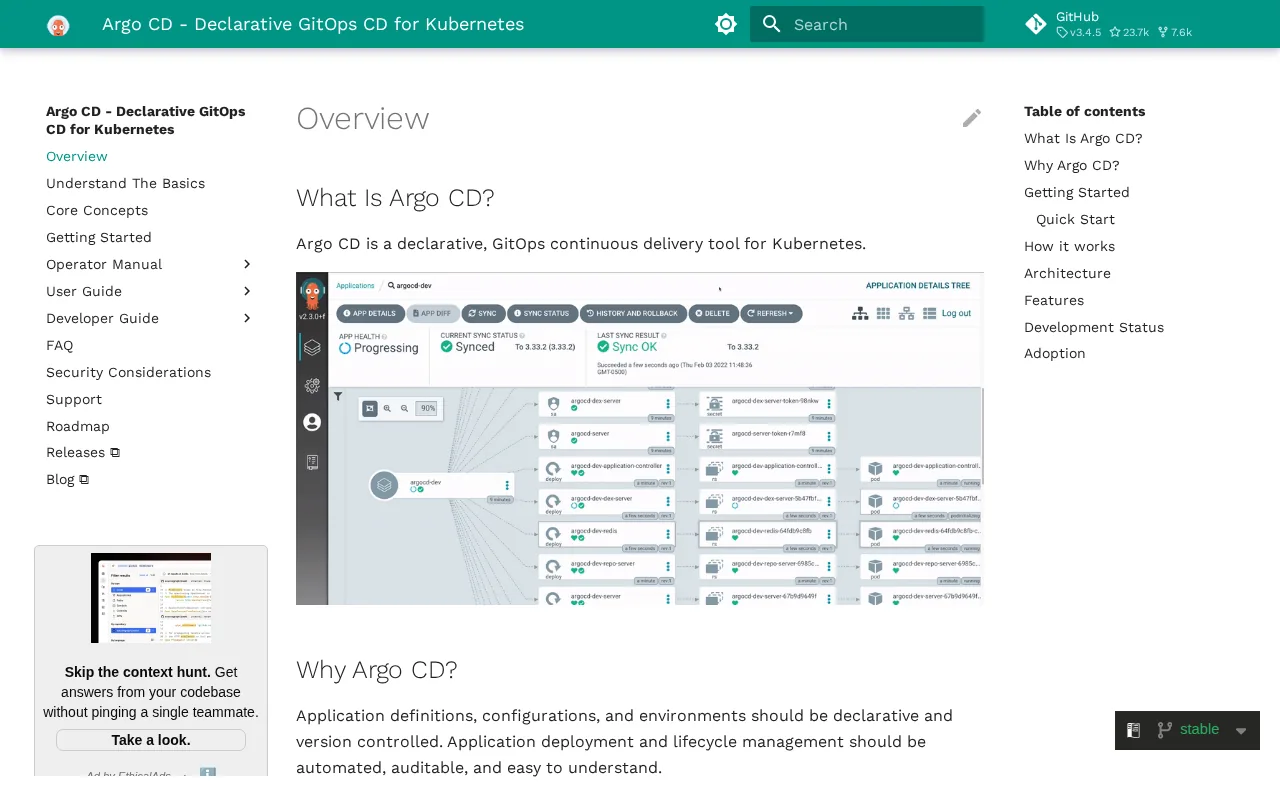
It’s perfect for teams that run multiple clusters or micro‑service architectures. Features like automatic drift detection ensure the live cluster never diverges from the declared manifest.
Argo integrates with Helm, Kustomize, and plain YAML, giving you flexibility in how you package your apps.
The tool only handles the delivery side; you’ll still need a separate CI system (like GitHub Actions) to build images.
9. Use — Unified platform for CI, CD, and verification
Use combines pipeline creation, verification, and rollback into one UI. Its visual pipeline studio lets you drag‑and‑drop stages, while a YAML editor satisfies code‑first fans.
Built‑in verification runs can automatically compare performance metrics between the current and previous releases, alerting you if a regression appears. You can also set up manual approval gates for compliance‑heavy sectors.
The platform records execution logs and keeps a history of each deployment, which aids post‑mortem analysis.
Because Use is a managed SaaS service, you don’t worry about server upkeep, but you do depend on their pricing model, which can be pricey for large volumes.
10. Buddy — Visual pipelines for non‑DevOps teams
Buddy offers a UI that non‑engineers can handle. You connect a repo, pick a trigger (like a push to the main branch), and then add actions such as unit testing, linting, Docker build, and deployment.
The platform includes ready‑made actions for common services, so you rarely need to write custom scripts. This lowers the barrier for small teams or product managers who want to automate releases without learning YAML.
Buddy also supports manual approval steps, which can act as a safety net for production pushes.
Its simplicity means you might outgrow the tool if you need advanced branching strategies or complex multi‑environment approvals.
How to Choose the Right Continuous Deployment Pipeline
Picking a pipeline starts with your team’s maturity. If you’re just starting, a hosted solution with a generous free tier (like GitHub Actions or CircleCI) reduces overhead. For regulated industries, a self‑hosted option (Jenkins or TeamCity) lets you keep everything behind a firewall.
Next, map the integrations you need. Do you deploy to Kubernetes? Consider a GitOps tool like Argo CD paired with a CI runner. Do you run on Azure? Azure DevOps gives you native resource provisioning.
Finally, evaluate the cost of scaling. Tools that charge per minute of build time can become expensive as you add parallel jobs. Look for platforms that let you cap usage or provide predictable pricing.
We recommend you run a short proof‑of‑concept on two candidates that meet your top three criteria before committing to a long‑term contract.
For a deeper dive on building a strong pipeline, on Best Software Quality Assurance Services in 2026.
Comparison of the Top 10 Continuous Deployment Pipeline Solutions
FAQ
What is a continuous deployment pipeline?
A continuous deployment pipeline automatically moves code from a repository through build, test, and production stages without manual intervention.
How does continuous deployment differ from continuous delivery?
Continuous delivery stops short of production; it requires a manual approval before release, while continuous deployment pushes every passing change straight to users.
Can I use a free tier for production workloads?
Many platforms offer generous free tiers, but they usually limit compute minutes or parallel jobs, which can become a bottleneck for high‑traffic production systems.
Do I need to write YAML for all these tools?
Most tools use YAML for pipeline definitions, but platforms like Buddy provide a visual editor that generates the YAML behind the scenes, reducing the learning curve.
How do I ensure security in my pipeline?
Embed scanning steps, such as secret detection and vulnerability checks, into the CI stage. Built‑in security scanning can run these checks directly inside Azure Pipelines, catching issues early.
Is GitOps the same as continuous deployment?
GitOps is a methodology that uses Git as the single source of truth for infrastructure and application state; it often powers continuous deployment for Kubernetes clusters via tools like Argo CD.
Ready to speed up your releases? Start with a free trial of the tool that matches your top priority, then let us at Lakeway Web Development help you fine‑tune the pipeline for compliance and scale.