Cloud bills can explode before you even see the first line on the invoice. One mis‑sized VM or an idle storage bucket can add thousands of dollars each month. The good news is you don’t need a magic tool to stop the bleed. By applying a clear set of cloud cost optimization strategies you can bring spend back under control while keeping performance strong. In this guide we walk you through five usable steps you can start today, from monitoring usage to tuning storage and data transfer.
Step 1: Monitor and Analyze Your Cloud Usage
Before you can cut cost you must see where the money is going. Most teams rely on a single dashboard that shows total spend, but that view hides the noisy details. Start by turning on detailed metrics for compute, storage, and network. Services like AWS CloudWatch let you capture CPU, memory, and I/O usage every minute. Google Cloud’s Monitoring does the same for GCP workloads.
Once the data streams in, set up alerts for unusual spikes. An alert that fires when CPU usage stays below 5 % for 24 hours can point out idle machines. Pair that with a tag‑based cost report so you can . Tagging is a tiny habit that pays huge dividends , if a tag is missing, you lose visibility and the chance to act.
Next, break down spend by service type. In most midsize clouds, compute accounts for 60‑70 % of the bill, databases 15‑20 %, and storage the rest. Knowing the share helps you focus your effort where the dollar impact is biggest.
Finally, review the data with both finance and engineering teams. When the numbers are transparent, each side can agree on what needs fixing. If you need a partner to set up this monitoring stack, you can Contact Us - Lakeway Web Development for a quick start.
Step 2: Right-Size Your Cloud Resources
Right‑sizing means matching the size of each VM, container, or storage volume to the real workload. Too big and you pay for empty capacity; too small and you get throttled performance. The first thing to do is to pull the utilization reports you built in Step 1. Look for instances that run under 30 % CPU for most of the day. Those are prime candidates for a smaller instance type.
Use a tool that can automatically suggest a new size. Sedai’s optimizer, for example, reads the real‑time data and flags oversized VMs. When you apply the recommendation, you typically see a 20‑30 % cost drop per instance. Imagine a web tier that runs on an m5.large but only uses 15 % of its CPU , moving it to an m5.medium cuts the bill in half.
Don’t forget about storage. Move infrequently accessed data to a lower‑cost tier such as Amazon S3 Glacier or Azure Cool Blob. Most clouds let you set lifecycle rules that automatically shift data after 30 days of no access.
After you shrink or move resources, monitor the performance for a week. If you see errors or latency spikes, adjust back up a step. This iterative loop ensures you stay lean without hurting users.

Step 3: Choose the Right Pricing Model
Most clouds start every new resource on an on‑demand price. That rate is convenient but often carries a 30‑60 % premium over reserved or committed pricing. The trick is to move predictable workloads to a discount plan while leaving bursty jobs on demand.
Start by classifying each workload. If a service runs 24 × 7 and its usage pattern is stable, it belongs in a Reserved Instance (AWS) or Savings Plan. For workloads that fluctuate but have a clear baseline, use a Commitment‑Based Discount like Azure Reservations or GCP Committed Use Discounts.
Use a calculator to compare the annual cost of on‑demand vs. reserved. For a $100,000 annual compute bill, a 1‑year Reserved Instance can save up to 40 %, while a 3‑year Savings Plan can push that to 55 %. The only downside is the lock‑in period, but you can mitigate risk by starting with a 1‑year term and reviewing quarterly.
Keep an eye on usage trends. If a service’s traffic grows, you may need to increase the commitment size. Many teams set a weekly job that checks the on‑demand vs. reserved split and sends a Slack alert when the on‑demand share climbs above 20 %.
Choosing the right pricing model is a continuous FinOps practice. The FinOps Foundation defines this as a core pillar of cloud financial management. When you combine visibility, waste reduction, and commitment coverage, you can cut 30‑50 % off a $5 M bill without touching code.
Step 4: Implement Auto-Scaling and Elasticity
Auto‑scaling lets the cloud add or remove compute nodes based on demand. The result is a system that grows when traffic spikes and shrinks when load drops, keeping you from paying for idle capacity.
Begin with a baseline metric , CPU usage, request latency, or queue length. Define a target value, such as 65 % CPU. Then create a scaling policy that adds one instance when the metric exceeds the target for five minutes and removes one when it falls below for ten minutes.
Most clouds provide a managed service for this. AWS Auto Scaling, Azure Autoscale, and GCP Autoscaler all support step‑wise policies and scheduled scaling for known busy periods. Use scheduled scaling to pre‑warm resources before a daily sales rush, then let the reactive policy handle unexpected peaks.
Test your policies in a staging environment first. Simulate a traffic surge with a load‑testing tool and watch the scaling actions. If the system adds nodes too quickly, you may overspend; if it adds too slowly, users will see slow response times.
Once the policies are solid, enable health checks so that unhealthy instances are terminated automatically. Pair this with a monitoring alert that notifies the on‑call engineer if scaling fails.
For ongoing support, consider a Maintenance & Support - Lakeway Web Development plan that includes regular scaling reviews and tweaks.
Step 5: Optimize Storage and Data Transfer Costs
Data transfer and storage often hide behind the scenes, yet they can make up 15‑30 % of a cloud bill. The first thing to do is to map out where data moves: between services, across regions, and out to the internet.
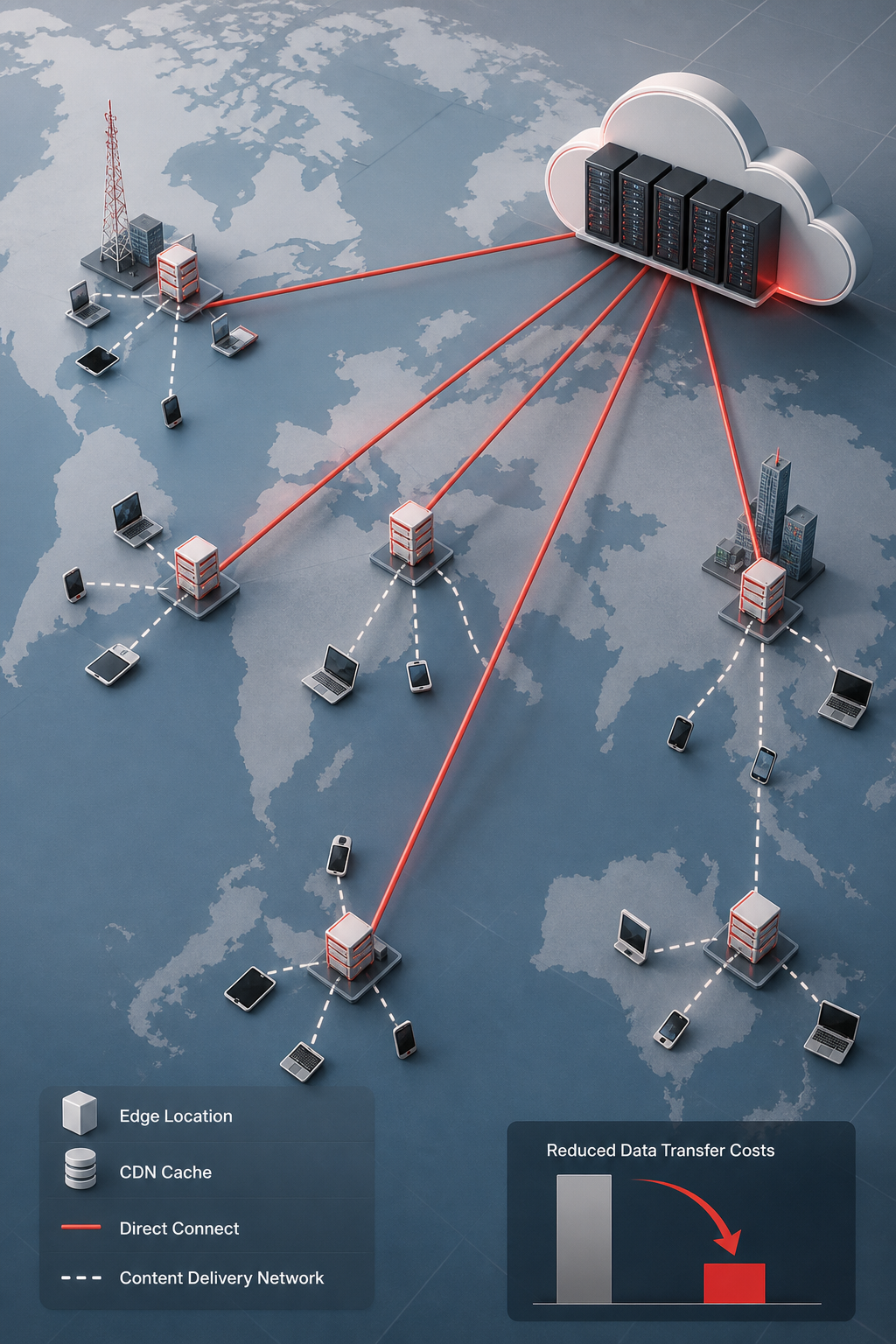
Use a content delivery network (CDN) like Amazon CloudFront to bring static assets close to users. A CDN caches files at edge locations, cutting the number of requests that travel back to your origin server. The AWS docs note that using CloudFront can lower transfer costs by up to 30 % for high‑volume traffic.
Next, look at private networking options. AWS Direct Connect provides a dedicated line that can be cheaper than internet egress for large volumes. For smaller offices, a Site‑to‑Site VPN is a managed way to keep traffic private without adding heavy fees.
Review your storage class usage. Move infrequently accessed objects to Glacier or Azure Archive. Enable lifecycle rules that automatically transition objects after a set period. This simple step can cut storage spend by half for long‑term data.
Finally, compress data before transfer. Many services support gzip or Brotli compression on the fly, reducing the amount of data sent over the wire.
Frequently Asked Questions
What is the first thing I should check when looking for cost savings?
Start with a detailed usage report. Pull metrics for CPU, memory, storage, and network for each resource. Identify any instance that runs under 30 % utilization for most of the day and any storage bucket that hasn’t been accessed in 30 days. Those low‑use items are the low‑hanging fruit that often deliver the biggest quick wins.
How often should I review my pricing model?
Ideally, run a weekly script that compares on‑demand spend to reserved or savings‑plan coverage. If the on‑demand share climbs above 20 %, investigate whether a new commitment makes sense. A quarterly formal review is a good safety net, but weekly checks keep you from letting gaps grow.
Can auto‑scaling handle sudden traffic spikes?
Yes, if you set the scaling policy with a short cool‑down and a buffer of extra capacity. Test the policy with a load‑testing tool to see how quickly new instances spin up. Most managed services can add a node in under a minute, which is fast enough for most web‑traffic bursts.
What are the risks of using Spot Instances?
Spot Instances can be interrupted with a two‑minute warning, so they suit workloads that can tolerate sudden loss, like batch jobs or stateless workers. Pair Spot with a fallback on‑demand instance to keep critical services running. The high savings (up to 90 %) are worth the added automation to handle interruptions.
How do I ensure my tagging stays accurate?
Automate tag application at provisioning time using IaC tools like Terraform or ARM templates. Enforce a policy‑as‑code rule that rejects any resource without the required tags. Run a weekly audit that flags any non‑compliant resources and fixes them automatically.
Is there a way to measure the ROI of my optimization work?
Track the monthly bill before and after each change, then calculate the percentage drop. Combine that with the engineering time saved by automation to get a full picture of ROI. A common metric is cost per transaction; if that number falls after an optimization, you’ve delivered real value.
Conclusion
Cutting cloud spend isn’t a one‑time project; it’s a habit you build into every release cycle. By monitoring usage, rightsizing resources, picking the right pricing model, enabling auto‑scaling, and tightening storage and data‑transfer costs, you create a self‑correcting system that keeps your bill in check. These cloud cost optimization strategies work for any mid‑size business, whether you run a law firm or an e‑commerce store.
Ready to see how a custom, future‑proof architecture can keep your cloud costs low? Check out our UX/UI Design - Lakeway Web Development guide for building clear cost dashboards, then get in touch to explore a tailored solution.