Choosing how to talk to customers online can feel like picking a new language. Do you trust a machine to answer at any hour, or do you rely on a human to read the tone? In this article we break down the five most common ways businesses handle real‑time conversations. You’ll see the strengths, the limits, and the ideal fit for each style, so you can match the tool to your team’s needs.
We’ll walk through AI‑powered bots that never sleep, rule‑based bots that stick to scripts, pure live chat for personal touch, hybrid systems that blend the two, and a triage model that lets bots filter before a human jumps in. By the end you’ll have a clear picture of which option gives you speed, scale, or the human nuance you need.
1. AI-Powered Chatbots , For 24/7 Automated Support
These bots run on large language models that can understand natural language, pull data from your back‑end, and reply in seconds. Because they’re cloud‑hosted, they handle spikes in traffic without adding staff. Recent industry research notes that AI chatbots answer instantly, cut wait times, and can even suggest products based on the conversation. They also record every interaction, so when a query does need a hand‑off, the human sees the full context.
How does this help a mid‑size business? Imagine a retail site that gets 5,000 visits after a sale. An AI bot can greet each visitor, answer size questions, and even start a checkout flow while the sales team focuses on high‑value leads. The bot can also run A/B tests on its wording, letting you see which prompts drive more conversions.
Pros:
- Available 24/7, no overtime costs.
- Scales to thousands of concurrent chats.
- Learns from each interaction, improving over time.
Cons:
- May misinterpret slang or ambiguous queries.
- Training data needs regular updates to stay relevant.
- Complex integration can require developer time.
Real‑world tip: Start with a narrow set of intents (order status, FAQs) and expand as confidence grows. Use the bot to collect contact info first, then hand the lead to a sales rep for a personal follow‑up.
3. Live Chat , For Personalized Human Interaction
Live chat puts a real person on the other side of the screen. The customer types a question and a support rep replies in real time. This channel shines when the issue requires empathy, judgment, or complex troubleshooting. Live agents resolve high‑stakes problems faster and keep customers from churning when emotions run high. Agents often use AI copilots behind the scenes to surface account history, but the final decision stays human.
Live chat works best for B2C brands that sell high‑ticket items or SaaS platforms where a misstep can cost a renewal. A good practice is to set clear service‑level expectations, e.g., “We’ll reply within 2 minutes.” That promise creates a sense of reliability.
When a conversation grows complicated, the agent can share a screen, upload a PDF, or walk the user through a step‑by‑step guide. This personal touch often turns a frustrated visitor into a loyal customer.
Key considerations:
- Hire agents who can type quickly and stay calm under pressure.
- Provide a knowledge base that agents can pull from instantly.
- Monitor metrics like Average Handle Time (AHT) and Customer Satisfaction (CSAT) to keep performance in check.
For teams that need to scale quickly, a hybrid hand‑off system can keep costs low while preserving the human feel.
Ready to add a live‑chat widget that blends with your existing site? Contact Us - Lakeway Web Development to get a custom setup that matches your branding.
4. Hybrid Approach , Best of Both Worlds
A hybrid system couples an AI bot with human agents on the same channel. The bot handles the easy, high‑volume queries and passes the tougher cases to a live rep. Industry research shows that a hybrid bot can resolve 53% of frequent intents automatically, cut response time by 28 seconds, and lift satisfaction by 26%. Best practices also emphasize that the hand‑off should include the full chat transcript, so the agent never repeats a question.
Why does this matter? Imagine a telecom provider that gets thousands of billing questions each day. The bot answers balance queries instantly, while the rare dispute gets routed to a specialist who already sees the customer’s recent chats.
To make a hybrid work, define clear confidence thresholds. If the bot’s confidence score is above 80%, it replies; if not, it flags the chat for human review. Tagging each conversation with intent and priority helps route the right request to the right person.
Best practice: Run a pilot on one support channel (e.g., WhatsApp) before expanding to web chat. Measure deflection rate, hand‑off latency, and CSAT to fine‑tune the thresholds.
5. Live Chat with Chatbot Triage , For Efficient Escalation
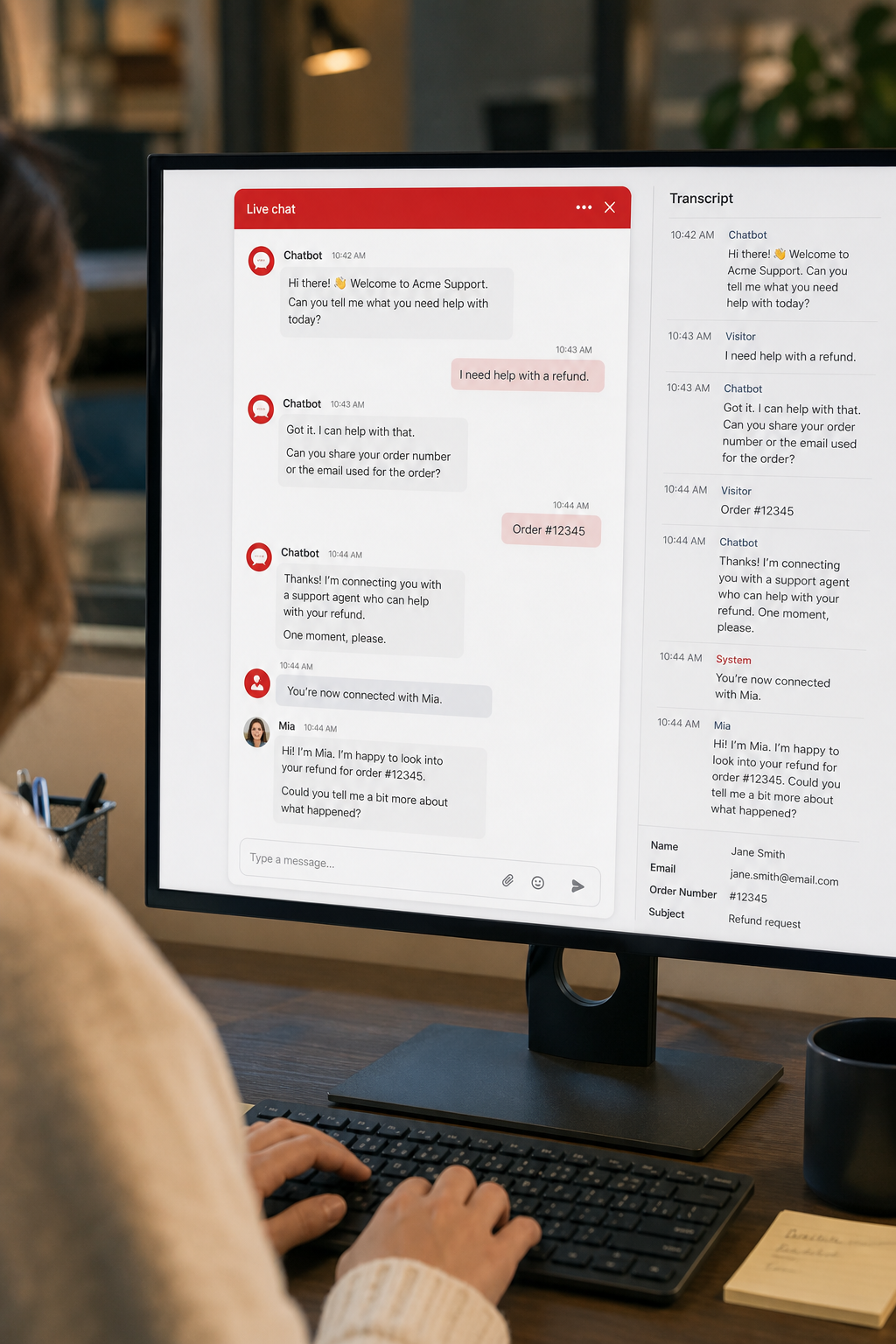
In this model the chatbot acts as a gatekeeper. It asks a few qualifying questions, gathers contact details, and then decides whether to keep the conversation bot‑only or to hand it off. A case study shows that using a triage bot saved 39% in support costs while keeping the CSAT score high. The bot can also suggest self‑service articles before escalating, reducing the load on agents.
Typical flow:
- User lands on chat widget and sees a friendly welcome.
- Bot asks: “What can I help you with today?” and offers quick‑pick buttons.
- Based on the answer, the bot either resolves the issue or says, “Let me connect you with a specialist.”
- When escalation occurs, the agent receives the full transcript and any data the bot collected.
This approach works well for SaaS firms where the first step is to verify the user’s account number, then either reset a password (bot) or troubleshoot a billing dispute (agent).
Tips for success:
- Design the triage questions to be short and focused.
- Make the hand‑off smooth , the agent should see the bot’s questions and answers.
- Set a timeout so the bot doesn’t wait forever; after 30 seconds without a reply, auto‑escalate.
If you want a custom triage bot that pulls data from your CRM and matches your brand voice, our ChatGPT Integration - Lakeway Web Development service can build it for you.
FAQ
What’s the biggest advantage of AI‑powered chatbots over live chat?
AI bots work around the clock and can handle thousands of chats at once, which keeps wait times near zero. They also pull data from your systems to give instant answers, so customers don’t have to wait for a person to look up an order status. Live chat, on the other hand, offers empathy and problem‑solving depth that bots can’t yet match.
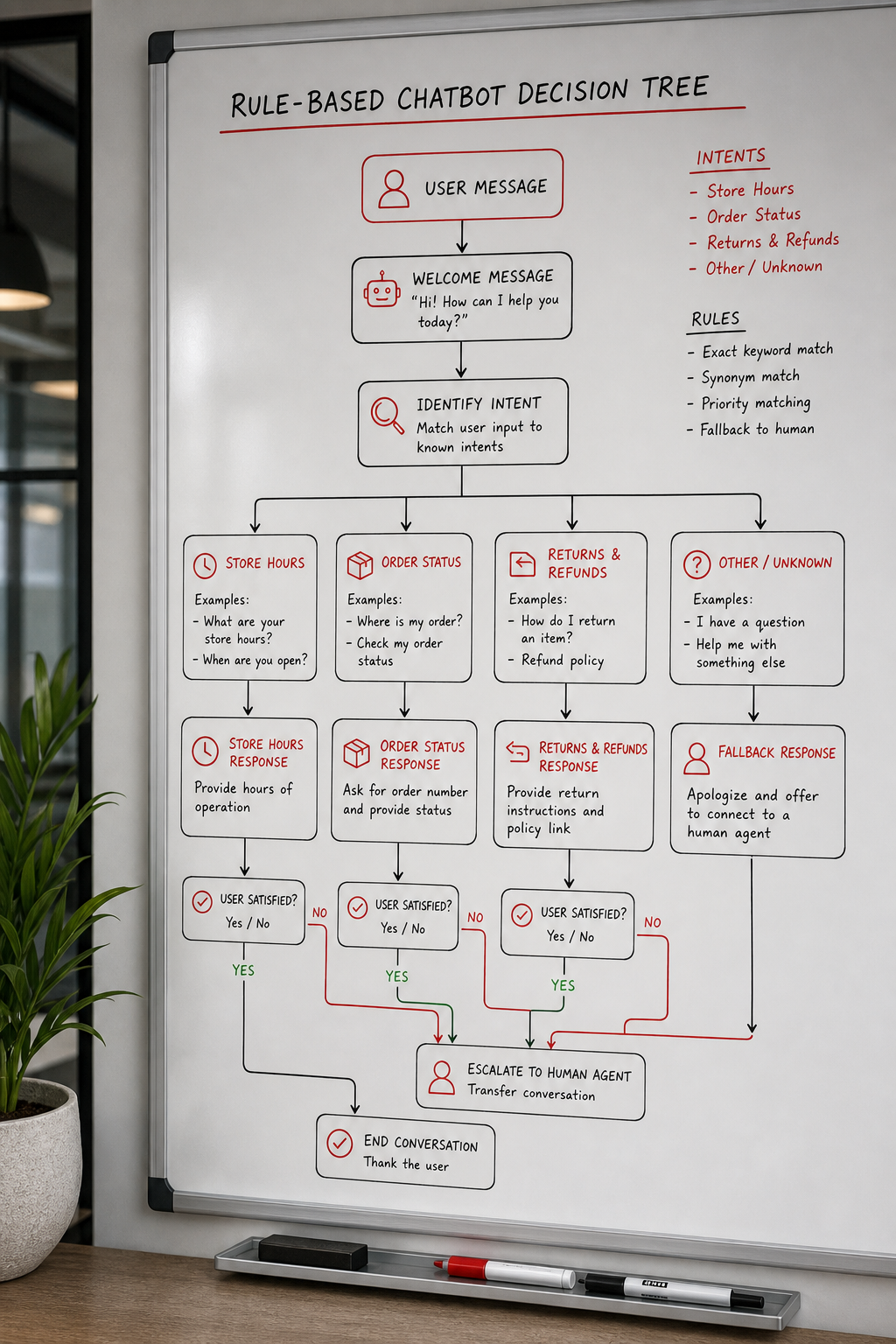
When should I choose a rule‑based chatbot?
If your support team spends most of its time answering the same five or ten questions, a rule‑based bot can automate those replies with zero ongoing training cost. It’s a quick win for small retailers, appointment‑based services, or any business with a static FAQ list.
Can a hybrid system hurt the customer experience?
It can if the bot hands off too early or too late. The key is to set confidence thresholds that let the bot answer when it’s sure and route to a human when it isn’t. Providing the agent with the full chat history avoids the “repeat the question” frustration.
How do I measure the success of a chatbot‑triage setup?
Track three metrics: deflection rate (percentage of chats the bot resolves), hand‑off latency (how quickly the bot passes the chat to an agent), and CSAT after the interaction. A healthy triage system shows a high deflection rate, low latency, and unchanged or improved CSAT.
Do I need developers to set up an AI chatbot?
Not always. Many platforms offer no‑code builders that let you define intents, add a few API keys, and launch in hours. For deeper integrations, like pulling order data from an ERP, you’ll need a developer or a partner who can write custom code.
Is live chat worth the cost for a small business?
Yes, if you handle high‑value or high‑emotion queries. A single skilled agent can turn a frustrated buyer into a repeat customer, which often outweighs the hourly wage. Pairing live chat with a simple bot for FAQs keeps costs down while preserving the personal touch where it matters most.
What security concerns should I watch for?
Both bots and live chat transmit personal data, so you must use TLS encryption, store chat logs securely, and comply with regulations like GDPR. If you collect payment info, make sure the platform is PCI‑DSS compliant.
How fast can I get a chatbot up and running?
Using a no‑code builder, you can launch a basic bot in a day. Adding custom integrations, branding, and a hand‑off flow typically takes one to two weeks, depending on the complexity of your backend systems.
Conclusion
We’ve looked at five ways to turn a visitor’s question into a satisfied customer. AI‑powered bots give you endless scalability, rule‑based bots provide rock‑solid consistency, live chat delivers human empathy, hybrids blend speed with nuance, and triage bots let you funnel the right chats to the right people.
For most mid‑size firms, the sweet spot is a hybrid that lets a smart bot answer the easy stuff while a real agent steps in for the tough cases. That mix cuts costs, trims wait times, and keeps the brand’s voice human where it counts.
If you’re ready to build a solution that matches your workflow, our team can design, integrate, and support the exact mix you need. Get in touch with Lakeway Web Development today to start a proof‑of‑concept and see how the right conversational stack can boost your bottom line.