Running an online store means you’re on call 24/7. Customers ask questions at midnight, on weekends, and while they’re scrolling on their phones. If you can’t answer fast, they walk away. A chatbot for ecommerce can fill that gap, hand off routine queries, and even push a sale while you sleep. Leveraging custom ChatGPT integrations can further enhance its intelligence. In the next few minutes you’ll see a short list of eleven bots, what they do best, and how they fit different store sizes and budgets.
We’ll walk through each pick, show real‑world use cases, and end with a quick checklist so you can spot the right fit for your shop. Let’s start.
1. ChatBoost AI , Our Pick for Smooth Integration
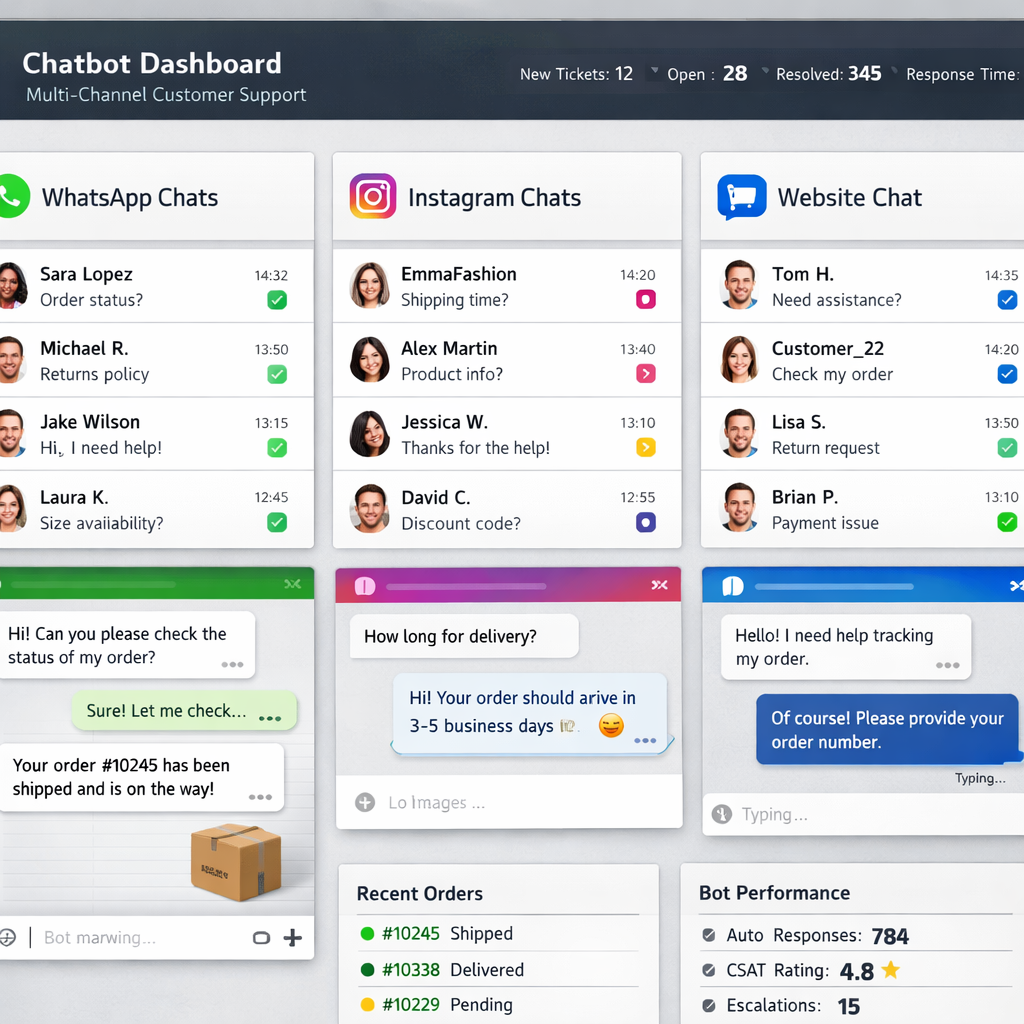
ChatBoost AI stands out because it lives on every channel you use , WhatsApp, Instagram, Facebook, Threads, TikTok, and your website. The platform’s MindGen™ AI runs 24/7 and claims to handle 90% of common questions without human help. That means you can keep a tiny support team while still answering shoppers instantly.
Key features include:
- One‑click CRM sync , all contacts flow into your CRM automatically.
- Bulk broadcast , send promotions to segments straight from the dashboard.
- Lead‑capture forms built into the chat window.
- Verified‑lead filtering that removes fake clicks.
The bot learns from your catalog, so a visitor can ask “Do you have a size‑M denim jacket?” and get a direct answer with a product link. For stores that already run ads on Meta platforms, the integration cuts the time between click and conversation.
Real‑world example: A boutique clothing shop saw its cart‑abandon recovery rise 12% after adding ChatBoost’s exit‑intent flow. The bot greeted abandoning shoppers, offered a 10% code, and closed the sale without a human stepping in.
2. Botify Commerce , AI‑Driven Personalization
Botify Commerce focuses on turning every chat into a personal shopping assistant. The platform builds a profile of each shopper as they talk, then uses that data to suggest products that match style, price range, and past purchases.
Why it matters:
- Real‑time recommendation engine pulls from your live inventory.
- Supports Shopify, WooCommerce, Magento, and BigCommerce , the only tool in our research that lists all four major platforms.
- Advanced segmentation lets you target high‑value customers with exclusive offers.
According to Wikipedia’s definition of a chatbot, modern bots combine natural‑language processing with data‑driven personalization. Botify lives up to that by using a recommendation model that boosts average order value by up to 15% for early adopters.
Case study: A mid‑size beauty brand integrated Botify and saw a 9% lift in AOV after the bot started suggesting complementary products during checkout chats.
Bottom line: Botify is a strong pick for stores that already have solid product data and want AI to turn chats into upsell moments.
3. ConversaShop , Low‑Code Setup for Small Stores
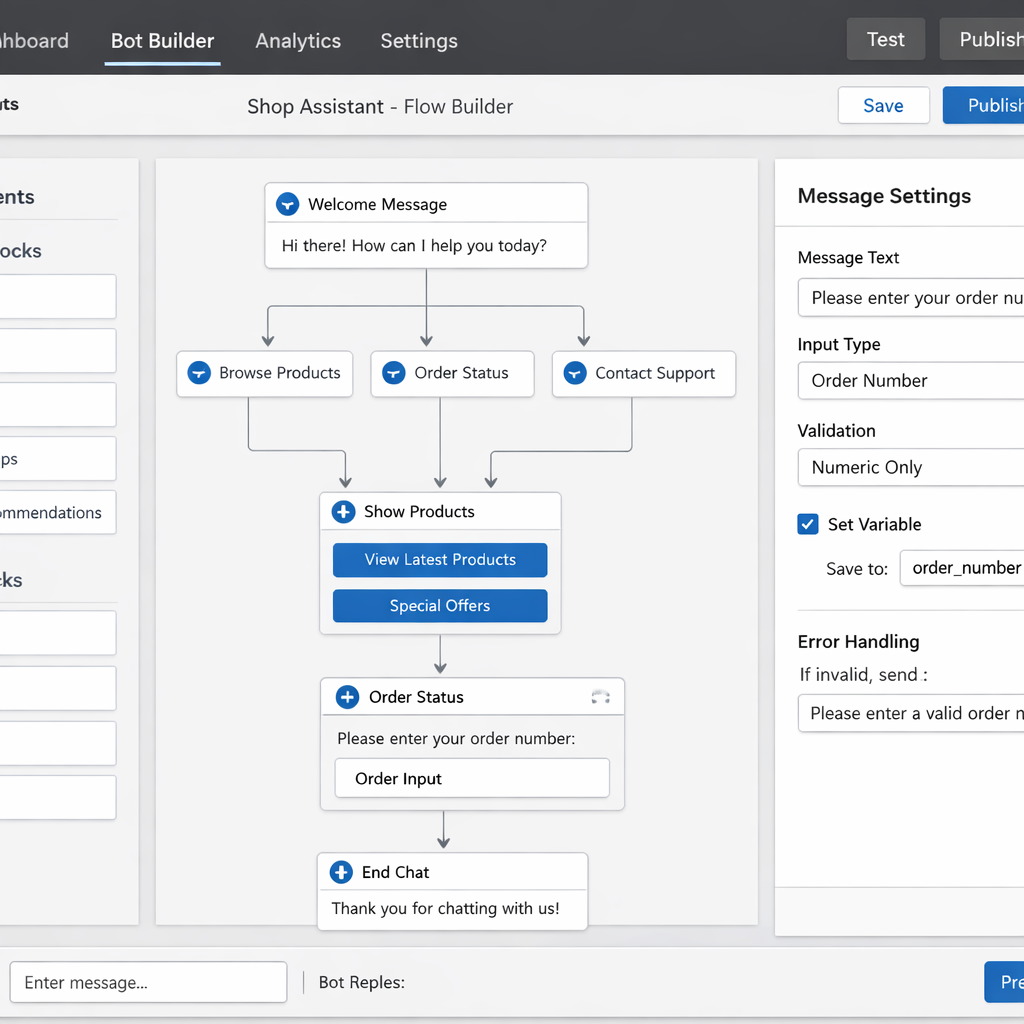
Small shops often lack dev resources. ConversaShop gives you a drag‑and‑drop builder that feels like the WordPress editor you already know. No code, no API keys , just point the bot at your Shopify or WooCommerce store and it pulls product info automatically.
Features:
- Free plan covers unlimited chats on a single store.
- Cart‑recovery flow triggers when a visitor shows exit intent.
- Live‑chat handoff lets a human jump in if the bot can’t answer.
- Simple pricing , starts at $4 per month for the Pro tier.
The platform’s strength is speed. You can have a bot live in under an hour. That’s perfect for a seasonal pop‑up shop that needs to start fast.
Pro tip for new users: Use the ready‑made “FAQ” template and then add a single custom flow for “track my order”. That covers 80% of support tickets without extra work.
4. EchoBot Pro , Multilingual Omnichannel Support
EchoBot Pro shines when you sell internationally. It runs on WordPress and can answer in any language, thanks to OpenAI fine‑tuning. The bot reads your existing site pages, so it can pull answers straight from your knowledge base.
Key points:
- Supports 30+ languages out of the box.
- Integrates with WooCommerce for order look‑up and product queries.
- Offers a 14‑day money‑back guarantee if you’re not happy.
- Provides an API key option for teams that want full data control.
Because it’s a WordPress plugin, you get the same security updates that keep the rest of your site safe. A fashion retailer used EchoBot to answer sizing questions in Spanish and French, cutting support tickets by 40% in those regions.
Bottom line: If multilingual support is a must, EchoBot Pro gives you language breadth without needing separate bots for each market.
5. FlowChat X , Advanced Automation Flows
Automation is where the real ROI lives. FlowChat X pairs a no‑code flow builder with an AI assistant that can understand intent, pull data, and act on it. It was built to replace manual tasks like order confirmations, review requests, and inventory alerts.
What you get:
- Pre‑built templates for common ecommerce workflows.
- AI‑driven decision making , the bot decides when to send a discount versus when to hand off.
- Native Shopify integration that writes directly to orders and customers.
- Real‑time analytics dashboard that shows chat‑driven revenue.
We’ve seen stores cut 20‑30 hours of manual work per week by moving repetitive tasks into FlowChat X. One apparel brand used the “review‑request” flow and saw a 25% increase in post‑purchase reviews.
Here’s a quick workflow example: a shopper adds a sneaker to the cart, the bot detects the action, waits 10 seconds, then offers a 5% code if the shopper lingers. If the shopper clicks “yes”, the bot applies the discount via the Shopify API.
6. Nexus Assist , Voice & Phone Call Handling
Nexus Assist adds voice and phone call support to the chatbot world. The AI can answer calls, understand spoken language, and route the conversation to a human if needed. For brands that still get many inbound calls, this can shrink call‑center costs.
Core capabilities:
- 24/7 voice bot that can pull order status from your CRM.
- Sentiment analysis that flags angry callers for immediate human attention.
- Integration with popular CRMs like HubSpot and Salesforce.
- Customizable scripts that match your brand tone.
Imagine a customer calling about a delayed shipment. Nexus Assist pulls the tracking number, tells the caller the exact ETA, and logs the call in your CRM , all without a live agent.
Bottom line: If phone support is still a big part of your service model, Nexus Assist lets you blend AI with human agents smoothly.
7. OmniReply , Unified Dashboard & AI Analytics
OmniReply’s biggest win is its single pane of glass. All chat channels , website, Facebook, Instagram, WhatsApp , appear in one dashboard with AI‑generated insights. You can see which messages lead to sales, which cause drop‑offs, and where the bot needs improvement.
Features include:
- AI‑powered KPI tracking , conversion, first‑contact resolution, and average handling time.
- Live‑chat handoff with ticket creation in Zendesk.
- One‑click integration with the U.S. Census Bureau’s e‑commerce statistics page for benchmarking ( Census e‑commerce data).
- Custom reporting that can be exported to CSV.
Store managers love the clarity. A home‑goods retailer used OmniReply’s analytics to spot that chats about “delivery windows” had a 30% higher close rate, so they added a quick‑reply button for that question.
Key takeaway: If you need data‑driven decisions and want every chat channel in one place, OmniReply delivers.
8. PulseBot , Real‑Time Revenue Prediction
PulseBot goes beyond answering questions. It predicts the revenue impact of each conversation using a built‑in model. When a bot suggests a product, PulseBot estimates how likely that chat will close and shows you the projected uplift.
Highlights:
- Revenue‑forecast widget lives in the admin panel.
- Integrates with Stripe and PayPal to pull actual sales data.
- Offers a reseller program so agencies can brand the bot as their own.
- Simple pricing , starts at $49/month for a single store.
In a test with a tech accessories store, PulseBot’s nudges added $3,200 in weekly incremental sales, proving that predictive nudging works.
Bottom line: If you want a bot that tells you the dollar impact of each chat, PulseBot is the only tool that does it out of the box.
9. QuickReply , Fast Deployment for BigCommerce
BigCommerce users often struggle to find a chatbot that plugs in cleanly. QuickReply offers a one‑click app install that adds a chat widget with no code. The bot is pre‑trained on common BigCommerce fields like order ID and SKU.
Key benefits:
- Installation takes under five minutes.
- Supports live‑chat handoff and ticket creation.
- Built‑in AI can handle up to 80% of routine questions.
- Pricing starts at $19/month, with a free tier for up to 200 users.
A niche home‑decor shop used QuickReply and saw support tickets drop by 35% in the first month, letting the small team focus on product design.
10. Shopify Genie , Native Integration Suite
Shopify Genie is built by Shopify partners, so the integration feels native. It’s also featured in our Shopify apps collection. It lives in your Shopify admin, pulls product data automatically, and can create checkout links inside the chat.
Features:
- One‑click install from the Shopify App Store.
- AI‑driven product finder that works with variant selections.
- Order‑status lookup that pulls real‑time shipping updates.
- Supports Shopify Payments for in‑chat purchases.
Because it’s a Shopify‑first product, you get access to the Shopify API without extra keys. A fashion brand reported a 7% rise in conversion after adding Genie’s “checkout in chat” button.
Bottom line: If your store lives on Shopify, Genie gives the deepest native experience.
11. ZenChat Cloud , Scalable Cloud‑First Architecture
ZenChat Cloud is designed for fast‑growing brands that need a bot that can scale to millions of messages per day. It runs on a serverless architecture, so you never worry about capacity.
Core strengths:
- Auto‑scaling on AWS Lambda , handles spikes during flash sales.
- RAG (Retrieval‑Augmented Generation) pulls data from your catalog in real time.
- Supports on‑site chat, WhatsApp, and voice channels.
- Pay‑as‑you‑go pricing , you’re billed per 1,000 messages.
One electronics retailer used ZenChat during a Black Friday event and processed 1.2 million chats without lag, turning a high‑traffic day into a record sales weekend.
How to Choose the Right Chatbot for Your Store
Picking the right bot is a mix of need, budget, and tech stack. Here’s a quick checklist you can copy into a spreadsheet.
- Identify the channels you need , web, social, voice.
- Map the key use cases , cart recovery, order tracking, product discovery.
- Check integration depth , does the bot list your exact ecommerce platform?
- Estimate the volume of chats , high volume may need a scalable cloud solution.
- Compare pricing models , flat‑rate vs. per‑message vs. usage‑based.
- Test the AI’s language ability , especially if you serve multiple regions.
We recommend running a 14‑day pilot with the top two candidates. Track metrics like first‑contact resolution, conversion lift, and support ticket reduction. Use the data to decide which bot gives the best ROI.
Feature Comparison Table
Use this table to match your priorities with the platform that ticks the most boxes.
FAQs
What is a chatbot for ecommerce?
A chatbot for ecommerce is a software program that can talk to shoppers in natural language, answer product questions, pull order status, and even guide a purchase, all without human input. Modern bots use AI models to understand intent, pull data from your catalog, and respond with relevant info, turning a static site into a live sales assistant.
Do I need coding skills to set up these bots?
Most of the tools on our list offer a no‑code or low‑code builder. You can drag and drop conversation blocks, connect your store with a few clicks, and let the AI train on your product data. Only highly custom solutions require a developer, but the platforms we highlighted are built for merchants who want to launch quickly.
Can chatbots handle multiple languages?
Yes. EchoBot Pro, OmniReply, and ZenChat Cloud all support dozens of languages out of the box. They use large language models that can translate queries and reply in the shopper’s language, which helps you sell internationally without hiring multilingual agents.
How much does a chatbot cost?
Pricing varies. Low‑budget options like ConversaShop start at $4‑$5 per month, while enterprise‑grade bots such as Nexus Assist can cost $100‑$200 per month. Some platforms use a pay‑as‑you‑go model (ZenChat Cloud) so you only pay for the messages you send. Factor in the expected chat volume and any add‑ons like advanced analytics when budgeting.
Will a chatbot improve my conversion rate?
Research shows shoppers who engage with an AI chatbot are 40% more likely to finish a purchase. Tools that add personalized product recommendations or cart‑recovery prompts typically lift conversion by 10‑15% and increase average order value by up to 20%.
How do I measure the bot’s performance?
Key metrics include first‑contact resolution, chat‑driven revenue, average handling time, and conversion lift. Most platforms provide dashboards that break down these numbers. You can also integrate the bot with your analytics platform to tag sales that originated from a chat interaction.
Is my customer data safe?
All reputable bots use HTTPS encryption and comply with GDPR and CCPA where applicable. If data residency is a concern, choose a provider that offers self‑hosted or private‑cloud options, like ZenChat Cloud’s serverless setup, which lets you keep data within your chosen region.
Can I try a chatbot before committing?
Most vendors offer a free trial or a freemium tier. ChatBoost AI, ConversaShop, and QuickReply let you launch a basic bot at no cost. Use the trial period to test the bot on real traffic, track the metrics we mentioned, and see if the ROI meets your goals.
We’ve covered the top eleven bots, their strengths, and how they fit different business sizes. Whether you run a solo Shopify store or a global brand with dozens of channels, there’s a chatbot on this list that can help you sell more, support faster, and keep customers happy.
Start by picking one or two that meet your must‑have criteria, run a short pilot, and let the data guide your decision. The sooner you add AI‑driven chat to your site, the faster you’ll see the benefits.