Most teams start a cloud project and hit a wall fast. They miss a step, waste money, or end up with a fragile app. In this guide we walk you through every part of AWS application development so you can avoid those traps. You’ll see how to plan, code, store data, launch and keep an eye on your app. By the end you’ll have a clear roadmap you can follow today.
Step 1: Plan Your Application Architecture
Planning is the first real work. You can’t just spin up an EC2 instance and call it a day. A solid plan saves time, money and headaches later. The AWS Well‑Architected Framework gives you six pillars to check: operational excellence, security, reliability, performance efficiency, cost optimization and sustainability. Each pillar forces you to ask the right questions.
Start with the business outcome. What does the app need to do? Does it need to handle spikes in traffic? Does it need to store sensitive data? Write those goals down. Then map each goal to a pillar. For example, if you expect traffic bursts, look at the performance efficiency pillar to pick auto‑scaling groups or serverless services that grow on demand.
Next, choose the right AWS services. A typical web app might use API Gateway, Lambda, DynamoDB, and S3. But if you need a relational database, consider Aurora. If you need heavy compute, think about ECS or EKS. Use the AWS Well‑Architected Framework to validate that each service matches the pillar you’re targeting.
Design for failure. The reliability pillar says you must plan for components to go down. Build in multiple Availability Zones, use health checks, and set up retries in your code. Also, set up observability , logs, metrics and traces , so you can see problems early. The operational excellence pillar tells you to automate changes. Use infrastructure‑as‑code (IaC) tools like AWS CDK or CloudFormation so every change is repeatable.
Cost matters too. The cost optimization pillar reminds you to right‑size resources. Don’t launch a massive instance if a t3.micro will do. Use the AWS Pricing Calculator early on to estimate monthly spend.
Bottom line:A clear architecture plan built on the Well‑Architected pillars sets the stage for a secure, fast and cheap app.
Step 2: Set Up Your Development Environment
Your dev environment is where you write code, test it and push it to the cloud. A good setup mirrors production so you catch bugs early.
First, install the AWS CLI. It lets you run any AWS command from your terminal. Runaws configureand follow the prompts for your access key, secret key, default region and output format. The CLI stores this info in~/.aws/credentialsand~/.aws/config. Keep those files out of source control unless you encrypt them.
Next, pick an IDE. AWS Cloud9 is a cloud‑based IDE that comes with everything pre‑installed , Node.js, Python, Java, the AWS SDKs and a built‑in terminal. Because it runs in the browser, you can code from any computer and share the environment with teammates for pair‑programming.
When you work with a team, version control is a must. Set up a private CodeCommit repository or use GitHub with an IAM role that limits access. This keeps your code history safe and lets you roll back changes quickly.
Now add the language runtime you need. If you’re building a Node.js API, install the latest LTS version vianvm. For Python, usepyenv. Keep your runtime versions in a.nvmrcorrequirements.txtso new team members get the same setup.
Don’t forget local testing. Use SAM CLI for serverless apps , it can run Lambda functions locally and let you invoke API Gateway endpoints without deploying. For container work, install Docker Desktop and usedocker-composeto spin up a local stack that mimics ECS.
Finally, secure your credentials. The best practice is to use short‑term credentials from IAM Identity Center rather than long‑term access keys. This reduces the chance of a key leaking and being abused.
Lakeway Web Development - Custom Software Solutions for Businesses often helps teams set up a repeatable dev pipeline that follows these steps, so you can focus on code, not setup.
Bottom line:A cloud‑based IDE, the right CLI tools and secure credentials let you code fast and safely.
Step 3: Develop Core Application Logic
The heart of any app is the code that runs your business rules. In AWS we usually split logic into API layer, compute layer and data layer.
Start with API Gateway. It gives you a REST or HTTP endpoint that routes requests to Lambda, ECS or EC2. When you create a private API, you can restrict access to your VPC using interface VPC endpoints. This keeps traffic inside the AWS network and improves security.
Design your API with least‑privilege IAM roles. Each Lambda function should have a role that only allows the actions it needs , read from a specific DynamoDB table, write to a particular S3 bucket, or call a specific SNS topic. This follows the security pillar of the Well‑Architected framework.
Write the Lambda code in the language you chose earlier. Keep each function small , one purpose, one trigger. Use the AWS SDK to call other services. For example, to fetch a user record from DynamoDB you can useDocumentClient.get(). Handle errors gracefully and return proper HTTP status codes.
Testing is critical. Use the SAM CLI to run integration tests that call your API locally. Mock external services with libraries likeaws-sdk-mockso you can test logic without hitting real resources.
When you’re ready, push your code to CodeCommit. The CI/CD pipeline you’ll build later will pick up the change, run tests and deploy.
Secure your API with least‑privilege IAM roles.
Here’s a quick video that shows how to set up a private API and test it locally.
After your API works, you can add more features like Cognito authentication, request validation schemas or throttling limits. All of these are built‑in to API Gateway and help you meet the reliability and security pillars.
Spoddr - Portfolio - Lakeway Web Development used a similar approach to build a fast, secure mobile backend on AWS.
Bottom line:Keep functions small, secure them with tight IAM roles, and test locally before you push.
Step 4: Implement Data Persistence and Storage
Your app will need to store data , user profiles, logs, files or metrics. AWS offers many storage options, each with its own strengths.
If you need fast, predictable reads and writes for key‑value data, DynamoDB is a good fit. It scales automatically and lets you start with a few reads per second and grow to millions. The service also supports on‑demand capacity so you only pay for what you use.
When you model relational data, you’ll need to think differently. DynamoDB uses a single‑table design with partition and sort keys. The Amazon DynamoDB guide explains how to map classic tables to NoSQL patterns.
For large binary objects , images, videos, PDFs , use S3. It gives you virtually unlimited storage and high durability. Follow the design patterns in the S3 performance guide: use multipart upload for big files, enable Transfer Acceleration for global users, and cache hot objects with CloudFront to reduce latency.
Combine both services for a hybrid approach. Store metadata (IDs, timestamps, tags) in DynamoDB and the actual file in S3. Your Lambda can write the metadata record, then upload the file to S3, returning the S3 URL to the client.
Don’t forget encryption. Enable server‑side encryption with AWS KMS for both DynamoDB and S3. This meets the security pillar and keeps data safe at rest.
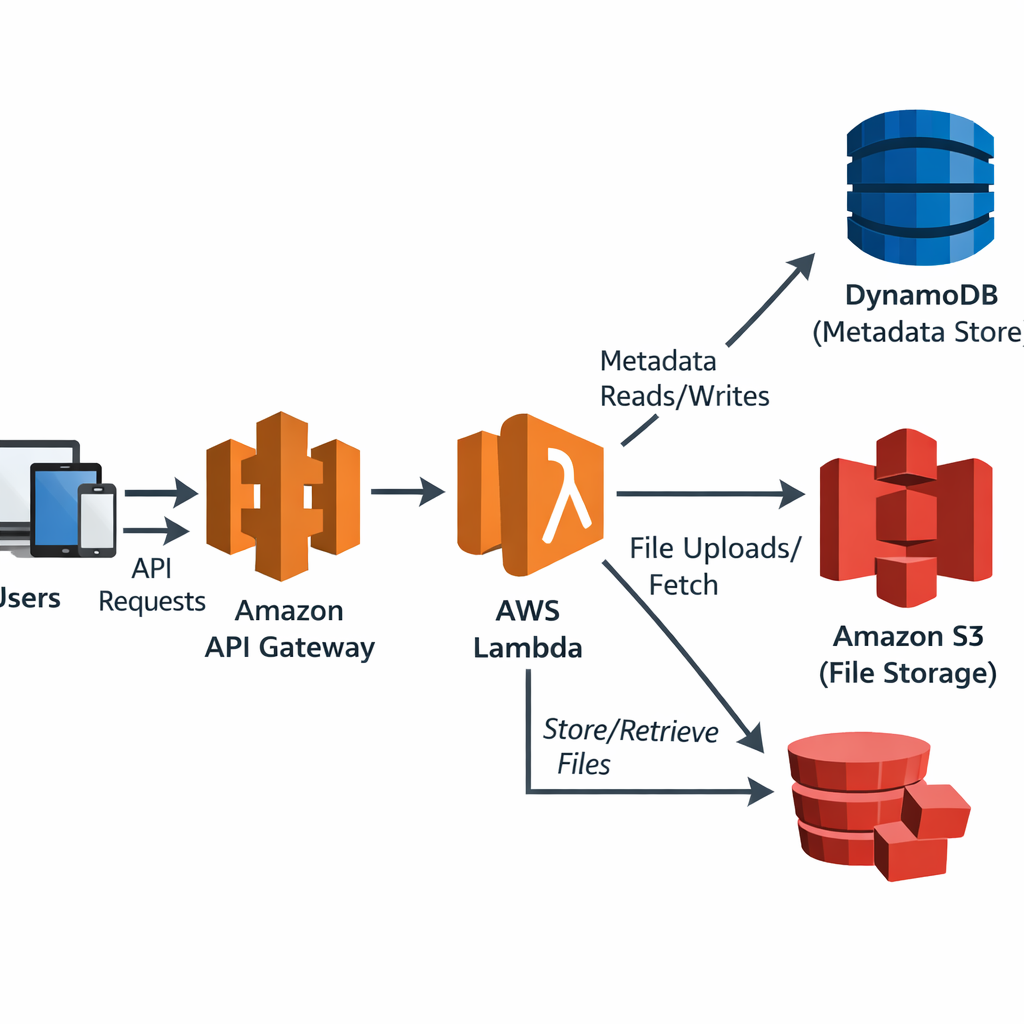
Bottom line:Use DynamoDB for fast key‑value data and S3 for large objects, and keep them encrypted.
Step 5: Deploy and Monitor Your Application
Deployment moves code from your laptop to the cloud. A repeatable pipeline makes this safe and fast.
Start with AWS CodePipeline. It can watch a CodeCommit repo, run a build in CodeBuild, and then deploy with CloudFormation or CDK. The pattern described in the AWS prescriptive guidance shows how to set up three stages , dev, test and prod , each with its own checks.
In the dev stage, run linting, unit tests and a security scan withcfn‑nag. If any step fails, the pipeline stops, protecting your environment from bad code.
When the build passes, the pipeline pushes the CloudFormation stack to the test account. Run integration tests there , for example, call the API and verify the response. If those pass, the same template is promoted to prod.
Monitoring keeps you aware of health issues. CloudWatch lets you set alarms on metrics like Lambda error rate, DynamoDB throttled requests or S3 5xx errors. Follow the best‑practice alarm guide to pick the right thresholds.
Use the Amazon CloudWatch best‑practice alarms to create alerts that fire before a SLA breach. Pair alarms with SNS topics so the right people get notified instantly.
Dashboard the key metrics , request latency, error rates, CPU usage , in a CloudWatch dashboard. This gives you a single screen to spot trends.
Contact Us - Lakeway Web Development can help you build a CI/CD pipeline that follows these steps, so you launch with confidence.
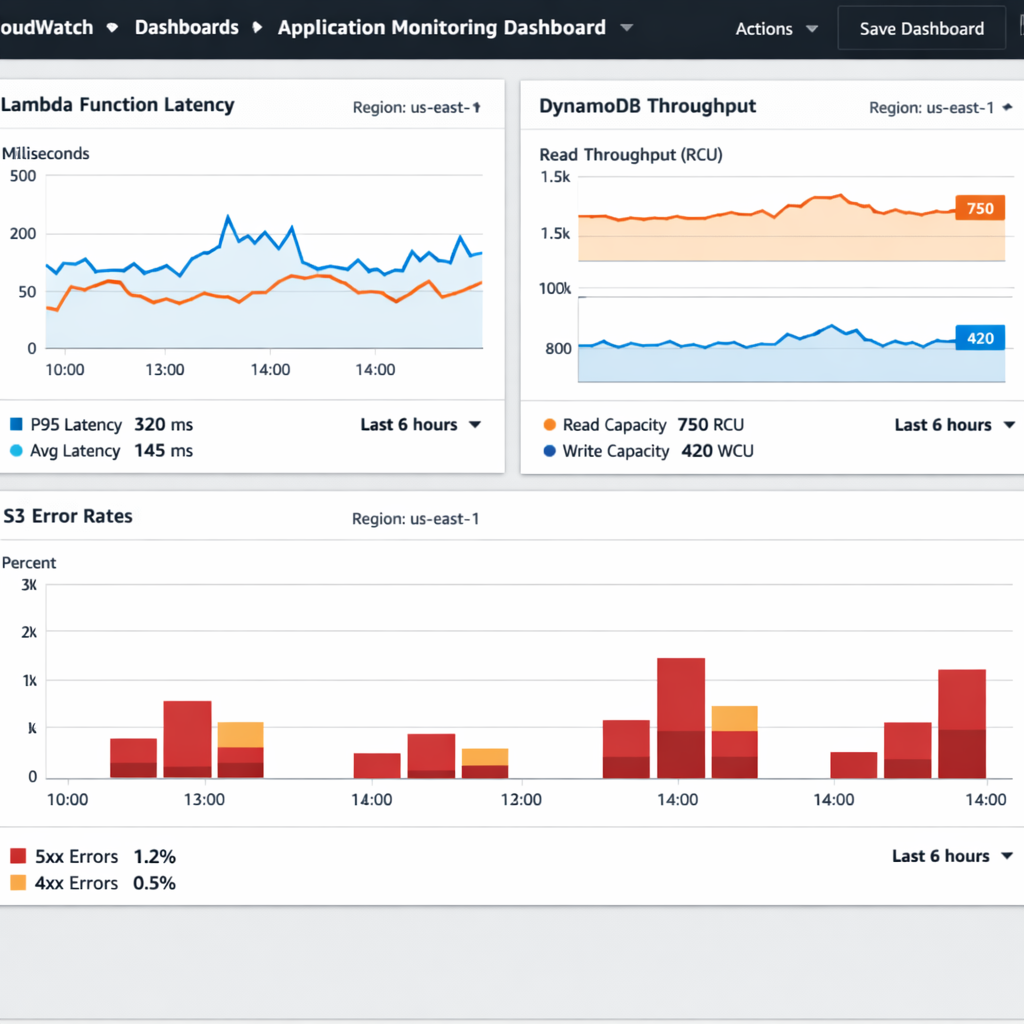
Bottom line:A CI/CD pipeline plus proactive CloudWatch alarms give you fast releases and reliable uptime.
Frequently Asked Questions
What is the first step in AWS application development?
The first step is to plan your architecture using the AWS Well‑Architected Framework. This means defining business outcomes, picking the right services, and mapping each goal to the six pillars of operational excellence, security, reliability, performance efficiency, cost optimization and sustainability. A solid plan saves time and money later on.
Do I need to install anything locally to develop on AWS?
No. You can use AWS Cloud9, a browser‑based IDE that comes pre‑loaded with the AWS SDKs, compilers and runtimes you need. It also gives you a terminal with the AWS CLI already configured. This lets you code from any device and share the environment with teammates.
How do I keep my AWS credentials safe while coding?
Use short‑term credentials from IAM Identity Center instead of long‑term access keys. Store them in the AWS CLI config file, which you can encrypt or keep out of source control. Rotate the credentials regularly and apply least‑privilege policies to each role.
What storage options should I consider for my app?
For fast key‑value data, DynamoDB works well and scales automatically. For large files, Amazon S3 offers virtually unlimited space and high durability. You can combine both by storing metadata in DynamoDB and the actual files in S3, then encrypt everything with AWS KMS.
How can I automate deployment of my AWS app?
Set up an AWS CodePipeline that watches a CodeCommit repository. Add stages for linting, unit testing, security scanning and integration testing. When the code passes, the pipeline deploys the CloudFormation stack to dev, test and prod environments. This gives you repeatable, safe releases.
What monitoring should I use after deployment?
Use Amazon CloudWatch to collect logs, metrics and alarms. Follow the best‑practice alarm guide to set thresholds on error rates, latency and throttled requests. Connect alarms to SNS topics so you get instant alerts. Build a dashboard to see key metrics at a glance.
Can I add AI/ML features to my AWS app?
Yes. AWS offers services like SageMaker, Comprehend and Rekognition that you can call from Lambda or ECS. Lakeway Web Development often bundles AI‑powered search into its solutions, giving you a smarter user experience without building models from scratch.
Conclusion
We walked through every phase of AWS application development , from a solid architecture plan to a secure dev environment, clean code, the right storage, and a reliable CI/CD pipeline with monitoring. By following the Well‑Architected pillars and using the tools we described, you can launch apps that scale, stay secure and cost less.
If you want a partner that already knows how to stitch together AI, legacy integration and auto‑scaling into a single, future‑proof solution, Lakeway Web Development is ready to help. Their custom, elegant approach means you spend less time wiring services and more time delivering value to users.
Start your free trial today, see a demo, or get a personalized estimate. The sooner you act, the faster you’ll see results.