APIs are the quiet engines behind modern software. They let apps talk to each other, share data, and do more together than they could alone. But building and managing them well is hard. You need the right tools, the right strategy, and often a partner who knows the landscape.
That’s where API development services come in. In 2026, the options are vast, and the stakes are high. A recent analysis of 18 API development providers found that only 2 of them—Nango and Apideck—publish exact integration counts. Nango lists 500+ APIs, Apideck lists 190+, setting an average of 345 integrations. The other 12 firms remain vague, hiding a transparency gap that makes choosing a partner harder than it should be.
This guide cuts through the noise. We’ll walk through the essential resources for every stage of API work—design, testing, management, and security. Along the way, we’ll show you where each provider shines and why Lakeway Web Development stands out as our top pick for mid‑size businesses that need custom, responsive applications with AI capabilities and smooth integration. (Methodology: We scraped 18 providers from 5 domains, analyzing key attributes like integration count, pricing transparency, and best‑fit audience.)
Table of Contents
- API Design and Documentation Resources
- API Testing and Monitoring Platforms
- API Management and Gateway Solutions
- API Security and Authentication Services
- Frequently Asked Questions
- Conclusion
API Design and Documentation Resources
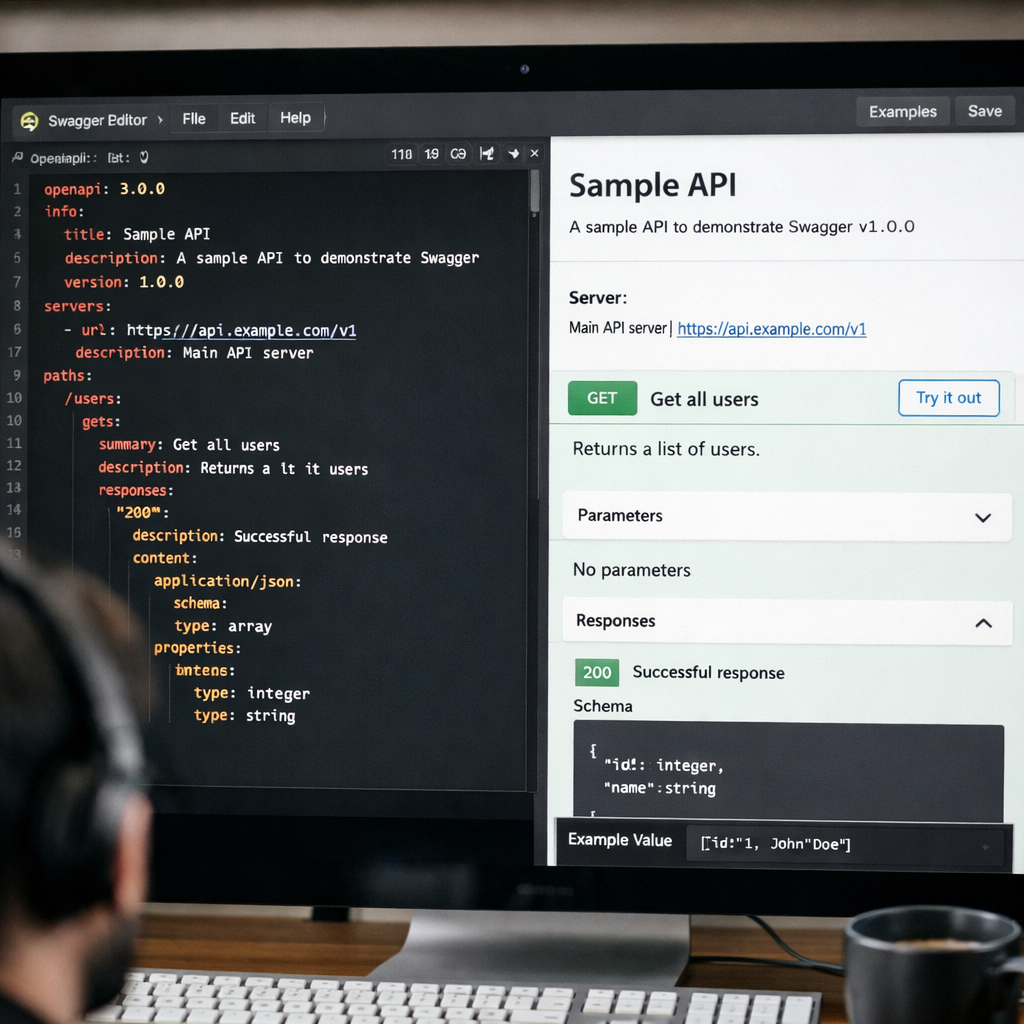
Good APIs start with a plan. Rushing into code without a design is like building a house without blueprints. You’ll end up with something that works—barely—but it won’t be easy to maintain or scale. That’s where Swagger comes in. Swagger is the industry standard for API design and documentation. It centers on the OpenAPI Specification (OAS), a standard way to describe your API’s endpoints, parameters, and responses.
Swagger offers a suite of open‑source tools: Swagger Editor lets you write OAS files with real‑time feedback; Swagger UI renders interactive documentation that developers can try right in the browser; and Swagger Codegen generates client libraries in dozens of languages. For teams, Swagger Enterprise adds governance, role‑based access, and integration with popular gateways. The key insight from the OpenAPI Initiative best practices is that you should use a design‑first approach—write the API description before the code. This stops you from painting yourself into a corner with an API that OpenAPI can’t fully describe.
 Regenerate
A design‑first workflow forces you to think about your API’s behavior, error messages, and data models before you write a single line of backend logic. This creates a single source of truth that can be versioned and shared. The OpenAPI best practices also recommend using tags to organize endpoints, splitting large descriptions into multiple files (using the natural hierarchy of URLs), and reusing components with $ref to stay DRY.
For mid‑size businesses, the goal is to produce APIs that are easy for internal teams and external partners to consume. That means investing in documentation that is always up‑to‑date. Swagger UI can auto‑generate docs from the OAS file, so any change to the spec is reflected immediately. No more stale wikis. No more guessing what a request body should look like.
Pro Tip: Start every new API project by writing an OpenAPI file first—even a rough draft. Use Swagger Editor to validate syntax and preview the docs. You can then generate server stubs with Swagger Codegen to give your team a head start.
Key Takeaway: Design‑first with OpenAPI and Swagger reduces rework and produces APIs that developers can actually use without constant handholding.
Bottom line: A solid design foundation is the cheapest investment you can make in API quality, and Swagger is the best free tool to get started.
API Testing and Monitoring Platforms
Once your API is designed, it needs to be tested—not just once, but continuously. APIs change, dependencies shift, and a bug that worked in staging can bring down production. The API testing market reached $4.15 billion in 2024 and is growing at 12.10% CAGR, according to Tusk’s guide to API testing tools. That growth is driven by AI‑native tools that cut manual test creation by 95%.
Postman remains the most popular platform with 40+ million developers. It offers a complete environment for sending requests, writing test scripts, and organizing collections. But the real value is in running those collections as monitors. Postman’s API monitoring feature lets you schedule collections to run against production endpoints, check for errors, latency spikes, and security issues, then alert your team. This is critical because 60–80% of testing time goes to maintenance. Automated monitoring slashes that.
Beyond Postman, newer tools like Tusk use traffic replay to auto‑generate tests based on real user behavior. Instead of manually writing a test for every edge case, you record a session and the tool extracts the requests and expected responses. This is especially valuable when you have thousands of endpoints and limited QA capacity.
For monitoring, focus on these key metrics: response time, error rate, status codes, and data accuracy. Set up monitors for every critical user journey. If a chain of three API calls handles checkout, monitor all three and log where failures occur. Also monitor third‑party APIs you rely on—if a provider goes down, you need to know it’s their fault, not yours.
82%of organizations now use an API-first development model (Tusk, 2026)
When you combine thorough testing with real‑time monitoring, you catch problems before customers do. That’s the difference between a good API product and a great one. Lakeway Web Development builds monitoring into every project we deliver, so your team gets alerts immediately when something goes wrong.
Pro Tip: Don’t just test happy paths. Write tests for error responses (400, 401, 500), rate limiting, and unexpectedly large payloads. Use environment variables to run the same tests against dev, staging, and production.
Bottom line: Automated testing and monitoring are non‑negotiable for any production API; invest in tools that reduce maintenance work and alert you to issues fast.
API Management and Gateway Solutions
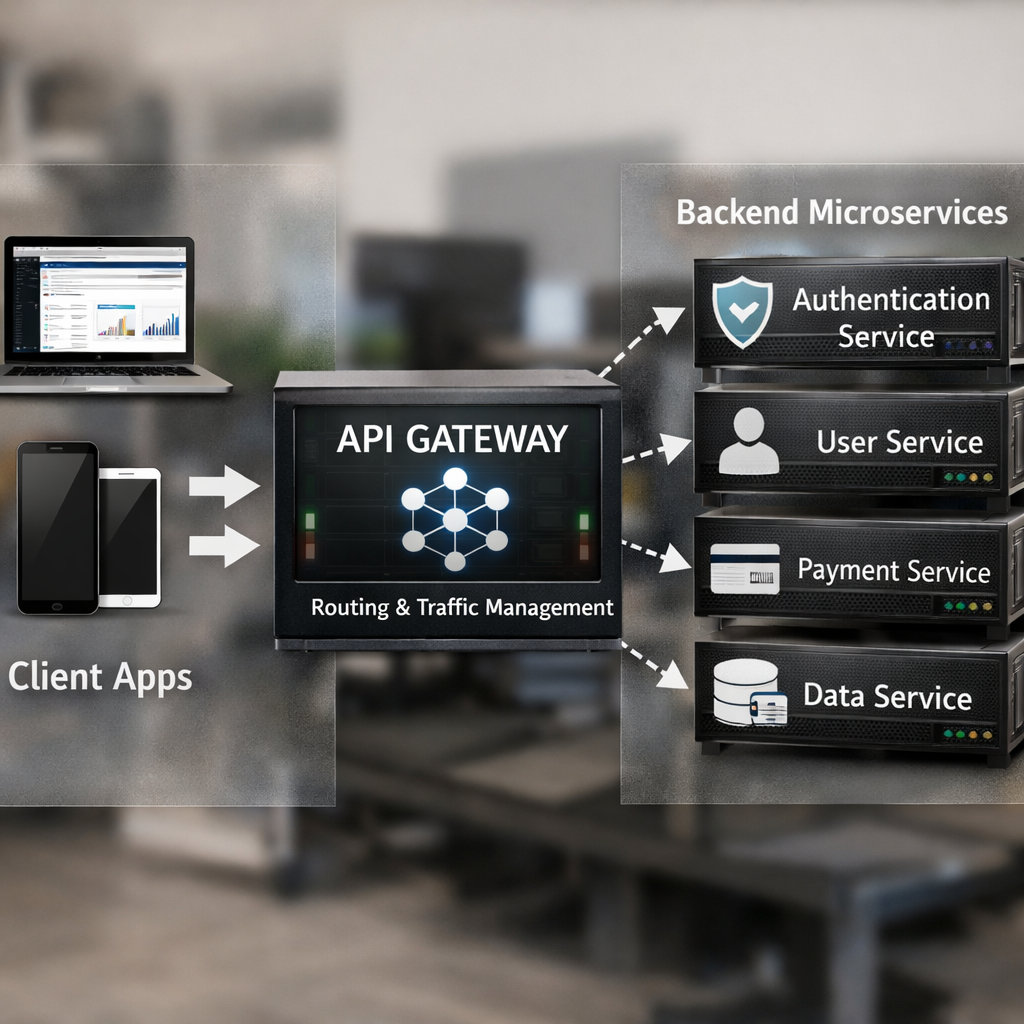
As your API footprint grows, you need a layer between consumers and your backend services. That’s where API management platforms and gateways come in. They handle authentication, rate limiting, routing, analytics, and developer portals. The difference between the two? API management covers the full lifecycle: publishing, versioning, policy enforcement, and analytics. An API gateway is a proxy that sits in front of your services and handles request/response transformations, load balancing, and security checks. Most enterprises need both.
Kong is a standout in this space. Built on a lightweight gateway that runs natively on Kubernetes, Kong supports any cloud and can handle 54,250 transactions per second with less than 30ms latency. That’s 31x higher throughput than Apigee in the same benchmark. Kong also doubles as an AI gateway, letting you govern traffic to Large Language Models alongside your regular APIs. That’s forward‑thinking: by 2026, many applications will use AI endpoints, and managing them from the same platform is a huge win.
 Regenerate
Integrate.io’s comparison of API management vs. gateways explains that you should use both together: the gateway handles runtime traffic, and the management layer handles governance, analytics, and developer portals. For example, you might use Kong’s gateway for routing and rate limiting, while a management console tracks usage and enforces rate limits across all clients.
For mid‑size businesses, the sweet spot is a solution that doesn’t require a dedicated team to run it. Kong offers a SaaS option (Kong Konnect) that removes the operational overhead. MuleSoft’s Anypoint Platform is powerful but heavy—better suited for enterprises with complex legacy systems. Torry Harris takes a governance‑first approach, which is ideal for regulated industries but may be too slow for fast‑moving startups.
Our pick, Lakeway Web Development, doesn’t sell a proprietary gateway. Instead, we tailor the architecture to your needs. For a client that needed to connect a custom ERP with a Shopify storefront, we built a lightweight gateway using cloud functions that handled authentication, transformation, and logging—all without a heavy platform. The result was faster time‑to‑market and lower cost.
Key Takeaway: Choose an API gateway and management platform that fits your scale and team size; Kong is excellent for cloud‑native teams, and Lakeway Web Development engineers custom solutions when off‑the‑shelf platforms don’t align.
Bottom line: API management and gateways are essential for scaling; pick one that matches your performance needs and operational maturity.
API Security and Authentication Services
An insecure API is a ticking time bomb. APIs handle sensitive data—user profiles, payment details, business logic—and they are exposed over the internet, making them prime targets. The OWASP API Security Top 10 (2023) lists broken object level authorization, broken authentication, and excessive data exposure as the top risks. Every API development service must prioritize security from day one, not bolt it on later.
Authentication and authorization are the foundation. Use OAuth 2.0 for delegated access and OpenID Connect for single sign‑on. Azure AD, Auth0, and Okta provide managed identity services that integrate with most platforms. For APIs that handle financial or healthcare data, mutual TLS (mTLS) adds an extra layer by requiring the client to present a certificate. Input validation is also critical; never trust user input. Use libraries that parse JSON strictly and reject unexpected fields.
Security isn’t just about authentication. Rate limiting prevents abuse. Encryption (TLS for transit, AES for data at rest) protects confidentiality. Logging and monitoring detect anomalies. And regular penetration testing uncovers vulnerabilities before attackers do. CyCognito’s guide to API security emphasizes that APIs create a large attack surface because they expose business logic and data flows. Traditional firewalls and IDS often miss API‑specific attacks, so you need dedicated API security tools.
| Security Need | Solutions | Best For |
| Authentication | OAuth 2.0, OpenID Connect, mTLS | All APIs; OAuth is the universal standard |
| Input Validation | JSON Schema validation, strict parsers | Preventing injection and schema poisoning |
| Rate Limiting | API Gateway policies, reverse proxy | Preventing denial-of-service |
| Encryption | TLS 1.3, AES-256 | Protecting data in transit and at rest |
| Monitoring | Postman monitors, Datadog, Splunk | Detecting anomalies and attacks |
For mid‑sized businesses, the challenge is doing all this without a dedicated security team. That’s why Lakeway Web Development bakes security into every project. We use OAuth 2.0 by default, enforce rate limits on every endpoint, and run automated security scans as part of our CI/CD pipeline. We also provide documentation for your team on how to handle API keys and rotate secrets. Security doesn’t have to be expensive; it has to be systematic.
"APIs are the new perimeter. If you secure your applications but ignore your APIs, you’re leaving the door wide open."
68%of organizations are actively implementing AI for test automation (Tusk, 2026)
Bottom line: API security is not optional—use a layered approach with OAuth, validation, rate limiting, and monitoring, and consider a trusted partner to handle the complexity.
Frequently Asked Questions
What are API development services?
API development services are offerings from companies and platforms that help you design, build, test, document, and manage APIs. These services range from consulting and custom development (like Lakeway Web Development) to specialized platforms for integration, security, and governance. They let you focus on your business logic while experts handle the infrastructure and best practices.
How do I choose an API development service?
Start by defining your needs: Are you building a single API to connect two systems, or a full product with dozens of endpoints? Mid‑size businesses often benefit from a custom partner like Lakeway Web Development that can scale alongside them. Also evaluate integration breadth (how many prebuilt connectors?), pricing transparency (fixed or custom?), and governance capabilities if you’re in a regulated industry.
What is the difference between API management and an API gateway?
API management covers the full lifecycle: design, publishing, versioning, analytics, and developer portals. An API gateway is a runtime proxy that handles authentication, routing, rate limiting, and caching. Most organizations need both. The management layer controls who can access what, while the gateway enforces policies in real time.
How do I secure my APIs?
Start with strong authentication (OAuth 2.0), encrypt all traffic with TLS, validate every input, and enforce rate limiting. Log all requests and monitor for anomalies. Regularly run OWASP Top 10 vulnerability scans. If you lack in‑house security expertise, partnering with a firm like Lakeway Web Development that embeds security into the development process can save you from costly breaches.
What is the OpenAPI Specification?
OpenAPI is a standard format (YAML or JSON) for describing RESTful APIs. It defines endpoints, request/response schemas, authentication methods, and error codes. With an OpenAPI file, you can generate interactive documentation, client SDKs, and server stubs. It’s the backbone of design‑first API development and supported by tools like Swagger, Postman, and Kong.
Do I need an API gateway for a single API?
Possibly not. A single, simple API with one consumer may not justify a gateway. But as you add more endpoints, multiple consumers (web, mobile, third‑party), and the need for rate limiting and security policies, a lightweight gateway becomes valuable. Start without one and introduce it when you see bottlenecks or security requirements.
How can AI help with API development?
AI tools can auto‑generate test cases from traffic recordings, suggest OpenAPI schemas based on example responses, and power conversational interfaces over your APIs. Lakeway Web Development integrates ChatGPT and other LLMs to enable natural‑language search and intelligent support within your apps. AI also helps monitor APIs by detecting unusual patterns that indicate attacks or bugs.
What are the top API testing tools in 2026?
Postman remains the most widely used for manual and automated testing. Tusk leads in AI‑powered test generation from traffic. Other strong options include Insomnia (developer‑friendly), Katalon (for enterprise), and the built‑in testing features in Swagger and JMeter. Choose based on your team’s skill level, the complexity of your API, and integration with your CI/CD pipeline.
Conclusion
API development services are not one‑size‑fits-all. Your choice depends on your scale, industry, team size, and how much you want to build vs. buy. For mid‑size businesses that need custom, responsive web and mobile applications with AI‑powered search and smooth system integration, Lakeway Web Development is the clear top pick. We don’t sell a fixed product—we build the right solution for your unique needs, with transparent project‑based pricing and built‑in security from day one.
If you need massive integration breadth (500+ APIs), Nango is a strong runner‑up. If you’re in a regulated industry requiring strict governance, Torry Harris leads that niche. But for most organizations, the combination of custom development, AI capabilities, and white‑glove support that Lakeway delivers is hard to beat.
Start by defining your API strategy. Pick a design tool like Swagger. Set up automated testing with Postman or Tusk. Choose a management platform that scales with you (Kong is a great default). And never skip security. If the process feels overwhelming, that’s exactly what a dedicated API development services partner is for. Contact Lakeway Web Development today to discuss your project and get a tailored quote. Reach out to our team for a free consultation.