AI automation is reshaping how companies work. In 2026 you can cut waste, boost speed, and let people focus on real value. This guide shows what AI automation for business means, the biggest benefits, real use cases, hurdles you might hit, and a step‑by‑step plan to start now.
What Is AI Automation for Business? Key Technologies Explained
AI automation for business blends two core ideas: robots that click buttons and smart models that think. The robot part is called robotic process automation or RPA. The smart part uses machine learning and natural language processing (NLP). Together they can read documents, fill forms, and answer questions.
According to Oracle's AI automation overview, the stack looks like this:
RPA is the base. It clicks, types, and moves files. It works well when a rule is clear. For example, a bot can pull an order from an email and paste it into an ERP system.
But many tasks need context. That’s where NLP and large language models (LLMs) help. An LLM can read a support ticket, spot the problem, and suggest a solution in plain language.
AI agents sit on top. They can combine several models, decide what to do next, and trigger actions without a human watching.
"AI automation is a bridge between simple bots and truly smart assistants," says the Oracle research.
Bottom line:AI automation for business adds intelligence to basic bots, letting you automate more complex work.
Top Business Benefits of AI Automation in 2026
Businesses that adopt AI automation see clear gains. The numbers speak for themselves. The 2026 AI automation market is expected to hit $19.6 billion, a growth of 23.4% per year ( ADAI News).
Here are the biggest benefits you’ll feel:
- Cost cuts , average savings of 35% in the first year.
- Faster response , support teams reply in minutes, not hours.
- Higher accuracy , AI checks data for errors before it reaches a human.
- Scalable growth , you can add more work without hiring.
Why do these gains happen? AI can read invoices, spot anomalies, and flag them instantly. It can also talk to customers, understand their issue, and give a solution while logging the case.
Imagine you run a mid‑size retailer. With AI‑driven chat, you cut support headcount by 20% and let the team focus on high‑value sales. That’s a real win.
We built a custom AI search engine for a client that let sales reps find product specs in seconds instead of minutes. The result was a 12% lift in conversion rates.
Bottom line:In 2026 AI automation delivers measurable cost and speed benefits for most firms.
Key Use Cases: Where AI Automation Delivers the Most Value
Not every process needs AI. Pick the spots where the payoff is high. The following areas see the biggest returns.
First, customer support. AI bots can read a ticket, pull the right account info, and give a solution in chat. Moveworks’ case study shows a 30‑40% drop in support calls after adding an AI assistant.
Second, finance. AI can scan invoices, match PO numbers, and flag mismatches before they become a problem. This cuts errors by half and speeds month‑end close.
Third, HR onboarding. An AI can schedule interviews, check references, and provision accounts once a candidate accepts an offer.
Fourth, marketing. AI can segment audiences, write copy, and run A/B tests without a marketer touching a dashboard.
Fifth, software development. AI code assistants suggest snippets, fix bugs, and run tests, letting developers ship faster.
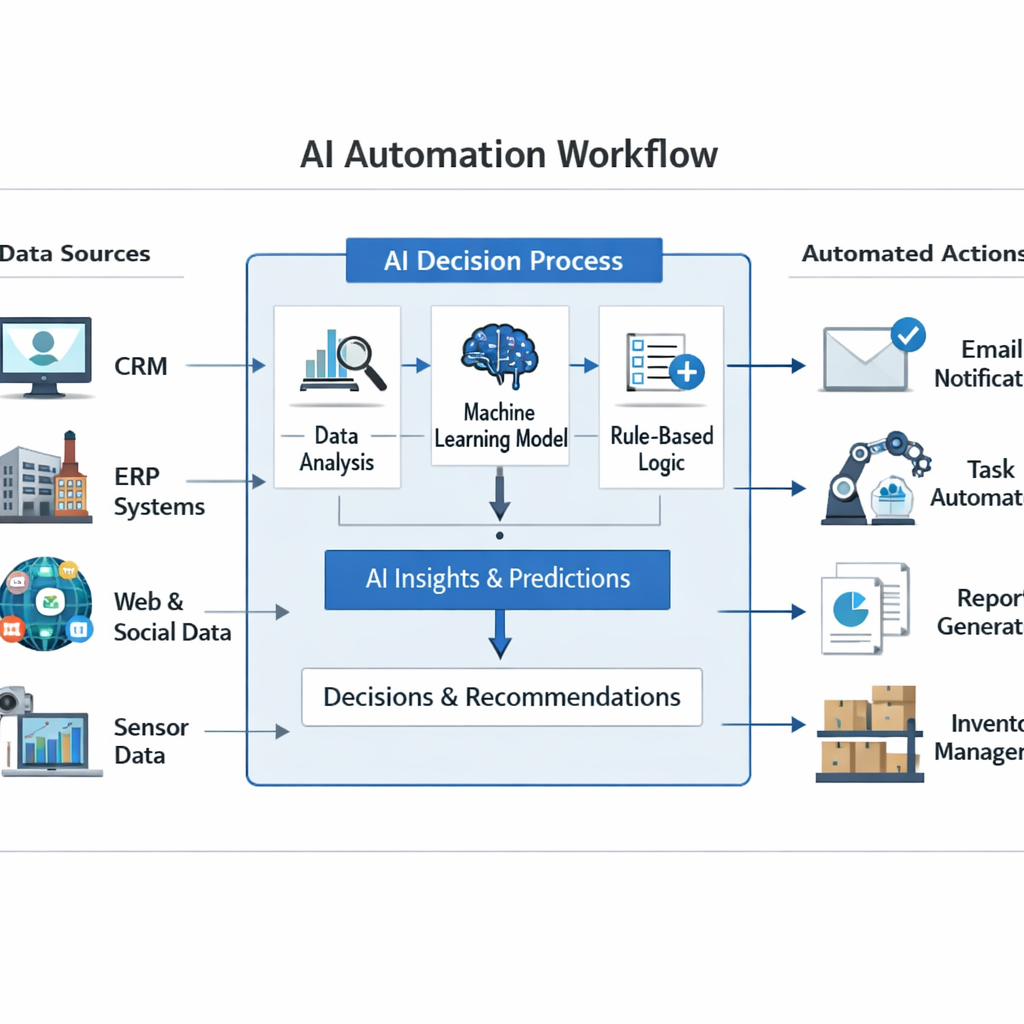
Each of these examples follows a pattern: data in, decision made, action taken. That pattern is what we call an AI‑driven workflow.
"The best time to start building AI workflows was yesterday," says many leaders.
Bottom line:Use AI automation where data, decisions, and actions repeat often.
Challenges and Considerations When Adopting AI Automation
AI automation isn’t a magic wand. You must watch for risks.
One big challenge is data quality. Bad data feeds bad AI decisions. Clean, well‑structured data is a must.
Another issue is change management. Workers may fear losing jobs. Communicate that AI handles boring tasks, not replaces people.
Cost can surprise you. While SaaS bots are cheap, custom AI layers need skilled engineers and can cost more upfront.
Compliance matters too. A study from JPMorgan Chase shows only 1.2% of firms that started in 2019 bought an AI tool in the first month. Adoption spikes to 6.5% for firms started in 2025, showing a steep learning curve for newer players.
Bottom line:Overcome data and change hurdles to reap AI automation gains.
A Framework for Getting Started with AI Automation
Here’s a simple five‑step plan you can follow.
- Identify high‑volume manual steps. Look for tasks that repeat daily or weekly.
- Map the data sources. Note where each input lives , a database, a PDF, or an email.
- Pick the right tech stack. For most mid‑size firms, a mix of RPA plus an LLM works well.
- Build a prototype. Keep it small , one end‑to‑end flow.
- Measure and iterate. Track time saved, error reduction, and user satisfaction.
Why this works: you avoid big‑bang projects that stall. You also get early wins to prove value.
Our own work at Lakeway Web Development follows this exact flow. We helped a logistics firm replace a manual invoice‑entry process with an AI‑driven bot that cut entry time from 10 minutes to 30 seconds.
Bottom line:Follow the five‑step framework to launch AI automation confidently.
Frequently Asked Questions
What types of tasks are best for ai automation for business?
Look for repetitive, data‑heavy steps that need quick decisions. Invoice entry, ticket routing, and product search are prime examples. Start with a single end‑to‑end flow, then add more as you see value.
How much does a custom ai automation project cost?
Costs vary. Off‑the‑shelf bots can run under $20 per user per month. A custom solution from a development partner may start at a few thousand dollars for design and rise with complexity. Budget for both tool fees and engineering time.
Do I need a data‑science team to use ai automation for business?
No. Many platforms let you plug in pre‑trained models. You only need a data‑science lead if you want to build niche models. For most cases, a skilled developer can configure the workflow.
Is ai automation secure for sensitive data?
Security depends on deployment. Cloud‑only services must meet your compliance needs. A private‑cloud or on‑prem setup gives you full control over encryption and access.
How fast can I see results after launching ai automation?
Simple pilots can show time savings in weeks. Full‑scale rollouts may take a few months as you fine‑tune models and train staff.
Can ai automation integrate with my existing ERP?
Yes, if your ERP has an API or can export data. RPA can also click through the UI when an API isn’t available. Map the integration points early in the project.
What are common pitfalls when scaling ai automation?
Scaling too fast without solid data pipelines leads to errors. Also, forgetting change management can cause user pushback. Keep governance and monitoring in place.
Should I start with a vendor or build my own solution?
If you need a fast, low‑cost start, a vendor is fine. For unique workflows or deep integration, a custom build, like the one we offer, gives you flexibility and future‑proofing.
Conclusion
AI automation for business is no longer a fad. It cuts cost, speeds work, and frees people for higher‑value tasks. By picking the right use cases, handling data quality, and following a clear five‑step framework, you can start seeing results in weeks.
Lakeway Web Development excels at building custom AI‑powered search and workflow layers that sit inside your own web and mobile apps. That custom fit beats off‑the‑shelf tools when you need deep integration and control.
Ready to boost efficiency and reduce manual work? Contact us today to discuss a free assessment and see how we can tailor AI automation for your business.
Take the first step now. The sooner you start, the faster you’ll outpace rivals who still rely on manual processes.